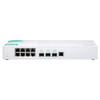
QNAP QSW-308-1C-US 3-Port 10GbE SFP+ 8-Port Gigabit Unmanaged Switch
Overview
The QNAP QSW-308-1C-US is an 11-port unmanaged switch combining three 10GbE SFP+ uplinks with eight Gigabit RJ45 downlinks — purpose-built for small NAS environments, surveillance closets, and SMB workgroups that need a 10G backbone without the overhead of managed firmware. One of the three SFP+ ports doubles as a 10GbE RJ45 combo port, giving you a direct copper option for servers or workstations that lack an SFP+ NIC. No VLAN configuration, no CLI, no licensing — plug in and the switch works.
Key Features
- Three 10GbE SFP+ Ports (1 Combo RJ45): Three 10Gbps uplink slots handle aggregated NAS traffic or inter-switch trunks without bottlenecking a multi-drive array. The combo port on port 3 accepts either an SFP+ module or a direct Cat6A cable — useful when a short copper run to a server is simpler than sourcing a DAC.
- Eight Gigabit RJ45 Downlinks: Eight 1GbE ports serve workstations, IP cameras, or edge devices on standard Cat5e/6 cabling. For a 4K surveillance deployment, eight cameras at roughly 8–16 Mbps each consume under 130 Mbps aggregate — well within a single 1GbE port's capacity per device, and the 10G uplink absorbs combined NVR write traffic comfortably.
- Unmanaged Operation: No IP address, no management interface, no firmware update cycle to maintain. This is a deliberate tradeoff: you cannot configure port isolation, VLAN segmentation, or QoS. If your deployment requires any of those, this is the wrong switch — step up to a managed model in the QNAP QSW line. For straightforward NAS-attached or camera-to-NVR topologies, the simplicity is an asset.
- 11-Port Total Density: At 11 ports (3x10G + 8x1G) in a compact form factor, the QSW-308-1C-US fits a half-width shelf or small rack without consuming a full 1U slot, leaving space for a PoE injector or patch panel in tight installations.
- QNAP NAS Integration: Pairs directly with QNAP NAS units that carry 10GbE SFP+ interfaces — a TVS or TS series NAS connected via SFP+ DAC cable to this switch eliminates the GbE bottleneck on multi-camera write workloads or multi-user file access scenarios.
Integration and Compatibility
The QSW-308-1C-US (often searched as QSW 308 1C US) fits into any topology where a 10G spine is needed for a NAS or NVR and the edge devices run at 1GbE. Compatible with standard SFP+ DAC cables and optical transceivers from major vendors — verify transceiver compatibility against the QNAP QSW-308-1C compatibility list, as there is a noted compatibility issue with Intel X520 adapters. The combo port accepts standard SFP+ modules or Cat6A copper up to 10GBase-T distances. No software, drivers, or QNAP account required.
For network switches in surveillance and NAS deployments, this model sits in the entry-level 10G tier. Pair it with a QNAP NAS or NVR for a clean 10G-uplink architecture. If your deployment also needs PoE for cameras, combine with a dedicated PoE switch on the 1GbE downlink segment. See the network switch selection guide for structured wiring and topology recommendations.
Frequently Asked Questions
Q: Does the QSW-308-1C-US support PoE on any of its ports?
A: No. None of the 11 ports on the QSW-308-1C-US deliver PoE. If you need to power IP cameras or access points directly from the switch, you will need a separate PoE switch or midspan injector on the 1GbE segment.
Q: How many 10GbE ports does the QSW-308-1C-US have?
A: Three. Two are SFP+-only; the third is a combo port that accepts either an SFP+ transceiver or a direct 10GBase-T RJ45 copper connection — but not both simultaneously.
Q: Can I manage the QSW-308-1C-US remotely or configure VLANs?
A: No. This is an unmanaged switch with no management interface, web GUI, or CLI. VLAN segmentation, port mirroring, QoS, and SNMP monitoring are not available. If those features are required, consider a managed switch in the QNAP lineup.
Q: Is the QSW-308-1C-US compatible with non-QNAP equipment?
A: Yes — the switch uses standard 10GbE SFP+ and 1GbE RJ45 interfaces and works with any compliant upstream router, NAS, or server. Note the documented compatibility issue with Intel X520 adapters on the SFP+ ports; verify your NIC against the QNAP compatibility list before deploying.
Q: What is the total port count on the QSW-308-1C-US?
A: 11 ports total: 3x 10GbE SFP+ (one of which is a combo SFP+/RJ45) plus 8x 1GbE RJ45.
The QSW-308-1C-US lands in a specific sweet spot: you have a QNAP NAS with a 10GbE SFP+ port, eight 1GbE edge devices, and you do not want to pay for managed switch features you will never configure. The combo SFP+/RJ45 port is the detail that often closes the decision — if your NVR or workstation has a 10GBase-T NIC and no SFP+ cage, you connect it directly on copper without buying a transceiver or DAC cable.
Technical Highlights:
- 3x 10GbE SFP+ Uplinks: Three 10G ports give you enough headroom to uplink a NAS, connect an upstream aggregation switch, and run a dedicated 10G workstation simultaneously — all at line rate without contention on an 11-port unmanaged fabric.
- Combo Port Flexibility: Port 3's SFP+/RJ45 combo accepts Cat6A copper for 10GBase-T runs up to 30m or an SFP+ DAC/optical module — one port, two wiring scenarios, decided at install time.
- Zero Management Overhead: No firmware, no login, no scheduled maintenance window. For a surveillance closet or NAS shelf that an IT generalist maintains, this is a concrete operational advantage over a managed model.
Deployment Considerations:
- Plan your PoE budget separately — the QSW-308-1C-US has no PoE on any port. In a camera deployment, all eight 1GbE downlinks need either PoE injectors or a secondary PoE switch feeding into these ports.
- Intel X520 NIC users: the QNAP spec page flags a known compatibility issue with X520 adapters on the SFP+ ports. If your server runs an X520, validate on the QNAP compatibility matrix before committing to this switch.
Best fit for a QNAP NAS-centric small office or surveillance head-end: NAS on 10G SFP+, NVR or workstation on the combo copper port, cameras or endpoints on the eight 1GbE ports — clean, zero-config, no recurring management cost.