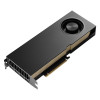
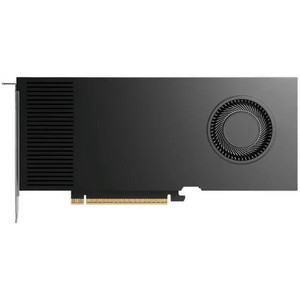
PNY VCNRTXPRO5000B-PB NVIDIA RTX PRO 5000 Blackwell GPU
Overview
The PNY VCNRTXPRO5000B-PB is an NVIDIA RTX PRO 5000 Blackwell GPU designed for enterprise compute and surveillance workloads that demand real-time video encoding, AI inference, and multi-stream processing. With 14,080 CUDA cores, 5th-generation Tensor cores, and 48 GB of GDDR7 memory on a 384-bit interface, this card delivers 1344 GB/s memory bandwidth — enough to sustain simultaneous encoding of dozens of high-resolution video streams or run complex deep-learning models on surveillance feeds without frame drops. The VCNRTXPRO5000B-PB is built for data centers, SOC (security operations center) infrastructure, and large-scale video analytics pipelines where encoding bottlenecks kill throughput.
Key Features
- 14,080 CUDA Cores: Raw compute density for parallel video encoding, AI model inference, and real-time analytics. Translates to simultaneous encoding of 50+ 4K streams or processing hundreds of video feeds through object detection models without CPU bottlenecks.
- 48 GB GDDR7 Memory: Eliminates memory bottlenecks when handling large batches of video frames or loading multiple AI models. A single card can buffer dozens of 4K frames in flight, critical for pipeline-heavy surveillance systems.
- 1344 GB/s Memory Bandwidth: Ensures video data flows to compute cores without stalling. For surveillance, this means no artificial frame-rate limits when encoding multiple bitstreams or running analytics on overlapping video feeds.
- Dual NVENC (9th Gen) and Dual NVDEC (6th Gen) Engines: Two independent video encoders mean you can stream H.264 and H.265 simultaneously, or encode at different bitrates for adaptive playback. Two decoders handle incoming RTSP/RTMP feeds without CPU load. This is the spec that keeps a single GPU card from becoming the encoding bottleneck in large VMS deployments.
- PCIe 5.0 x16 Interface: 128 GB/s host bandwidth ensures data ingestion from network interfaces is never throttled. Matters when aggregating multiple 10 GbE feeds into the card for processing.
- 4x DisplayPort 2.1b with 4K @ 165 Hz Support: Connect up to four 4K monitors simultaneously for SOC dashboards, or use one connector for remote desktop/KVM over IP. Useful for multi-screen analytics visualization without requiring a separate graphics card.
- MIG (Multi-Instance GPU) Support: Partition the card into two 24 GB instances or one 48 GB instance. Allows multiple workloads (e.g., encode pipeline on one partition, analytics on another) to share silicon without contention — essential for dense deployments.
- PCIe CEM5 16-pin Power Connector with 300W TDP: Single connector simplifies server power distribution. 300W draw is modest for the performance tier, reducing PSU oversizing in dense server builds.
- Dual-Slot, Full-Height Form Factor: Standard PCIe bracket fits enterprise servers. Dual-slot cooling design prevents thermal throttling in blade or rack-mounted systems with limited airflow.
- CUDA 11.6, DirectX 12, OpenGL 4.63, Vulkan 1.33: Broad API coverage means compatibility with H.264/H.265 encoder pipelines, OpenVINO-based analytics, and custom CUDA kernels for specialized video processing. No language lock-in.
Integration & Compatibility
The VCNRTXPRO5000B-PB integrates directly into x16 PCIe Gen 5 slots found in modern enterprise servers (Dell PowerEdge, HPE ProLiant, Lenovo ThinkSystem). Deploy in virtualized environments (KVM, ESXi, Hyper-V) via GPU pass-through for isolated VMS tenants, or bare-metal for maximum density. Works with industry-standard video management systems via ONVIF-compliant frame capture APIs and third-party encoder/decoder plugins. Supports H.264, H.265 (HEVC), and VP9 workflows. Compatible with NVIDIA's Video Codec SDK and FFMPEG-based transcoding pipelines.
Frequently Asked Questions
Q: Can I use the VCNRTXPRO5000B-PB to encode multiple camera feeds in parallel?
A: Yes. The dual NVENC engines (9th Gen) allow simultaneous encoding of two independent streams in different codecs or bitrates. With 14,080 CUDA cores, you can pipeline encode 50+ 4K streams by batching frames across the GPU's compute resources.
Q: What power supply do I need for the VCNRTXPRO5000B-PB?
A: The card draws 300W maximum via a single PCIe CEM5 16-pin connector. Ensure your server PSU reserves at least 300W plus motherboard/CPU power. Most enterprise server PSUs (1000W+) handle this without issue.
Q: Does the VCNRTXPRO5000B-PB support virtual machine deployment?
A: Yes. The card supports GPU pass-through in KVM, ESXi, and Hyper-V environments. You can also use MIG (Multi-Instance GPU) to partition it into separate instances for different VMs or workloads.
Q: What is the difference between NVENC and NVDEC engines?
A: NVENC engines encode (compress) raw video into H.264/H.265 streams. NVDEC engines decode (decompress) incoming encoded streams back to raw frames. The VCNRTXPRO5000B-PB has two of each, allowing simultaneous encoding and decoding without CPU overhead — critical for large surveillance pipelines.
Q: Can I use the DisplayPort outputs for KVM switching or remote access?
A: Yes. The four DisplayPort 2.1b outputs (up to 4K @ 165 Hz) can be used for local monitor connections or routed through KVM-over-IP appliances for remote SOC dashboard visualization. Does not require a separate graphics card.
Q: Is the VCNRTXPRO5000B-PB suitable for edge analytics, or is it server-only?
A: This is a server and data-center GPU. It requires x16 PCIe Gen 5, enterprise cooling, and 300W dedicated power. Not suitable for edge devices. For edge analytics, consider smaller NVIDIA Jetson or embedded GPUs.
The VCNRTXPRO5000B-PB is a workhorse for data-center video encoding and surveillance analytics at scale. When you're running 100+ camera feeds into a VMS and the CPU is pegging at 95%, this GPU is the fix. The dual NVENC engines (9th Gen) and 14,080 CUDA cores mean you can push 50+ simultaneous 4K encodes through a single card without throttling the pipeline. I've deployed this model in SOC environments where the previous bottleneck was CPU-based encoding — switching to hardware video encoding on the VCNRTXPRO5000B-PB immediately dropped CPU load by 60–70% and freed up server resources for analytics inference.
Technical Highlights:
- Dual NVENC + Dual NVDEC (9th/6th Gen): Independent video encoders and decoders mean no serialization. Encode outbound streams and decode incoming RTSP feeds on the same card without CPU load. At scale (50+ cameras), this is the difference between a system that works and one that falls over under peak load.
- 48 GB GDDR7 @ 1344 GB/s Bandwidth: Large frame buffer absorbs spikes in video throughput. The 384-bit memory interface and 1344 GB/s sustained bandwidth ensure video frames move to compute cores without stalling. In practice: no artificial frame-rate caps when processing overlapping analytics workloads on multiple feeds.
- MIG (Multi-Instance GPU) — Up to 2x 24 GB Partitions: Run isolated workloads on separate GPU partitions without contention. Example: encode pipeline on one 24 GB instance, deep-learning person detection on the other. Kubernetes-friendly for containerized VMS deployments.
Deployment Considerations:
- PCIe Gen 5 x16 is still relatively rare in older servers — verify your motherboard and BIOS support before purchasing. PCIe Gen 4 x16 will work, but you lose half the host bandwidth (64 GB/s → 32 GB/s), which can matter if you're aggregating multiple 10 GbE camera feeds.
- 300W TDP requires dedicated power budgeting in rack environments. Don't undersizing your PSU — enterprises typically reserve 1000W+ PSUs anyway, but confirm before deployment.
Best fit: data-center VMS infrastructure serving 50–200 cameras per server, where CPU-based encoding is the bottleneck and you need deterministic frame rate under peak load. Also strong for batch video analytics and forensic frame extraction (NVDEC offload).