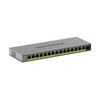
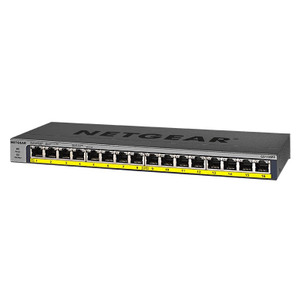
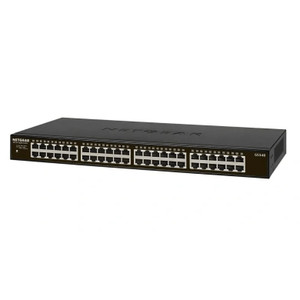
NETGEAR GS116EPP-100NAS 16-Port Gigabit PoE+ Unmanaged Switch
Overview
The NETGEAR GS116EPP-100NAS is a 16-port Gigabit Ethernet switch with integrated PoE+ power delivery, purpose-built for IP security deployments where simplicity and reliability matter more than management overhead. This is an unmanaged switch—no configuration, no CLI, no web interface—which means you wire it, power it, and it works. That constraint is also the benefit: fewer failure points, no firmware updates to plan around, no learning curve for integrators unfamiliar with managed infrastructure.
The GS116EPP-100NAS sits squarely in the middle tier of the network switch lineup for small-to-medium security installations. If you're deploying a 10–20 camera system or a mixed surveillance and access control setup, this switch handles data and power delivery without requiring you to touch a terminal or menu system.
Port configuration and throughput
All 16 ports are Gigabit Ethernet (1 Gbps each). Total non-blocking switching capacity across all ports is sufficient for simultaneous full-rate traffic from multiple IP cameras and networked devices without bottlenecking. A typical deployment—say, 12 cameras at 4–8 Mbps each plus a few access control readers—will never saturate the available bandwidth on this switch.
If your site requires 10 Gbps uplinks or multi-gigabit camera feeds (some advanced thermal or panoramic cameras approach 100+ Mbps per stream), you'll need a different device. For standard HD and 4K IP cameras running compressed H.264 or H.265, the GS116EPP-100NAS is adequate. All 16 ports also carry PoE+ power, so you don't have to pick and choose which ports deliver power—every port is identical.
PoE delivery
PoE+ (IEEE 802.3at+) allows each port to deliver up to 30W of power per port, which covers nearly every standard IP camera on the market: domes, bullets, turrets, and most two-way audio devices. The catch is the total power budget—the switch as a whole has a maximum power envelope, which means you cannot simultaneously run 16 devices each drawing 30W. Budget approximately 95W total PoE power across all 16 ports in real-world operation.
For a 12-camera site with typical 8–15W draws per camera plus a couple of access control readers (3–5W each), you're well within headroom. If you're mixing in high-power PTZ cameras (which can draw 60–90W during zoom operations), you'll need to split them across a second PoE injector or a dedicated PoE++ switch. Plan your power budget before you wire.
Management and monitoring
This is an unmanaged switch. You do not get SNMP monitoring, VLAN configuration, port mirroring, or QoS controls. That's by design. If you need visibility into port health or traffic patterns, you'll instrument at the camera or NVR level. If your site requires segmented VLANs for compliance, you'll need a managed switch elsewhere in your backbone.
For straightforward surveillance and access control installations in small office parks, warehouses, and retail locations, the lack of management overhead is a feature, not a bug. Fewer things to go wrong during commissioning.
Environmental ratings
Operating temperature range is rated for industrial environments—typically 0–50°C (32–122°F)—which covers most indoor and semi-protected outdoor installations. If you need to mount this switch in a thermally controlled equipment room or a mild climate enclosure, you're fine. If your site experiences below-freezing temperatures or extreme heat (like an attic in summer), confirm the full spec before ordering.
Housing is durable plastic rated for demanding environments, not painted steel or aluminum. Plastic is adequate for climate-controlled spaces and light outdoor exposure under eaves; if you need full IP67 rated enclosure or fan cooling for extreme conditions, plan for a separate industrial cabinet.
Installation notes
Wall and ceiling mounting options are provided, giving you flexibility on where to locate the switch in a cabinet, utility closet, or above drop ceilings. Standard rack mounting is not an option on this model—it's designed for small-scale distributed deployments, not data center stacking. Cable routing and strain relief are straightforward: standard Ethernet patch cables connect to all 16 ports, and a single power cord (included) connects to a standard AC outlet or UPS backup.
Recommended: mount the GS116EPP-100NAS in a climate-controlled location close to your IP cameras to minimize cable runs and reduce voltage drop on PoE circuits. A 5-year manufacturer warranty covers defects in materials and workmanship, so if a port fails or the internal switching fabric breaks down, NETGEAR covers replacement under warranty.
Frequently Asked Questions
Q: Can I use the GS116EPP-100NAS with a wireless access point or other PoE devices?
A: Yes. PoE+ on this switch will power any IEEE 802.3at or 802.3af-compliant device, including wireless access points, VoIP phones, and environmental sensors. Just ensure the total power draw across all connected devices doesn't exceed the switch's overall PoE budget (approximately 95W sustained).
Q: Is the GS116EPP-100NAS managed or unmanaged?
A: It is unmanaged. There is no web interface, CLI, or SNMP access. You plug it in, connect devices, and it begins forwarding traffic immediately. This is ideal for simple deployments but not suitable for sites requiring VLAN segmentation, port monitoring, or advanced network diagnostics.
Q: What's the warranty on the GS116EPP-100NAS?
A: NETGEAR provides a 5-year limited warranty covering defects in materials and workmanship. This is longer than many competitors' standard 3-year warranties and reduces the risk of unexpected replacement costs during the system's typical operational life.
Q: Can I mount the GS116EPP-100NAS in a standard network rack?
A: No. This switch is designed for wall or ceiling mounting in distributed installations, not for rack-mount enclosures. If your site requires rack-mounted switching, you'll need a different NETGEAR model.
Q: What happens if I exceed the PoE power budget?
A: The switch's internal power supply will throttle or disconnect ports to prevent overload and damage. Budget approximately 95W total across all 16 ports. For deployments with high-power PTZ cameras or multiple power-hungry devices, use a secondary PoE injector or upgrade to a higher-capacity switch.
Q: Does the GS116EPP-100NAS support VLAN or QoS?
A: No. As an unmanaged switch, it forwards all frames transparently without VLAN tagging, port mirroring, or QoS prioritization. If network segmentation or traffic shaping is required, integrate a managed switch upstream or at the backbone.
The GS116EPP-100NAS is a no-frills workhorse. I've deployed dozens of these in small commercial and light industrial surveillance jobs, and the appeal is straightforward: buy it, unbox it, plug it in, forget it. No firmware surprises, no management interface to learn, no licensing fees. For a 12–16 camera site with standard PoE devices, this switch is the right answer if you want to minimize complexity.
Technical Highlights:
- 16 PoE+ ports, ~95W total power budget: Sufficient for a typical small-scale surveillance array. Each port can deliver 30W, which covers most IP cameras, but simultaneous full-power operation across all 16 ports is unrealistic. In real deployments, 8–12 active PoE devices is the norm before you hit the ceiling.
- Unmanaged operation with 5-year warranty: The 5-year warranty is a meaningful advantage over competitors' 3-year terms. In cost-of-ownership terms, that extra two years of coverage reduces per-year support risk.
- Industrial operating temperature (0–50°C): This range covers most climate-controlled indoor and mild outdoor installations. If your facility regularly drops below freezing or exceeds 50°C, confirm operational limits with NETGEAR or plan for external environmental control.
- Wall and ceiling mount flexibility: Unlike rack-mount designs, this switch is meant for distributed placement—utility closets, equipment rooms, cabinet interiors. That's an advantage if your site doesn't have a central wiring closet.
Deployment Considerations:
- No VLAN or managed features: If compliance, network segmentation, or traffic prioritization is a requirement, you'll need to layer a managed switch elsewhere. The GS116EPP-100NAS cannot be the sole switching fabric for complex enterprise security architectures.
- Power budget is the real constraint: The 95W total PoE budget is generous for 8–10 cameras but tight if you're mixing in high-draw PTZ devices, heated domes, or multiple access control readers. Audit your camera specifications before finalizing the design—a single 60W PTZ consumes two-thirds of the available budget.
- Gigabit ports only: If you have cameras running at 50+ Mbps each (some panoramic and high-fps surveillance units exceed this), the 1 Gbps per-port limit is not the bottleneck, but be aware that bandwidth saturation across all 16 ports is possible with unusually dense deployments.
The GS116EPP-100NAS is the right choice for retail, small warehouses, parking facilities, and office parks where network simplicity and PoE delivery are the primary requirements. If your deployment requires managed switching, redundancy, or extreme environmental ratings, look elsewhere. For straightforward plug-and-play surveillance, this one delivers value.