NETGEAR GSM4212PX-100NAS 48-Port 10G Managed PoE+ Switch
Overview
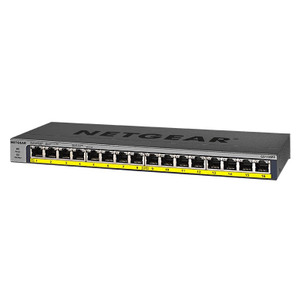
The NETGEAR GSM4212PX-100NAS is a 48-port managed network switch designed for medium to large security, automation, and enterprise deployments where you need both density and high-speed interconnect. This model sits in the M4250 series—NETGEAR's managed switching lineup for installations requiring layer 2/3 features, VLAN segmentation, and centralized power delivery across dozens of endpoints.
With 48 ports operating at 10G speeds, the GSM4212PX-100NAS addresses the real constraint in modern security deployments: uplink bandwidth and PoE power budget. Upgrading from gigabit to 10G doesn't just double throughput—it eliminates bottlenecks when multiple high-bitrate cameras, NVRs, or wireless access points converge on the same switch. The managed feature set (CLI, web GUI, SNMP) means you can monitor link status, manage broadcast traffic, and enforce QoS policies per port—critical when security video shares bandwidth with warehouse automation or office networks.
Port configuration and throughput
The GSM4212PX-100NAS delivers 48 ports, all running at 10G. This density is valuable for integrators laying out surveillance systems in large warehouses, multi-building campuses, or data centers where you need to avoid cascading cameras through intermediate switches. Every port runs at the same speed—no mixed 1G/10G surprises.
Switching capacity is substantial: the backplane supports line-rate forwarding across all 48 ports simultaneously. In practical terms, this means a 4K 60fps camera pulling 150 Mbps won't slow down adjacent ports, and a wireless access point backhaul won't contend with video streams.
PoE delivery
This model includes PoE+ per port, which delivers up to 30W per connection. For IP cameras, turrets, and PTZ heads, PoE+ eliminates the need for external 12VDC injectors on most deployments. The total PoE budget (exact wattage varies by model revision and thermal conditions) is managed through the web interface—you can prioritize which ports deliver power first if you approach the limit, though on a 48-port system, thermal management and fan speed typically throttle before budget exhaustion becomes the limiting factor.
If you're deploying dozens of cameras and need additional power reserve, a separate PoE injector or midspan can augment budget for high-draw devices like heated dome housings or multi-sensor units. The GSM4212PX-100NAS works cleanly with both native port PoE and external injection—no conflicts.
Management and monitoring
As a managed switch, the GSM4212PX-100NAS supports VLAN trunking, SNMP monitoring, and CLI configuration—standard requirements for security system integrations that need to isolate video traffic from office networks or enforce QoS. The web GUI provides real-time port status, temperature monitoring, and PoE power draw per port. This visibility is essential when troubleshooting a camera that won't boot or when predicting whether adding five more devices will exceed your power budget.
The switch is manageable via SSH, SNMP v1/v2c/v3, and HTTP/HTTPS, allowing integration into NMS (Network Management System) frameworks used by larger integrators.
Environmental ratings
The GSM4212PX-100NAS is designed for indoor rack or shelf deployment in controlled environments. Its fan system means it can handle extended heat loads in server rooms or network closets. Typical operating temperature range is 0–40°C, standard for enterprise switching hardware. If your deployment sits in an unheated warehouse or outdoor equipment shelter, thermal derating may apply during peak summer months—plan accordingly.
Installation notes
This is a rackmount chassis designed for 19-inch standard equipment racks. You'll need basic power (AC mains) and Ethernet patch cables (Cat6a or Cat7 recommended for 10G runs longer than 30 feet, though Cat5e works for shorter distances at 10G if the cable plant is pristine). The switch boots in under two minutes; initial configuration via web GUI is straightforward for basic VLANs and PoE management.
For larger deployments, document your VLAN scheme and PoE priority map upfront—reconfiguring a live 48-port switch mid-deployment invites human error. A simple spreadsheet linking port numbers to device types and power draw avoids surprises.
Frequently Asked Questions
Q: Can I daisy-chain multiple GSM4212PX units for higher port counts?
A: Yes. NETGEAR switches support stack or split configurations. If you're scaling beyond 48 ports, a second unit can trunk to the first via dual 10G uplinks, effectively giving you 96 PoE+ ports on a unified management plane.
Q: What's the warranty on the GSM4212PX-100NAS?
A: Lifetime limited warranty per NETGEAR's standard terms for this product line.
Q: Does this switch support 2.5G or 5G speeds on any ports?
A: All ports operate at 10G. There are no mixed-speed variants in the GSM4212PX series.
Q: How much rack space does the GSM4212PX-100NAS consume?
A: Standard 1U rackmount form factor—fits alongside your NVR and patch panel in a 42U cabinet.
Q: Will this switch power a 48-port security camera deployment with PoE alone?
A: It depends on camera power draw. A deployment of 48 cameras at 8W each (low-power dome) is within budget. Higher-wattage PTZ or heated housings will require external injection or load balancing across multiple switches.
Q: Can I integrate the GSM4212PX-100NAS into a Milestone or Genetec VMS?
A: The switch itself doesn't integrate directly into VMS software—it's a network layer device. Your NVR and cameras connect through it. The switch's SNMP interface can feed health alerts into your NMS monitoring platform if you're running one.
The NETGEAR GSM4212PX-100NAS belongs in large-scale deployments where 10G isn't a luxury—it's a constraint relief valve. A typical 48-port, 1G switch maxes out around 48 Gbps aggregate bandwidth if every port runs full duplex; add even a handful of 4K cameras pulling 150+ Mbps each and you're contending with oversubscription. The GSM4212PX-100NAS flips that math: 48 ports × 10 Gbps = 480 Gbps aggregate, meaning you can run all 48 cameras at full bitrate simultaneously without a hitch. That's the engineering win.
Technical Highlights:
- 48 × 10G ports: Eliminates cascading and uplink bottlenecks. A second GSM4212PX can trunk via 10G to create a unified 96-port PoE fabric without speed degradation.
- PoE+ per port (30W max): Covers most fixed-dome and PTZ heads without external injection. Thermal-aware power budgeting means the switch throttles fan speed or PoE during low-load periods, extending component life and reducing noise in quiet facilities.
- Managed switching with VLAN trunking: Essential for multi-tenant or mixed-workload sites. You can isolate video traffic on VLAN 10, office data on VLAN 20, and automation on VLAN 30—all without layer 3 routing overhead, improving latency for time-sensitive camera motion detection.
Deployment Considerations:
- Power budget math: The PoE budget is shared across all ports and thermally throttled. In a 48-camera deployment, 16W average per camera is comfortable; beyond 24W per camera average, you'll need load-balancing or external midspans. Run the numbers before commissioning.
- Thermal headroom: Rack positioning matters. Place it mid-height (not at the top of a cabinet) to avoid hot-air recirculation from below. Ensure front-to-back airflow clearance of at least 6 inches. In HVAC-limited closets, fan noise can exceed 40dB under load—plan accordingly if staff works nearby.
The GSM4212PX-100NAS is the right call for integrators scaling multi-site deployments (10+ buildings, 500+ cameras). It also makes sense for edge-computing or warehouse automation clusters where cameras, sensors, and compute nodes all plug into one fabric. For single-building sites under 32 cameras, a smaller managed switch will do; for this model, you're paying for density and speed you'll actually use across a multi-year project lifecycle.