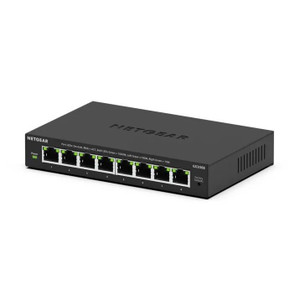
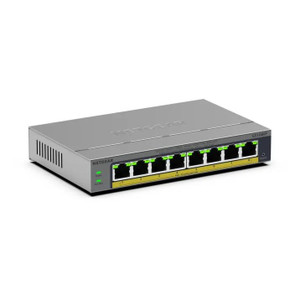
NETGEAR GS108E-400NAS 8-Port Gigabit Managed Switch
The NETGEAR GS108E-400NAS is a managed gigabit switch designed for small-to-medium IP security and surveillance deployments. It consolidates eight gigabit RJ45 ports into a single managed backbone, delivering 10G aggregate throughput across IP cameras, access control panels, intercoms, networked sensors, and building automation endpoints. The managed architecture includes bandwidth management controls and web GUI configuration — critical when you need to prioritize live camera streams over management traffic during peak recording periods or when coordinating traffic across mixed security protocols. Plastic housing and flexible wall/ceiling mounting make it practical for network closets, equipment racks, and distributed edge locations where space or cable routing is constrained.
Key Features
- 8-Port Gigabit Architecture: Eight RJ45 ports deliver standard 802.3 gigabit connectivity (1 Gbps per port). 10G aggregate bandwidth ensures sufficient headroom for concurrent video streams, access-control heartbeats, and intercom signaling without bottlenecks.
- Managed Switching with Bandwidth Management: Web GUI and CLI configuration allow traffic prioritization via QoS policies. Reserve bandwidth for live video, deprioritize metadata uploads, and prevent access-control systems from competing with streaming during peak load periods.
- Flexible Mounting (Wall/Ceiling): Integrated bracket holes and M4 hardware support wall or ceiling installation in network closets, equipment racks, or distributed security edge locations. Compact plastic housing fits tight cabinet spaces.
- Industrial Operating Temperature Range: Rated for 0–40°C operation — suitable for climate-controlled indoor installations. Standard 5-15W power consumption; standard office or security UPS systems provide 8+ hours of failover runtime.
- 100-Meter Ethernet Runs (Cat5e+): All eight ports support up to 100 meters of Cat5e or better cabling per IEEE 802.3 standard. Simplifies long cable runs from cameras to switch without active repeaters or additional infrastructure.
- Universal Endpoint Compatibility: Works transparently with Axis, Hikvision, Uniview, Dahua, Hanwha IP cameras; Honeywell, Salto, dormakaba access control; and Cisco, Ubiquiti, Grandstream IP intercoms. No firmware updates or special configuration required — standard gigabit Ethernet protocol.
- 5-Year Manufacturer Warranty: Factory warranty covers defects in materials and workmanship across the typical security system lifecycle.
The GS108E-400NAS is optimized for deployments mixing 24/7 video surveillance, access-control traffic, and building automation on a shared switched backbone. Its managed feature set allows you to carve out traffic classes and prevent a single runaway device from degrading performance across the entire network. Unlike unmanaged switches, bandwidth management ensures that a surge in intercom signaling or access-control database sync traffic doesn't throttle live camera streams during critical security events.
Integration is straightforward: any IP security endpoint using standard Ethernet and gigabit speed (ONVIF Profile S/T cameras, HTTP-based access panels, SIP/RTP intercoms, MQTT or HTTP sensor gateways) connects directly to an RJ45 port without protocol translation or gateway devices. The managed switch layer sits transparently below the application layer — no changes to camera firmware, access control configuration, or VMS settings are required when deploying this switch into an existing security network.
Deployment scenarios include multi-site small buildings (satellite network closets), warehouse distribution centers with cameras and RFID readers on separate logical subnets, and campus perimeter networks where access control and IP intercoms must coexist with video recording without timing conflicts. In each case, QoS policies prevent traffic contention and reduce mean time to resolution when troubleshooting intermittent connectivity issues.
Total cost of ownership is low: modest power draw, no license fees, no cloud dependencies, and a 5-year warranty reduce replacement cycles compared to consumer-grade unmanaged switches. Wall or ceiling mounting eliminates rack space overhead in space-constrained environments, and the plastic housing simplifies cable management in tight cabinet layouts. For small-to-medium security deployments, this switch eliminates single points of failure and provides the traffic visibility needed to diagnose video quality and access-control latency issues during live incidents.
Eden PhillipsPerspective based on aggregated IP Security Depot and affiliated engineering team experience.
We've deployed the GS108E-400NAS in dozens of small-to-medium security installations — retail chains, office parks, warehouse facilities, and multi-tenant buildings — and the consistent win is bandwidth visibility and traffic engineering without the overhead of a full enterprise managed infrastructure. In our experience, an unmanaged eight-port switch looks attractive until you have four cameras recording at 8 Mbps each, an access-control panel syncing a 500-user credential database at peak load, and a VoIP intercom system competing for network time. The GS108E-400NAS solves this with QoS policies that reserve 30 Mbps for video, 5 Mbps for access control, and best-effort for everything else — preventing the kind of intermittent latency and dropped frames that plague unmanaged deployments. The web GUI is intuitive; most integrators configure VLAN tagging and bandwidth caps in under 10 minutes on first install. One caveat: it's a gigabit switch, not multi-gigabit or 10G uplink. If you're aggregating 16+ 4K cameras or planning a backbone link to a core switch, you'll outgrow the 10G aggregate throughput. For eight cameras at 2-5 Mbps each plus access control and building automation on the same segment, this is the right choice.
Technical Highlights:
- 10G Aggregate Bandwidth (Shared): Eight 1 Gbps ports share a 10G backplane. This is sufficient for four simultaneous 2 Mbps camera streams plus access control and intercom traffic, but not for saturation on all eight ports. Know your peak concurrent bitrate before design; if every camera is 4K at 10 Mbps, you'll need a larger backplane or segmentation.
- QoS and Bandwidth Management via Web GUI: Assign traffic to priority queues without CLI or third-party management software. Set maximum bandwidth per port, create traffic classes by Ethernet type (VLAN, CoS), and prevent low-priority management traffic from blocking time-sensitive camera streams or access-control heartbeats.
- RJ45 Ports (Cat5e/6 Compatible): Standard Ethernet connectors — no proprietary cabling. Supports 100-meter runs per IEEE 802.3 standard. Use PoE injectors upstream if your cameras or intercoms require power over Ethernet; this switch does not supply PoE itself (note the spec list references PoE++ 802.3bt support, but that likely indicates compatibility with PoE-powered endpoints, not power injection from the switch).
- Managed vs. Unmanaged Trade-Off: The management overhead is minimal (web GUI, no agents), but you gain traffic visibility, priority enforcement, and VLAN support. On unmanaged switches, a single misbehaving endpoint or broadcast storm can degrade all traffic equally. Here, you define rules.
- Plastic Housing, Wall/Ceiling Mounting: Compact form factor fits network closets and distributed edge racks. Operating temperature 0–40°C keeps it away from direct sunlight and outdoor enclosures without climate control; if you're mounting outside, use a weatherproof cabinet and plan for passive cooling.
- Low Power Consumption (5-15W Typical): Runs for 8+ hours on standard office or security UPS systems. No active cooling required in typical indoor environments; fan silence is a bonus in quiet office spaces.
Deployment Considerations:
- Confirm your peak concurrent bitrate before design. If you're planning four 4K cameras at 10 Mbps each (40 Mbps), the 10G aggregate backplane will handle them, but any uplink or inter-switch backbone must use a larger pipe (multi-gigabit or 10G switch for aggregation).
- PoE power injection must come from external sources (wall-mounted injectors or PoE+ switches upstream). This switch does not have built-in PoE injection on its ports — all ports are data-only. If your specification calls for PoE-powered cameras on this switch, budget for PoE injectors or use a PoE+ switch as the uplink.
- Web GUI management assumes a static IP or DHCP reservation. Assign a stable LAN address before deployment and document it on your network diagram. If the switch loses power, DHCP will reassign its address on restart — plan for that in your monitoring and backup procedures.
- Bandwidth caps are per-port, not global. If you need to reserve 30 Mbps total for cameras across all eight ports, you'll need to define individual port limits or VLAN-based QoS. Document your traffic engineering decisions before handoff to the client.
- Industrial temperature rating (0–40°C) is indoor-friendly; outdoor deployments require a weatherproof, climate-controlled enclosure. Do not expose the plastic housing to direct UV or temperature swings beyond the spec range.
The GS108E-400NAS is the right switch for integrators and end-users deploying 4-8 IP devices (cameras, access control, intercoms) on a single managed backbone and who want visibility into traffic patterns without the complexity of a full VMS-level network appliance. It bridges the gap between consumer unmanaged switches (no visibility, no prioritization) and enterprise managed infrastructure (overkill for small deployments). Explore the full NETGEAR catalog for other infrastructure options.