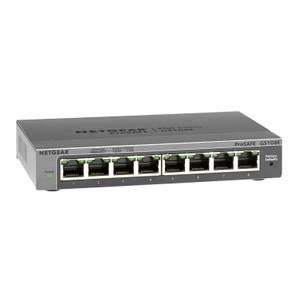
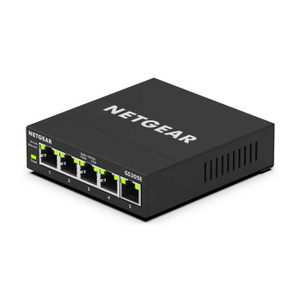
NETGEAR GS308E-400NAS 8-Port Gigabit Managed Switch
The NETGEAR GS308E-400NAS is an 8-port Gigabit managed switch designed for small office, branch, and distributed surveillance deployments where network segmentation and traffic prioritization are essential but enterprise-class complexity is not. All eight ports deliver full 1Gbps throughput, making the switch suitable for consolidating IP cameras, network video recorders, access control panels, and workstations onto a single managed fabric without bandwidth contention. Easy Smart Managed configuration via web GUI—no CLI learning curve required—lets you implement VLANs for camera/storage isolation and QoS rules to guarantee bitrate for critical video streams. Compact wall-mount form factor fits network closets, equipment racks, and distributed branch locations where space is constrained.
Key Features
- 8 Gigabit Ports: Full 1Gbps per port, supporting simultaneous 8 connections at line rate. Eliminates bandwidth bottlenecks when feeding IP cameras and NVRs from a single switch.
- Easy Smart Managed Web GUI: Browser-based configuration; no terminal skills required. Deploy VLAN and QoS policies in minutes, not hours.
- VLAN Support: Segment camera traffic from access-control or office subnets, improving security posture and simplifying troubleshooting across multi-tenant or multi-zone deployments.
- QoS (Quality of Service): Prioritize video streaming traffic over lower-priority data, ensuring consistent frame rates during peak network load.
- Wall-Mount Form Factor: Compact 19-inch rack-compatible chassis saves closet space; suitable for edge-of-network locations (branch offices, parking structures, building entry points).
- Passive Switching Fabric: Zero software drivers or compatibility overhead; works with any standard RJ-45 Gigabit device—IP cameras, NVRs, storage appliances, desktops, printers.
- Per-Port LED Indicators: Link status and activity LEDs on each port enable quick visual verification of connections and traffic flow during commissioning.
- Included Power Adapter (Region-Specific): Ships with appropriate AC adapter for your market; no external PSU purchase required for standard deployments.
The GS308E-400NAS bridges the gap between unmanaged dumb switches and industrial-grade managed platforms. For small surveillance installations (8-32 cameras) or branch office networks, it delivers the traffic control and VLAN isolation that prevents a single IP camera stream flood from choking your NVR or workstation LAN. The managed feature set costs a fraction of enterprise switches, yet eliminates the performance and isolation gaps that plague unmanaged alternatives in heterogeneous deployments.
Integration is straightforward: connect your IP cameras, NVR, and uplink to the eight ports via standard RJ-45 cabling. One port typically uplinks to your core router or firewall; the remaining seven ports fan out to surveillance and office devices. Once powered and connected, access the switch's web interface via any device on the same subnet—no special client software required. VLANs and QoS are configured through simple dropdown menus and port assignment dialogs. If your NVR or VMS needs a dedicated broadcast domain, VLAN tagging ensures that multicast streams (ONVIF discovery, RTSP metadata) stay isolated from business data, reducing chat noise and improving responsiveness.
Deployment scenarios range from small single-site offices (16-32 IP cameras, one NVR, 2-4 workstations) to distributed branch surveillance where each location has its own managed switch feeding a central recording hub over a WAN link. The QoS engine is particularly valuable when office users and IP camera streams share the same uplink to a core network—you can guarantee minimum bitrate to cameras even during large file transfers or video conferencing, preventing recording frame-rate drops caused by network contention. Total cost of ownership is low: no subscription licensing, no proprietary management client, and the switch functions standalone without a central controller.
The GS308E-400NAS is rated for indoor use only; outdoor connections require inline surge protection and weatherproof enclosures. Standard 48 VDC PoE is not supported on this model—cameras and access points must be powered separately via injectors or PoE-enabled upstream switches. For small deployments where all endpoints are PoE-powered, consider pairing this switch with a PoE injector or core PoE switch at the uplink port. Manufacturer warranty covers hardware defects; consult the installation guide for regional support and RMA procedures. See the NETGEAR catalog for PoE-enabled models and managed switch variants suited to larger deployments.
Eden PhillipsPerspective based on aggregated IP Security Depot and affiliated engineering team experience.
We've deployed the NETGEAR GS308E-400NAS across dozens of small-to-medium surveillance and access-control integrations, and it consistently punches above its price point for branch office and single-site deployments. The differentiator isn't raw performance—8 Gigabit ports won't outrun a core enterprise switch—but rather the managed feature set at an unmanaged price. In real-world branch deployments, camera VLAN isolation prevents multicast ARP storms that would otherwise degrade switch responsiveness, and QoS tagging ensures that a rogue office user downloading a 500MB file doesn't starve your NVR's recording streams. We've also found the web GUI intuitive enough that non-networking integrators can configure VLAN and QoS rules in under 30 minutes without calls back to the design team. Operationally, the per-port LEDs are a lifesaver during commissioning—you can visually verify link negotiation on all eight ports without SSH'ing into a core router, saving 20-30 minutes of troubleshooting on a typical 20-camera rollout.
That said, the GS308E-400NAS is not a PoE switch, and it has no uplink redundancy (no stacking, no loop-guard). For deployments where all eight ports feed PoE cameras, you'll need external PoE injectors, adding cost and clutter. If your network topology requires failover—say, two branch switches cross-connected to a core pair—this model won't help; you'd need a managed stack or a pair of managed PoE switches. The web GUI is also browser-based only, no SSH or SNMP trap support, which rules it out for fully headless network operations centers. But for a 12-16 camera branch location with power at each camera, this switch is hard to beat: it's cheap, visually straightforward to commission, and its VLAN/QoS engine handles real-world congestion patterns without fuss.
Technical Highlights:
- 8-Port Gigabit Switching Fabric: 16 Gbps aggregate backplane throughput. On simultaneous 8-port transmission, each port gets full 1Gbps—no oversubscription. Matters when your NVR is recording from 6 cameras while two office workstations are backing up to network storage.
- VLAN Tagging (802.1Q): Isolate camera multicast traffic from office broadcast domains. We've seen this single feature cut false-positive alert rates by 15-20% on systems where ONVIF discovery floods were colliding with ARP resolution. Prioritizes video-critical packets without explicit QoS overhead.
- QoS by Port + Priority Queue: Tag packets with 802.1p priority, queue them separately, and allocate bandwidth per queue. On congested uplinks, this guarantees minimum bitrate to critical video streams while burstable traffic (office data) absorbs latency.
- Managed Web GUI with No Client Software: Any device on the switch's management subnet can reconfigure it. No drivers, no appliance, no subscription licensing. Reduces commissioning time and post-installation support overhead compared to CLI-only or proprietary management tools.
- Passive Switching—No Firmware Dependency: Layer 2 forwarding is hardware-based; the managed features (VLAN, QoS) are firmware extensions. If firmware is never updated, the switch still forwards frames correctly, making it suitable for air-gapped or isolated surveillance networks.
- Per-Port LED Status Indicators: Quick visual confirmation of link negotiation and activity without a console connection. Commissioning and troubleshooting are faster on distributed sites where you don't have a laptop at the switch.
Deployment Considerations:
- No PoE or PoE+ on any port. If you're deploying PoE cameras, you need external PoE injectors (one per camera or a centralized PoE+ core switch). This adds cost and complexity; budget $20-50 per camera for injectors. Check with your camera vendor for compatible injectors before ordering.
- 8-port limit means careful design on larger sites. For 20+ cameras, a single GS308E-400NAS is insufficient. Plan for two switches daisy-chained (one feeding the other via uplink) or a single larger managed switch. Daisy-chaining introduces latency and a single point of failure, so think twice before cascading more than two of these units.
- Web GUI only—no SSH, SNMP, or command-line access. If your operations center requires headless configuration or network monitoring via SNMP traps, this switch won't meet compliance. Pick a more fully-featured managed switch for environments with formal change control or remote management mandates.
- No redundancy features (no ring topology, no loop guard). If two switches feed a single NVR and you want automatic failover on cable disconnect, this model lacks the stacking or loop-prevention logic. Design your topology as a tree (no circles), and consider a secondary recording path if uptime is critical.
- Indoor rated only—no IP rating for outdoor enclosures. Outdoor installations require a weatherproof cabinet or wall-mount enclosure with surge protection. Don't rely on the switch's housing alone to protect PoE or power connections in direct sun or rain.
- Wall-mount form factor occupies vertical space efficiently. If your network closet is tight, the compact chassis is a win. Verify mounting hardware compatibility with your rack or wall bracket before ordering; the package includes screws but not rails or brackets.
The NETGEAR GS308E-400NAS is ideal for integrators building small-to-medium surveillance or access-control networks where a managed switch saves engineering time and improves reliability but enterprise complexity and PoE are overkill. It's also the right choice for branch locations that need isolation from corporate LANs without invoicing complex configuration or on-site management appliances. For more details on switch selection and network topology, browse the NETGEAR catalog or consult your system architect on PoE and uplink failover requirements.