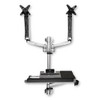
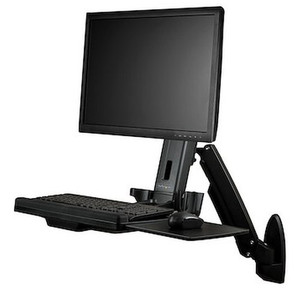
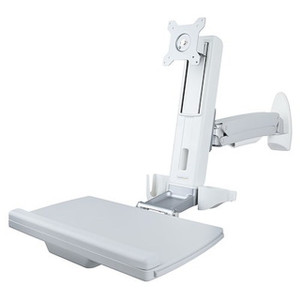
StarTech WALLSTSI2 Ergonomic Standing Wall-Mount Dual-Monitor Workstation
Overview
The StarTech WALLSTSI2 is a wall-mount sit-stand workstation built for control rooms, nursing stations, warehouse floor terminals, and any site where you need a permanent dual-monitor operator position without eating floor space on a desk or cart. It combines a dual-display arm assembly with an integrated keyboard tray on a single wall-anchored pole, so operators standing at a security console or a pick-station scanner terminal get full height, tilt, and swivel adjustment without a footprint on the floor. For security operations centers running multi-monitor VMS layouts, WALLSTSI2 gives each shift operator a workstation that adjusts to their height and viewing angle instead of a fixed-height counter.
Key Features
- Supports two displays from 13in to 30in: covers the common range for VMS monitor walls and dual-screen workstations, from compact 13in secondary screens up to 30in primary monitors — no separate mount needed if display sizes change later.
- 19.8 lb (9 kg) weight capacity per display: handles most 27-30in commercial-grade monitors used in control room and dispatch environments without overloading the arm.
- 75x75mm and 100x100mm VESA compatibility: covers the two dominant VESA patterns on commercial monitors, so you're not stuck sourcing a specific display brand to match the mount.
- 25.6in (650mm) maximum arm extension: lets each display reach out from the wall independently, useful for angling screens toward an operator seated or standing off-center from the pole.
- 17.5in (44.5cm) pole height adjustment plus 10.6in (27cm) monitor arm height adjustment: the combined range is what makes this a genuine sit-stand station — one operator can run it standing, the next shift can drop it down without swapping hardware.
- Display tilt +90/-15, swivel +/-120, and full 360 rotation: operators can pivot a screen to portrait for tall camera-grid layouts or long log lists, then swivel it back for a shared view during shift handoff.
- 26.9in wide x 10.2in deep keyboard tray with 30.9in (784mm) maximum extension and +90/-15 tilt: wide enough for a full keyboard and mouse pad side by side, and the tilt range lets it sit flat for typing or angle up out of the way when the operator is standing and working the displays only.
- Aluminum, steel, and plastic construction rated for 21.5 lb (9.8 kg) total product weight: a metal-frame build meant for continuous daily adjustment in a staffed operations environment, not a light-duty home-office arm.
- Wall-mount design: keeps the workstation off the floor entirely, which matters in tight dispatch rooms, security guard booths, or narrow control room aisles where a desk or floor stand won't fit.
- 10-year warranty: reflects a build intended for long-term fixed installation rather than a product meant to be replaced every few years.
Integration & Compatibility
WALLSTSI2 pairs naturally with a security operations build-out — mount it beside a rack of network video recorders or a monitor wall running footage pulled from IP cameras in the same facility. Because it's VESA-based rather than brand-specific, it works with most commercial monitors carrying a 75x75mm or 100x100mm pattern, so it's not tied to a single display line. If you're planning a full console build-out, review a VMS architecture guide before finalizing monitor count and layout — it affects how many wall-mount stations and what arm reach you actually need per operator position. For sites standardizing on a single mounting vendor across camera and display hardware, check the broader StarTech catalog for matching cable management and mounting accessories, and browse monitor mounts for single-display or higher-capacity alternatives if your layout needs differ from this dual-arm configuration.
What's in the Box
Evidence provided does not include itemized package contents for WALLSTSI2, so this section is omitted rather than guessed.
Frequently Asked Questions
Q: How many monitors does the WALLSTSI2 support?
A: Two displays, each ranging from 13in to 30in, with a maximum weight capacity of 19.8 lb (9 kg) per display.
Q: What VESA patterns does WALLSTSI2 accept?
A: Both 75x75mm and 100x100mm VESA hole patterns, covering the majority of commercial monitors.
Q: Is the WALLSTSI2 a sit-stand workstation?
A: Yes. It combines 17.5in of pole height adjustment with 10.6in of monitor arm height adjustment, plus a keyboard tray with 30.9in of extension and tilt, to support both seated and standing use.
Q: Does the WALLSTSI2 mount to a desk or only a wall?
A: WALLSTSI2 is a wall-mount unit — it anchors to the wall rather than clamping to a desk edge or standing on a floor base.
Q: What's the warranty on the WALLSTSI2?
A: 10 years.
Q: What is the WALLSTSI2 made of?
A: Aluminum, steel, and plastic, with a total product weight of 21.5 lb (9.8 kg).
I spec wall-mount workstations for control rooms more than almost any other mounting hardware, and the WALLSTSI2's combined 17.5in pole travel plus 10.6in arm height adjustment is what separates it from a fixed dual-arm mount — that's real sit-stand range, not a marketing label.
Technical Highlights:
- Dual 13-30in display support at 19.8 lb per arm: covers nearly every commercial monitor an operations center runs today, including 27in and most 30in panels, without hitting the per-arm weight ceiling.
- 25.6in (650mm) arm extension with +/-120 swivel and 360 rotation: gives each screen independent positioning, which matters when two operators share a console at slightly different standing positions.
- 26.9in x 10.2in keyboard tray with 30.9in extension: wide enough for full-size keyboard and mouse together, and it tilts +90/-15 so it tucks out of the way in standing mode.
Deployment Considerations:
- Because this is a wall-mount design, confirm the wall structure (stud spacing, wall type) can carry the 21.5 lb product weight plus two displays before installation — this isn't a grommet or desk-clamp mount you can reposition later without patching drywall.
- VESA coverage stops at 100x100mm — if you're running larger commercial displays with a 200x100 or 200x200 pattern, this arm won't bolt on without an adapter plate, which isn't included in the specs provided.
WALLSTSI2 is the right call for a dispatch or security operations console where floor space is tight and operators work standing shifts — a guard booth or SOC aisle where a desk-based dual-arm mount simply won't fit.