


StarTech Ergonomic Standing Wall-mount Workstation - - WALLSTSI2
Usually Ships in 2-3 Weeks
Free shipping over $499
$575.99


Manufacturer-verified compatible cameras, recorders, mounts, accessories, and licenses for this product. Adjust quantities and add the entire bundle to your cart in one click.
Questions about this product? Free pre-sales support from a senior specialist — product questions, compatibility checks, BOM quotes, price confirmation — typically answered within one business day. Need camera placement or system design work? Engineering time is $175 per hour (qty 1 = 1 hour). Hardware buyers get up to one hour ($175) credited back on their order.
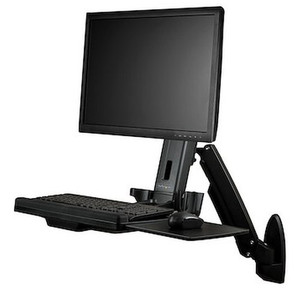
The StarTech WALL-WORKSTATION-S is a wall-mounted sit-stand workstation that carries a single monitor up to 27 inches and a keyboard tray on one articulating arm, letting operators switch between sitting and standing without a floor-standing cart eating up aisle space. It's built for control rooms, nursing stations, warehouse data terminals, and point-of-sale counters where floor space is tight but the workstation still needs full ergonomic adjustment. With a 17.2-inch height adjustment range and 21.6 inches of arm extension, WALL-WORKSTATION-S moves the display and keyboard together as a single unit, so operators don't have to re-aim a monitor after raising or lowering it.
This is a single-display wall-mount system — no multi-monitor support here, so budget accordingly if your workstation calls for dual screens. It pairs a VESA-compatible monitor mount with an integrated keyboard tray on a common vertical rail, which keeps the display and input device moving in sync during height changes. That matters in shared workstations (shift-based warehouse terminals, hospital charting stations) where different users need different heights fast, without fumbling two separate adjustments.
WALL-WORKSTATION-S (often searched as WALL WORKSTATION S) mounts to a wall using its own bracket rather than a rolling cart base, which makes it a fit for permanent installations rather than mobile workstations. Because it uses standard 75x75mm/100x100mm VESA patterns, it integrates with most commercial-grade 24-27in monitors without a proprietary adapter. If your deployment needs to serve more than one display at a workstation, look at a multi-monitor arm in the same product family rather than trying to double up this single-display unit. At 19.3 lb product weight (23.4 lb shipping) and a 37.6 x 26.3 x 36.5in footprint, plan wall anchor points accordingly — this is a load-bearing installation, not a light-duty accessory mount.
Q: What size monitors does the WALL-WORKSTATION-S support?
A: It supports a single display up to 27 inches with a weight capacity of 17.6 lb, using a 75x75mm or 100x100mm VESA mounting pattern.
Q: How much height adjustment does it offer?
A: The workstation has a 17.2-inch height adjustment range with 21.6 inches of maximum arm extension, letting it move from a seated to standing configuration.
Q: Does it include a keyboard tray?
A: Yes. The keyboard tray supports up to 5.5 lb, measures 17.7in wide by 8.1in deep, and tilts from 0 to 90 degrees.
Q: What's the warranty on the WALL-WORKSTATION-S?
A: It carries a 2-year manufacturer warranty.
Q: Can it support dual monitors?
A: No. The WALL-WORKSTATION-S is designed for a single display; a multi-monitor configuration requires a different mount in the family.
Q: How far from the wall does it sit when retracted?
A: The minimum profile from the wall is 13.1 inches, with up to 21.6 inches of extension available when needed.

I get asked a lot whether a sit-stand wall mount is worth it over a fixed bracket, and the WALL-WORKSTATION-S is a good example of where it pays off — 17.2 inches of height travel means one shared terminal can serve a seated dispatcher on one shift and a standing operator on the next without swapping hardware.
Technical Highlights:
Deployment Considerations:
This is the right call for a shared control-room or nursing-station terminal running 24/7 across multiple shifts, where the same screen and keyboard need to move between seated and standing users fast — not for a permanent single-user desk setup where a fixed-height mount would be cheaper.

Manufacturer-verified compatible cameras, recorders, mounts, accessories, and licenses for this product. Adjust quantities and add the entire bundle to your cart in one click.


Looking for more StarTech products? Shop the full StarTech catalog →
Support services and planning resources for commercial surveillance, access control, and infrastructure deployments.
Fixed scope • Fixed price