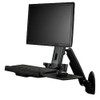
StarTech WALLSTS1 Ergonomic Wall-Mount Workstation with Adjustable Keyboard Tray
Overview
The StarTech WALLSTS1 is a steel wall-mount workstation built for fixed operator positions where floor space is constrained but display ergonomics still matter — think security control rooms, warehouse pick stations, manufacturing floor terminals, and nurse stations. It supports a single VESA-compatible display up to 24 inches and 17.6 lb, with a dedicated keyboard tray, and delivers 17.2 inches of vertical height travel so operators of different heights can work at the same station across shifts without fighting a fixed-position setup. For environments running wall-mount workstations, this is a full articulating solution rather than a static shelf — the arm extends out to 21.6 inches, the display tilts, swivels, and rotates, and the keyboard tray folds up when not in use.
The WALLSTS1 is finished in black powder-coat steel, which holds up in industrial settings without the surface wear you get from cheaper ABS housings. At 19.2 lb installed, it's a substantial mount — plan wall anchoring accordingly, especially on drywall-over-stud installations.
Key Features
- 17.2-Inch Height Adjustment: The full vertical travel range means a 5'2" operator and a 6'4" operator can both work at the same station without awkward viewing angles or wrist strain. In multi-shift environments, this eliminates the mid-shift ergonomic complaints that lead to accommodation requests.
- 21.6-Inch Maximum Arm Extension (548mm): Pulls the display out from the wall far enough to clear mounting surfaces, equipment panels, or recessed wall sections. When not in active use, retract it to keep aisles and walkways clear — particularly useful in narrow corridors or high-traffic areas.
17.6 lb Display Capacity (8 kg): Handles most commercial displays up to 24 inches, including ultrawide panels in that size range. Check your specific monitor's weight before ordering — a 24" ultrawide with a heavy panel chassis can approach this limit.- VESA 75x75 and 100x100 Compatibility: The two most common mounting patterns on commercial monitors, covering the majority of displays you'd deploy at an operator workstation. Verify your monitor's VESA pattern before installation — 200x100 and other non-standard patterns are not supported.
- Display Tilt +35° / -5°: The 35-degree upward tilt is more than most articulating arms offer and matters when the mount is installed higher on the wall (above 60 inches from floor) — you can angle the display down toward a seated or standing operator rather than leaving it flat.
- 360-Degree Display Rotation: Full portrait or landscape switching without re-mounting. Useful for application-specific layouts — thin vertical dashboards, portrait-orientation forms, or diagnostic displays that benefit from the taller aspect ratio.
- ±90-Degree Swivel Pivot: Rotate the display 90 degrees left or right from center to share content with an adjacent operator or reposition the viewing angle for different workstation configurations without relocating the wall mount.
- Keyboard Tray — 17.7" x 8.1" / 5.5 lb Capacity: Wide enough for a standard tenkeyless keyboard plus a compact mouse. The 0-to-90-degree tilt range lets operators set a neutral wrist angle, and when the station is unattended, fold the tray up vertically against the arm to reduce the footprint in tight spaces.
- Steel Construction: Commercial-grade steel frame handles the repeated daily adjustments of a multi-operator station without loosening joints or developing flex over time. This is the practical difference between a steel mount and a cost-reduced aluminum alternative in high-cycle environments.
- 2-Year Manufacturer Warranty: Covers manufacturing defects for the expected service life of a fixed workstation installation.
Integration and Compatibility
The WALLSTS1 works with any display carrying a 75x75mm or 100x100mm VESA pattern up to 24 inches diagonal and 17.6 lb. This covers the majority of commercial-grade operator monitors used in security operations, industrial HMI terminals, and healthcare workstations. If you're integrating with a security operations monitor or a commercial display at a guard desk or access control terminal, confirm both the VESA pattern and the panel weight — monitor manufacturers don't always list installed weight prominently in spec sheets.
Wall anchoring must be sized for the combined load: the WALLSTS1 itself weighs 19.2 lb, plus up to 17.6 lb of display, plus 5.5 lb of keyboard hardware — that's a potential 42+ lb dynamic load on the wall anchors when the arm is fully extended. For stud mounting, use structural lag screws; for masonry, use appropriate anchor hardware rated for the combined load. Review the ergonomic workstation mounting guide for anchor spacing and load distribution recommendations before installation.
The product dimensions at 31.5" x 26.3" x 19.7" (L x W x H) reflect the packaged configuration — plan clearance around the mounting location for full arm extension (21.6") and the keyboard tray swing radius before finalizing the wall position.
For broader operator station builds, pair this with a StarTech cable management solution to keep keyboard, display, and power cabling routed cleanly along the arm rather than hanging loose — loose cabling on an articulating arm is the most common serviceability issue in the field.
Frequently Asked Questions
Q: What is the maximum display size the WALLSTS1 supports?
A: The WALLSTS1 supports displays up to 24 inches diagonal, including ultrawide panels in that size class, provided the display uses a 75x75mm or 100x100mm VESA mounting pattern and weighs no more than 17.6 lb (8 kg).
Q: Can the WALLSTS1 support a single ultrawide monitor?
A: Yes, the WALLSTS1 is rated for ultrawide monitors up to 24 inches. Confirm the specific panel's weight and VESA pattern — some ultrawide chassis exceed 17.6 lb or use non-standard VESA patterns that are not compatible with this mount.
Q: What VESA patterns does the WALLSTS1 support?
A: The WALLSTS1 supports 75x75mm and 100x100mm VESA hole patterns. Other patterns such as 200x100mm or 200x200mm are not supported.
Q: How much vertical height adjustment does the WALLSTS1 provide?
A: The arm provides 17.2 inches of vertical height travel, which is enough range to accommodate seated and standing operators at the same workstation across different shifts.
Q: What is the warranty on the WALLSTS1?
A: The WALLSTS1 carries a 2-year manufacturer warranty covering manufacturing defects.
Q: What wall anchor type is recommended for the WALLSTS1?
A: The combined load (mount + display + keyboard hardware) can exceed 42 lb when the arm is fully extended. For wood stud installations, structural lag screws are appropriate. For masonry or concrete, use anchors rated for the combined dynamic load. Do not install into drywall without hitting studs or using masonry-rated toggle anchors.
The spec I keep coming back to on the WALLSTS1 is the 17.2 inches of height travel combined with the 21.6-inch arm extension — that combination is what separates a genuinely usable multi-shift workstation from a wall shelf with a pivot joint. I've seen fixed-height wall mounts installed in security operations rooms where operators on the overnight shift spend eight hours fighting a display set for the day crew. This mount eliminates that problem entirely.
Technical Highlights:
- Height Travel (17.2"): Covers the ergonomic range from a seated 5th-percentile female operator to a standing 95th-percentile male — one mount, one wall position, no compromise across shifts.
- Arm Extension (21.6" / 548mm): Enough reach to clear equipment panels, raceway covers, and recessed wall sections common in industrial and healthcare builds — retracts flush when the station is unattended.
- Keyboard Tray (17.7" x 8.1", 5.5 lb): The 0-to-90-degree tilt range and fold-up capability are underrated — in tight corridors this tray folds vertical and cuts the footprint significantly when the operator steps away.
Deployment Considerations:
- The combined weight of mount (19.2 lb) + display (up to 17.6 lb) + keyboard hardware (up to 5.5 lb) puts over 42 lb on the wall anchors at full arm extension — size your fasteners for that load, not just the mount weight listed on the box.
- The WALLSTS1 tops out at a 24-inch display — if your operator station requires a larger primary display (27-inch or above), this unit is not the right fit and you'll need to evaluate a higher-capacity articulating wall arm separately.
For security operations centers deploying guard desk terminals, access control operator stations, or warehouse receiving terminals where floor space is genuinely constrained and multi-shift ergonomics matter, the WALLSTS1 is the right specification — as long as your display falls within the 24-inch and 17.6 lb envelope.