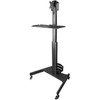
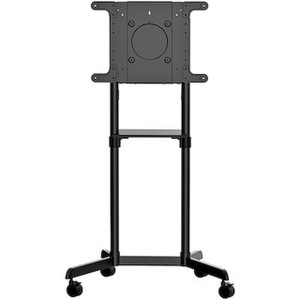
StarTech WKSTNCART Mobile Workstation Cart with Monitor Mount
Overview
The StarTech WKSTNCART is a height-adjustable mobile workstation cart designed for commercial environments where a fixed desk simply won't do — think security operations centers, staging areas, warehouse floors, IT dispatch stations, and temporary command posts. It pairs a fully adjustable monitor arm supporting displays up to 32 inches with a dedicated CPU holder, keyboard tray, and a heavy-duty wheeled base, giving you a complete rolling workstation you can reposition without disassembly. If your team rotates between workstations or needs to push a full monitoring setup from rack room to floor and back, this cart is built for that cycle.
The WKSTNCART ships as a self-contained unit — monitor mount, CPU holder, and keyboard shelf integrated into a single pole-mounted column on a mobile base. Total assembled weight sits at 39.7 lb, so it's substantial enough to feel stable but light enough for one person to relocate without equipment assistance.
Key Features
- Height Range 50.4"–63.0" (Adjustable Column): A 12.6-inch range of vertical adjustment means the cart can be configured for seated or standing operation, or handed off between operators of different heights without tools. For shared-use security monitoring stations or multi-shift environments, this eliminates the ergonomic compromise of a fixed-height desk.
- 32" Maximum Display Size: Supports monitors up to 32 inches — large enough to run a VMS with multiple camera grid views on a single screen. Smaller displays are fully supported; the VESA interface handles the size range without additional adapters.
- VESA 75x75mm and 100x100mm Compatibility: Both standard VESA patterns are supported, which covers the vast majority of commercial monitors in the 22"–32" range. If you're standardizing on a single monitor model across multiple carts, verify your monitor's VESA pattern once and you're done.
- Monitor Mount Weight Capacity 17.6 lb: This accommodates most commercial LCD panels in the supported size range. Before ordering, confirm your monitor's weight — some 32" displays with heavy glass panels approach this limit, especially older IPS models.
- Display Tilt ±30° and 360° Rotation: Full tilt and rotation flexibility means you can orient the display for a standing viewer, tilt it away from overhead lighting to kill glare, or rotate it to portrait mode for long-form log viewing or vertical dashboard layouts. Useful in staging or NOC environments where the display angle isn't fixed by a wall mount.
- CPU Holder: 22 lb Capacity, 4.8"–8.3" Width Range: The adjustable CPU cradle accommodates standard small-form-factor and mid-tower desktop cases within the 4.8–8.3 inch width range. The 22 lb weight rating handles most commercial workstation towers. Verify case width before deploying — slim desktops below 4.8" and full-tower cases above 8.3" won't fit.
- Keyboard Tray 25.6" × 9.6": The tray is sized for a standard full-size keyboard with room for a mouse alongside it — no need to compromise on keyboard type or mouse space. This matters in security monitoring contexts where operators run keyboard shortcuts continuously.
- Mobile Base with Wheels: The wheeled base makes the WKSTNCART repositionable across flat floor surfaces — useful in warehouse automation control areas, temporary event security posts, or anywhere a fixed workstation location creates workflow friction.
- Product Footprint 33.5" × 25.4": The base footprint is relatively compact given the feature set — comparable to a standard desk chair's floor space. Workstations in tight server rooms or narrow security booths should measure clearance before deploying.
Integration and Compatibility
The WKSTNCART is hardware-agnostic — it holds a monitor and desktop computer, not a specific brand or OS ecosystem. It integrates into any VMS workstation build (Milestone XProtect, Genetec Security Center, Avigilon Control Center, or similar) simply by mounting your existing display and tower. For security camera monitoring deployments, pair it with a mid-range 27"–32" display running your VMS client and a dedicated workstation-class PC or NVR with display output. The VESA 75x75 and 100x100 patterns cover virtually all commercial monitors in the supported size class.
If you're outfitting a full monitoring station, consider pairing this cart with a capable network video recorder or a dedicated VMS workstation PC for the CPU slot. The cart itself doesn't include a power strip or cable management accessories, so plan your cable routing before deployment — especially if the cart will be moved frequently.
For buyers building out a broader surveillance workstation setup or evaluating monitor mounts and stands across fixed and mobile configurations, the WKSTNCART sits at the intersection of ergonomic adjustability and mobility — a tradeoff that fixed-wall or desk-mount solutions can't offer. If you're unsure whether a mobile cart or a fixed desk mount better suits your layout, reviewing a workstation setup guide before committing can save a return trip.
Frequently Asked Questions
Q: What VESA patterns does the WKSTNCART monitor mount support?
A: The WKSTNCART supports VESA 75x75mm and 100x100mm mounting patterns. These two patterns cover the majority of commercial monitors in the 22"–32" size range.
Q: What is the maximum monitor size and weight the WKSTNCART can support?
A: The cart supports displays up to 32 inches with a monitor mount weight capacity of 17.6 lb. Confirm your specific monitor's weight before ordering, particularly with heavier glass-panel displays approaching the limit.
Q: How much height adjustment does the WKSTNCART provide?
A: The cart adjusts from 50.4 inches to 63.0 inches in height — a 12.6-inch range that accommodates seated and standing configurations or different operator heights in shared-use environments.
Q: What desktop tower sizes fit the WKSTNCART CPU holder?
A: The CPU holder accepts cases 4.8 to 8.3 inches wide with a maximum weight of 22 lb. This range covers most small-form-factor and standard mid-tower desktops. Slim desktops below 4.8" and full towers above 8.3" will not fit.
Q: What is the warranty on the StarTech WKSTNCART?
A: The WKSTNCART carries a 2-year manufacturer warranty.
Q: Does the WKSTNCART include cable management or a power strip?
A: Based on available product data, the WKSTNCART does not include a power strip or dedicated cable management system. Plan your cable routing before deployment, especially in applications where the cart will be moved frequently.
The WKSTNCART is one of those products I get asked about most often when a team is standing up a temporary or semi-permanent security monitoring post. The 12.6-inch height adjustment range — from 50.4 to 63.0 inches — is the spec that actually matters for multi-operator environments; it's enough range to go from a seated operator at desk height to a standing supervisor without anyone hunching over a fixed-height cart.
Technical Highlights:
- Monitor mount capacity (17.6 lb): Handles the majority of commercial 27"–32" displays, but this is the one spec to double-check before ordering. Some 32" panels with older IPS glass or metal enclosures push past 17 lb — confirm your display's spec sheet weight, not the shipping weight.
- CPU holder width 4.8"–8.3": The adjustable cradle covers standard mid-tower and SFF cases with a 22 lb rating, so most commercial workstations fit. Where I've seen this bite people is with ultra-thin client boxes below 4.8" — they need a shelf or separate mount instead.
- Display tilt ±30° and 360° rotation: The rotation capability is genuinely useful in surveillance ops — portrait orientation for long-form timeline or log views is something VMS operators actually use, and you can't do that on most fixed-arm desk mounts.
Deployment Considerations:
- The cart's 33.5" × 25.4" base footprint is manageable in most environments, but measure your aisle or booth clearance first — tight server corridors or security kiosk installations can make this a squeeze even at those dimensions.
- No integrated power management is included — plan cable routing and power strip placement before the cart goes live, especially if it will be relocated across shifts. Loose power cables on a moving cart are a trip hazard that's easy to prevent with a simple velcro wrap or zip-tie route planned at setup.
For a warehouse automation control floor or rotating-shift physical security operations center where operators need a full desktop setup that can be repositioned between zones without a facilities ticket, the WKSTNCART does that job cleanly. It's not the right call for a fixed analyst desk — a wall-mounted arm is cheaper and more stable in that scenario — but for genuine mobility requirements, this is the purpose-built option.