StarTech WALLSTSI1 Ergonomic Wall-Mounted Workstation
Overview
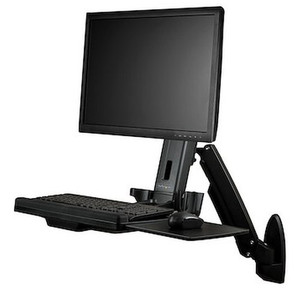
The StarTech WALLSTSI1 is a VESA wall-mounted workstation that combines a full-motion monitor arm with an integrated keyboard tray, built for control rooms, nursing stations, warehouse floors, and any environment where desk space doesn't exist but a fixed workstation still needs to go somewhere. Instead of bolting a monitor arm and a separate keyboard shelf to the wall as two projects, the WALLSTSI1 handles both from a single wall plate — a common requirement in security operations centers running network video recorders and multi-monitor VMS clients where floor space around the rack or console is already spoken for.
Key Features
- 19.8 lb (9 kg) monitor weight capacity, 13"-30" display range: covers everything from a compact secondary monitor up to a 30" primary display, so it scales from a single-operator kiosk to a full VMS review station without swapping hardware.
- 25.6 in (650 mm) maximum arm extension: pulls the display well off the wall for operators who need to position a screen mid-room rather than flush against it — useful when the mount point is set back from where someone actually sits.
- 75x75mm and 100x100mm VESA hole patterns: covers the two most common commercial and consumer display mounting standards, so compatibility isn't a guessing game against whatever monitor is already on hand.
- +90°/-15° display tilt and +90°/-15° keyboard tray tilt: lets you angle the screen down for a seated operator or up for a standing one, and matches the keyboard tray angle to reduce wrist strain during long shifts at a monitoring station.
- +/-120° display swivel and full 360° rotation: the swivel range lets one shared workstation serve two adjacent standing positions without remounting anything, and 360° rotation switches the display between landscape and portrait for tall aspect-ratio views like elevator lobby cameras or vertical dashboard layouts.
- 5.5 lb (2.5 kg) keyboard tray capacity with 30.9 in (784 mm) maximum extension: the tray pulls out independently of the display arm, holding a standard keyboard and mouse combo at a workable distance from the wall rather than crowding the operator against it.
- 26.9 in (683 mm) wide x 10.2 in (258 mm) deep keyboard tray: sized for a full keyboard and mouse pad side by side, not a cramped laptop-only shelf.
- Aluminum, steel, and plastic construction: the metal arm and frame carry the load-bearing weight while plastic covers the low-stress trim, keeping the assembly commercial-grade without the added weight of an all-metal enclosure.
- 16.0 lb (7.2 kg) product weight: light enough for one installer to position and level during mounting without a second set of hands, despite the reach and load rating.
- Silver finish: neutral enough to blend into server rooms, control rooms, and clinical or office environments without standing out against wall-mounted racks or panels.
Integration & Compatibility
Because the WALLSTSI1 supports both 75x75mm and 100x100mm VESA patterns, it pairs with the vast majority of 13"-30" commercial monitors used in video surveillance command stations, making it a practical companion to a wall-mounted NVR or a PoE switch stack feeding a nearby camera run. For teams planning a full monitoring wall, review a VMS architecture guide before finalizing mount placement — arm reach and tray extension both affect how close the rack or wall plate needs to sit to the operator position. The single-display support (one monitor per unit) means multi-monitor walls require one WALLSTSI1 per screen, spaced according to each arm's swivel range so adjacent units don't collide at full extension.
What's in the Box
Specific package contents were not available in the evidence provided for this listing.
Frequently Asked Questions
Q: What size monitors does the WALLSTSI1 support?
A: The WALLSTSI1 supports displays from 13" to 30" with a maximum weight capacity of 19.8 lb (9 kg), using 75x75mm or 100x100mm VESA mounting patterns.
Q: Can the WALLSTSI1 hold a keyboard and mouse?
A: Yes. It includes an integrated keyboard tray rated for 5.5 lb (2.5 kg), measuring 26.9 in wide by 10.2 in deep, with up to 30.9 in of extension from the wall.
Q: Does the display rotate for portrait orientation?
A: Yes. The WALLSTSI1 offers full 360° display rotation along with +/-120° swivel and +90°/-15° tilt.
Q: How far from the wall can the monitor extend?
A: The arm extends up to 25.6 in (650 mm) from the wall mount.
Q: What is the warranty on the WALLSTSI1?
A: The WALLSTSI1 carries a 10-year manufacturer warranty.
Q: How many displays does one WALLSTSI1 support?
A: One. Each unit is designed to support a single display; multi-monitor walls require one unit per screen.
I get asked a lot whether a monitor arm can double as the keyboard shelf in tight console builds, and the WALLSTSI1 is the answer for single-operator setups — it puts a 19.8 lb-rated display arm and a 5.5 lb-rated keyboard tray on one wall plate instead of two separate mounts.
Technical Highlights:
- 25.6 in arm extension: gives you real standoff distance from the wall — enough to center a display over a console desk edge rather than leaving it pinned flush to the mount point.
- 75x75mm / 100x100mm VESA support: the two-pattern coverage means you're not stuck sourcing a specific monitor model to match the mount; most 13-30 in commercial displays already carry one of these two patterns.
- 360° rotation with +/-120° swivel: on a control room wall with adjacent stations, that swivel range lets you angle the display toward whichever operator is standing at the console without unbolting anything.
Deployment Considerations:
- At 16.0 lb product weight plus a fully extended 25.6 in arm, confirm the wall substrate can carry the leveraged load at full extension — not just the static monitor weight.
- This is a single-display mount — plan on one WALLSTSI1 per screen if you're building a multi-monitor VMS wall, and account for swivel clearance between adjacent units.
This is the mount I'd spec for a security operations center replacing a fixed desk console with a wall-mounted single-monitor VMS review station — the combined arm-and-tray design solves the desk-space problem in one install instead of two.