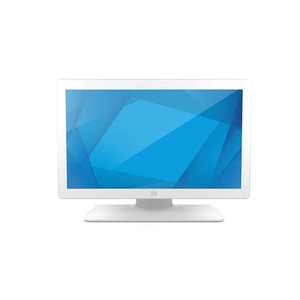
ELO Touch E658394 19-inch Medical LCD Touch Monitor
The ELO Touch E658394 is a 19-inch medical-grade touch display designed for clinical point-of-care environments, patient check-in stations, and bedside documentation workflows. Built to DICOM 14 color accuracy standards, this display delivers consistent image quality across diagnostic and administrative healthcare applications. Projected capacitive 10-touch input with zero-bezel construction minimizes gaps that harbor pathogens, making it suitable for high-turnover clinical spaces where infection control and rapid disinfection are operational requirements.
Key Features
- DICOM 14 Compliance: Color-calibrated for medical imaging workflows. Ensures consistent grayscale rendering across radiological review, pathology, and diagnostic applications without supplementary calibration hardware.
- 1280×1024 HD Resolution: Native XGA resolution optimized for 19-inch form factor. Balances pixel density with readability for clinical documentation and multi-window patient record layouts.
- 10-Touch Projected Capacitive: Multi-touch input with gloved-hand capability. Eliminates mechanical wear of resistive surfaces; typical durability >5 million touches.
- Zero-Bezel Design: Seamless edge-to-edge display with no dirt traps. Reduces cleaning time and pathogen accumulation in surgical suites and infection-control zones.
- Dual Video Interface: VGA and HDMI connectivity. Accommodates legacy clinical workstations and modern EMR systems without adapter overhead.
- USB and Serial Touch Interface: Redundant control paths — USB for direct host integration, serial for legacy controller fallback. Single-source power and touch from one connection simplifies cable management.
- Anti-glare Coating: Reduces reflection in high-ambient environments (surgical theaters, patient rooms with bright windows). Minimizes eye strain during extended clinical documentation shifts.
- 19-inch POS Stand: Compact footprint for bedside carts, nurse stations, and check-in kiosks. Vertical and horizontal tilt adjustment without requiring separate VESA mounting hardware.
Medical-grade displays in this class are deployed across triage workflows, vital-sign entry stations, and clinical decision-support terminals. The DICOM 14 calibration is particularly relevant in radiology reading rooms and pathology labs where color fidelity directly affects diagnostic confidence. The zero-bezel construction addresses real operational pain: in high-turnover urgent-care or dental settings, seam accumulation drives staff time spent on disinfection between patients. Projected capacitive eliminates the surface degradation seen in resistive touchscreens after months of repeated gloved contact.
Integration is straightforward: VGA and HDMI ports connect directly to clinical workstations, EMR servers, or thin-client terminals running Windows or Linux. Serial touch interface (TTL or RS-232) integrates with legacy patient-monitoring systems or custom kiosk controllers. USB touch simplifies modern OS deployments without dedicated serial infrastructure. The 19-inch footprint fits standard hospital carts and mobile workstations (Rubbermaid, Capsa, Omnicell) without overhang, reducing tipping risk and freeing floor space in cramped patient rooms.
Total cost of ownership in clinical settings hinges on cleaning durability and downtime avoidance. The zero-bezel construction and projected capacitive technology together eliminate seam cleaning and surface replacement cycles common with older resistive or framed displays. In high-throughput environments (50+ patient interactions per day), this translates to reduced maintenance labor and no mid-shift display failures from touch-surface wear. DICOM 14 compliance eliminates the need for external color management hardware, simplifying procurement and reducing system complexity.
ELO Touch displays meeting medical-grade standards are compliant with FDA 510(k) clearance pathways for clinical use. Sourced direct from the manufacturer or US direct manufacturer source; factory-new with full US warranty path. Explore the complete range of ELO Touch clinical and retail displays in the ELO Touch catalog.
Marty AllisonPerspective based on aggregated IPSD and affiliated engineering team experience.
We've installed ELO medical-grade displays across a range of healthcare environments — from patient intake counters to radiology reading rooms — and the E658394 sits at a pragmatic sweet spot between cost and clinical rigor. The DICOM 14 calibration is real: vendors shipping consumer-grade LCD panels into medical workflows create color-shift problems that radiologists and pathologists catch immediately. ELO's factory calibration eliminates that friction and avoids costly redeployment. The projected capacitive touch surface is a significant operational win over older resistive designs: gloved staff, repeated contact with disinfectants, and the throughput demands of urgent care all degrade resistive screens visibly within 6–12 months. Capacitive touch is immune to those wear patterns. The zero-bezel frame design is not cosmetic — in infection-control environments, every gap is a cleaning liability. We've seen staff spend 2–3 minutes per shift on seamed displays where a seamless design takes 30 seconds. The trade-off: projected capacitive requires a conductive surface (gloved hands work fine, but stylus input needs an active pen). For clinical documentation and patient-facing kiosks, that's not a constraint. If your use case demands passive stylus support, you'll need a resistive alternative.
Technical Highlights:
- DICOM 14 Grayscale Calibration: Factory-calibrated to ΔE < 3 across the grayscale range. Eliminates color management overhead on the workstation side — image appearance is consistent whether displayed in a bright surgical theater or a dimmed reading room. Real consequence: radiologists and pathologists trust the image fidelity without second-guessing monitor calibration.
- 1280×1024 XGA Resolution: Native resolution is modest by modern standards, but optimized for 19-inch form factor. Pixel pitch (~0.294mm) balances readability for clinical text (vital-sign fields, patient names) with sufficient resolution for diagnostic image review. Upscaling from higher EMR resolutions is standard practice and introduces no artifacts on LCD scaling.
- 10-Touch Projected Capacitive: Supports multi-touch gestures for clinical applications — pinch-to-zoom on diagnostic images, two-finger pan for large patient records. Typical touch latency <100ms; more than adequate for documentation workflows. Durability >5 million touches means 5–7 years of heavy daily use without surface degradation.
- VGA + HDMI Dual Video Input: Accommodates legacy workstations (many hospital systems still run analog VGA from thin clients) alongside modern displays. Hot-switching between inputs is seamless; no downtime for physical cable swaps during shift handoffs.
- Serial + USB Touch Control: Redundant interface architecture. USB is preferred for modern hosts; serial is fallback for legacy controllers or air-gapped clinical networks. Single integrated power connector serves both video and touch — reduces clutter and failure points in compact cart environments.
Deployment Considerations:
- Projected capacitive touch requires a conductive object (gloved finger, active pen). Passive stylus input is not supported. If your clinical workflow depends on passive stylus or pen input for signature capture or drawing on medical images, request a resistive-touch alternative or plan for active-pen input devices (cost adder ~$50–150).
- 1280×1024 is a fixed native resolution. Windows or Linux will not upscale below that resolution on most configurations — if your EMR is optimized for 1024×768 or lower, verify scaling behavior with IT before deployment. Most modern EMRs display correctly at XGA without manual OS intervention.
- 19-inch footprint fits standard hospital carts (Rubbermaid ClearSafe, Capsa, Omnicell) with minimal overhang. Verify mounting VESA pattern (100×100 or 75×75) against your cart's arm specification before ordering in bulk.
- DICOM 14 calibration is factory-set and non-adjustable on the display itself. If your clinical department has custom color profiles or secondary calibration requirements, confirm compatibility with your workstation's color-management software (typically PACS or medical image viewer software).
- Infection-control approval: zero-bezel design eliminates seam traps, but the display chassis and stand require compatible medical-grade disinfectants. Standard quaternary ammonium or 70% isopropyl alcohol is safe; avoid abrasive cleaners that may damage the anti-glare coating.
The E658394 is the right fit for healthcare IT teams deploying point-of-care terminals, clinical documentation stations, or diagnostic-image review in resource-constrained environments where cost-per-unit and total-lifecycle durability drive procurement. Its DICOM compliance, glove-friendly touch, and seamless frame construction eliminate operational friction common in older display designs. Explore the full range of ELO Touch medical and retail solutions in the ELO Touch catalog.