


Product images are provided for reference and may not represent the exact model, configuration, or included
components.
Overview
SKU:
ELK-M1KP3
Condition:
New
Availability:
Usually ships in 24 hours
Warranty
Manufacturer Warranty
ELK Products M1 Lcd Keypad M1Kp3
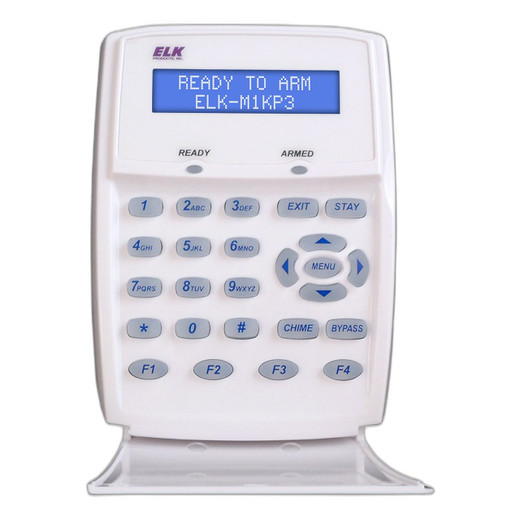
ELK Products ELK-M1KP3 M1 LCD Keypad Overview The ELK Products ELK-M1KP3 is an LCD keypad designed for use with ELK M1 security control panels. This …
ELK Products M1 Lcd Keypad M1Kp3
$179.99
Your recommended setup
Review items below — quantities update pricing automatically.
Item
Qty
Status
Price
Optional Add-Ons recommended
Services optional
Bundle Summary
Bundle Subtotal:
$0.00
Optional Add-Ons:
$0.00
Services:
$0.00
Total:
$0.00
Overview
SKU:
ELK-M1KP3
Condition:
New
Availability:
Usually ships in 24 hours
Warranty
Manufacturer Warranty
Description

ELK Products ELK-M1KP3 M1 LCD Keypad
Overview
The ELK Products ELK-M1KP3 is an LCD keypad designed for use with ELK M1 security control panels. This keypad provides operators with an integrated LCD display interface for system arming, disarming, zone monitoring, and status verification. The ELK-M1KP3 serves as a primary user interaction point within M1-based security installations, delivering real-time system feedback and command execution capability at the local control point.
Key Features
- LCD display for real-time system status and zone information
- Full keypad interface for arming, disarming, and system control
- Compatible with ELK M1 control panels
- User-friendly operator interface for security integrations
- Integrated feedback display for operator confirmation
- Support for multiple user codes and access management
Integration & Compatibility
The ELK-M1KP3 is engineered for direct integration with ELK M1 security control panels. This keypad is the standard user interface for M1-based systems and provides seamless communication with the main control panel. Integrators can deploy the ELK-M1KP3 as a primary keypad or supplementary entry point to expand system accessibility throughout a facility. The keypad operates within the M1 system architecture, allowing centralized management of user credentials, zones, and system events from a single platform.
Deployment Considerations
Security integrators should position the ELK-M1KP3 keypad at primary entry points or control stations where operators require frequent system access. The LCD display provides immediate visual feedback on system status, reducing operator confusion and improving response time during alarm events or system adjustments. Multiple keypads can be networked within a single M1 installation to support distributed control requirements. Proper placement ensures operator sightlines to the display and ergonomic access to control buttons.
Ted Perry
I've specified the ELK-M1KP3 keypad on multiple M1 control panel deployments across mixed-use facilities. The LCD display is a practical requirement for operators who need immediate confirmation of system state without querying the main panel or running diagnostic software. The ELK-M1KP3 fits well into facilities managing 10-50 zones where distributed arming and disarming is necessary.
Technical Highlights:
- Display Feedback: LCD screen provides zone status, system state, and user feedback for every command
- M1 Architecture Integration: Direct compatibility with M1 control panels eliminates compatibility testing and streamlines deployment
Deployment Considerations:
- Mount keypads in high-traffic entry areas where operators expect to interact with the system daily
- Test user code access and display refresh rates during commissioning to verify operator experience
- Plan keypad placement to align with building access points and existing M1 panel wiring infrastructure
The ELK-M1KP3 is a reliable operator interface that reduces training overhead and improves system usability. For integrators working with M1 control panels, this keypad is a standard recommendation where local system control and real-time feedback are required.
Specifications
Product Type:
LCD Keypad
Have Questions?
Ask an Expert.
RELATED PRODUCTS

System Design, Deployment & Technical Support
Support services and planning resources for commercial surveillance, access control, and infrastructure deployments.
Fixed scope • Fixed price
System Design Assistance
- Get help validating product compatibility
- Coverage requirements
- Storage planning and deployment architecture before you buy.
Deployment & Configuration Support
- Access fixed-scope support for rollout planning
- User setup guidance
- Migration and system standardization across single-site or multi-site deployments
Guides, Tools & Calculators
- PoE requirements
- Storage retention
- Camera selection and deployment methodology