StarTech HD2DP Active HDMI to DisplayPort Adapter
Overview
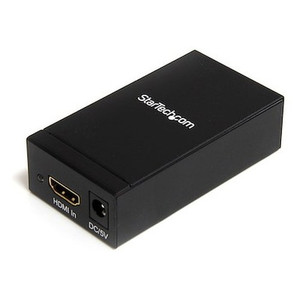
The StarTech HD2DP is an active HDMI-to-DisplayPort adapter built for situations where your source — a laptop, desktop GPU, or media device — outputs HDMI but your monitor or display accepts only DisplayPort. Because the conversion is active (not passive), the HD2DP handles the full signal translation without leaning on the display to do the work, which means broader compatibility with monitors that don't support passive HDMI-to-DP adapters. It draws power from a USB port (5V DC), so there's no wall adapter to manage, and it measures just 10.0 in x 0.9 in x 0.5 in — light enough at 2.5 oz to stay permanently attached behind a workstation or travel in a laptop bag.
Key Features
- 4K at 30 Hz output: The HD2DP drives displays up to 3840 x 2160 at 30 Hz — sufficient for 4K desktop productivity and media review workflows where you're not demanding high-refresh motion. If you're configuring a color-grading station or a 4K reference monitor that only accepts DisplayPort, this covers the resolution without requiring a GPU swap.
- 1920 x 1080 at 120 Hz: Drop to 1080p and the adapter supports up to 120 Hz refresh — meaningful for engineering workstations running simulation tools or secondary gaming displays where smooth motion matters and the source is HDMI-only.
- 1920 x 1200 support: Covers the 16:10 aspect ratio used by many professional monitors and older medical-grade displays. If your facility still runs WUXGA panels, the HD2DP handles that resolution without forcing a compromise to 1080p.
- Active conversion, not passive: Passive HDMI-to-DP adapters depend on the source GPU advertising a dual-mode (DP++) signal. Active adapters like the HD2DP perform the signal conversion internally, which means compatibility extends to sources that don't support dual-mode output — including many integrated graphics solutions and older discrete GPUs.
- 7.1 surround sound pass-through: Audio travels through the adapter alongside video. If your DisplayPort monitor or AV receiver handles 7.1, the HD2DP passes the full channel count — no separate audio cable required for command center or AV presentation setups.
- USB-powered at 5V DC: The adapter pulls power from a standard USB-A port. No separate power supply, no wall outlet proximity requirement. On most workstations the USB port is a few inches from the HDMI port, so cable management stays clean.
- Operating temperature 0°C to 45°C: Rated for standard indoor office and control room environments. Storage temperature extends to -10°C to 70°C, so the adapter survives being left in a vehicle or shipping container between deployments without damage.
- 10% to 85% RH non-condensing: Handles normal office and light industrial humidity ranges without requiring additional environmental controls.
Integration and Compatibility
The HD2DP is designed for scenarios where the signal direction is fixed: HDMI source to DisplayPort display. It does not work in reverse (DisplayPort source to HDMI display — that requires a separate adapter). Verify your source device has a standard HDMI output port and your display or receiver has a DisplayPort input before ordering. The USB power draw is low enough that a standard USB 2.0 port can supply it — no USB 3.0 or powered hub required in most cases, though a powered hub is a reliable fallback on systems with power-limited USB ports. The adapter covers a broad range of display connectivity needs for mixed-output environments. For workstations pairing this adapter with a DisplayPort monitor, no additional drivers are typically required on modern operating systems. Integrators building AV or digital signage systems with HDMI media players feeding DisplayPort screens will find this a clean solution. For larger deployments managing multiple display outputs, consider pairing with a KVM switch that handles HDMI or DisplayPort natively to simplify switching. Those building out workstation AV setups can rely on the 2-year manufacturer warranty for peace of mind on deployed units.
Frequently Asked Questions
Q: Does the HD2DP work from a DisplayPort source to an HDMI display?
A: No. The HD2DP is directional — HDMI input only, DisplayPort output only. For the reverse direction (DisplayPort to HDMI), you need a separate adapter designed for that signal path.
Q: Does the HD2DP require a driver installation?
A: The adapter is USB-powered and active, meaning it performs signal conversion internally. On most modern operating systems it functions without additional driver installation, though confirming compatibility with your specific OS version is recommended.
Q: What is the maximum resolution supported by the HD2DP?
A: The maximum supported resolution is 3840 x 2160 (4K UHD) at 30 Hz. At 1920 x 1080, the adapter supports up to 120 Hz refresh rate.
Q: Does the HD2DP pass audio as well as video?
A: Yes. The HD2DP supports audio pass-through including up to 7.1 surround sound, provided your DisplayPort display or connected AV system supports that channel count.
Q: What powers the HD2DP?
A: The adapter is powered via USB at 5V DC. A standard USB-A port on the host machine or a USB hub is sufficient — no separate power adapter or wall outlet is required.
Q: What is the warranty on the HD2DP?
A: The HD2DP carries a 2-year manufacturer warranty.
The spec that matters most on the HD2DP is the active conversion architecture — it's what separates this from passive HDMI-to-DP cables that fail silently when the source GPU doesn't advertise dual-mode output. In mixed-hardware environments where you're connecting newer workstations or laptops with HDMI-only outputs to existing DisplayPort monitor inventory, passive adapters are a reliability gamble. The HD2DP resolves that by handling the conversion internally, and the USB 5V power draw is low enough that it doesn't require a dedicated power source — just a spare USB-A port.
Technical Highlights:
- 4K 30Hz ceiling: At 3840 x 2160, the adapter delivers full 4K desktop resolution — appropriate for reference monitor work and productivity. If you need 4K at 60Hz, this adapter does not support it; plan accordingly when specifying for high-refresh 4K use cases.
- 1080p 120Hz capability: Dropping to 1920 x 1080 unlocks 120 Hz — relevant for engineering simulation displays or secondary screens where fluid motion is a stated requirement from the end user.
- 7.1 audio pass-through: Full 7.1 surround sound travels through the adapter alongside video, eliminating a separate audio cable run in command center or presentation room installations where the display handles audio.
Deployment Considerations:
- Confirm the source device outputs standard HDMI (not mini or micro HDMI without an adapter) and the display accepts full-size DisplayPort input before deploying at scale — this adapter covers one connector format on each end and does not include connector format converters.
- Operating temperature is rated to 45°C maximum — adequate for office and control room environments but worth noting in rack-adjacent or enclosed AV cabinet deployments where ambient temps can climb without active cooling.
The HD2DP is the right call for AV integrators standardizing on DisplayPort monitor infrastructure who need to connect HDMI-output laptops or media players without pulling new GPU cards or replacing display hardware — particularly in corporate briefing rooms and security operations centers where the monitor fleet is DisplayPort-native and the source mix is not.