
Ubiquiti UAP-AC-PRO-5-US vs TP-Link EAP225-OUTDOOR: Specification Comparison
The Ubiquiti UAP-AC-PRO-5-US and TP-Link EAP225-OUTDOOR are both dual-band 802.11ac (Wi-Fi 5) wireless access points designed for infrastructure deployments, managed via controller software, and powered over a single Ethernet cable. Both target installers needing outdoor-capable APs with centralized management. Key decision axes are RF throughput and client capacity, physical and environmental durability, and management platform and power requirements — the dimensions that most directly affect deployment planning for campuses, warehouses, and mixed indoor/outdoor sites.
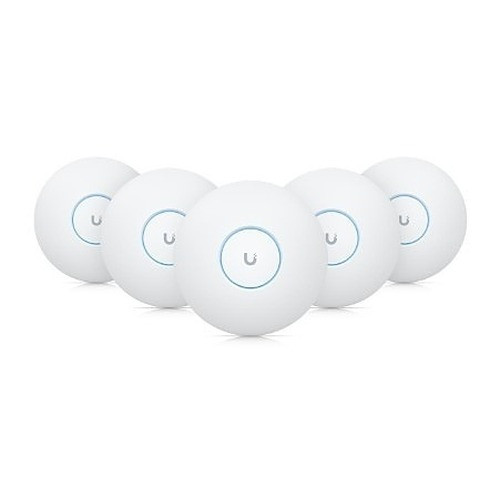
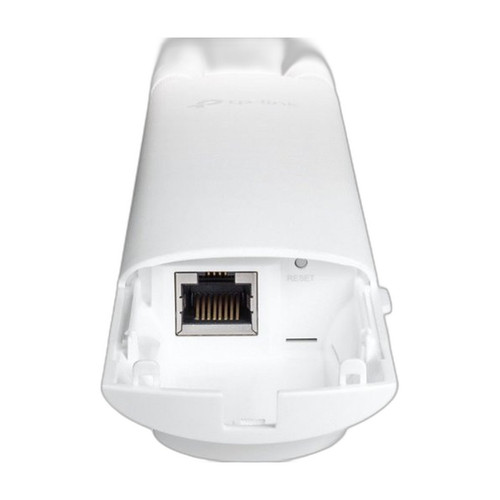
In This Guide
- Which AP delivers more RF throughput and can support larger client counts?
- How do these APs differ in environmental protection and power requirements?
- What management platforms and integration ecosystems do these APs require?
- Which should you choose: the UAP-AC-PRO-5-US or the EAP225-OUTDOOR?
- Side-by-Side Specs
- FAQ
Which AP delivers more RF throughput and can support larger client counts?
The UAP-AC-PRO-5-US is specified at 1750 Mbps combined (450 Mbps on 2.4 GHz plus 1300 Mbps on 5 GHz). Ubiquiti's published spec explicitly cites support for 50–300 concurrent clients, making this AP suited to medium-to-large deployments with dense device populations.
The EAP225-OUTDOOR is specified at AC1200 combined (300 Mbps on 2.4 GHz plus 867 Mbps on 5 GHz). No concurrent-client figure is provided in the supplied specifications. Its 5 GHz radio delivers 867 Mbps versus 1300 Mbps on the Ubiquiti, a 33% reduction in peak 5 GHz capacity.
For throughput-sensitive applications — video surveillance uplinks, dense Wi-Fi calling, or high-device-count courtyards — the UAP-AC-PRO-5-US holds a measurable RF advantage. For lighter-traffic outdoor extensions, the EAP225-OUTDOOR's AC1200 ceiling may be sufficient.
How do these APs differ in environmental protection and power requirements?
The EAP225-OUTDOOR carries an IP65 ingress-protection rating, meaning it is dust-tight and protected against sustained low-pressure water jets. Its operating temperature range is specified as -30 °C to 65 °C, covering cold-climate deployments and high-heat environments. It draws under 13 W and accepts PoE 802.3af (802.3af delivers up to 15.4 W at the switch port).
The UAP-AC-PRO-5-US is described as indoor/outdoor-capable with an operating temperature of -10 °C to 50 °C. No IP ingress-protection rating is present in the supplied specifications. It requires PoE+ (802.3at, up to 30 W at the port, ~13 W device max). The supplied PoE adapter is included in the package.
For genuinely harsh outdoor environments — exposed rooftops, docks, or sites with freezing winters — the EAP225-OUTDOOR's IP65 rating and -30 °C lower operating limit are concrete advantages not matched by the available Ubiquiti specs. Installers should verify Ubiquiti's enclosure rating against their site's weather exposure requirements independently, as it is not stated in the provided data.
What management platforms and integration ecosystems do these APs require?
The UAP-AC-PRO-5-US requires the UniFi Controller, available as a cloud-hosted service or on-premises installation. Two RJ-45 Ethernet ports support daisy-chaining, enabling multi-AP runs from a single switch port. Certifications listed are CE, FCC, and IC. The AP integrates natively into existing UniFi switching and security gateway deployments.
The EAP225-OUTDOOR is managed via TP-Link's Omada controller ecosystem (implied by the EAP product line, though the controller name is not explicitly stated in the supplied specifications). It provides a single Gigabit Ethernet uplink. No certification data is present in the supplied specifications.
Sites already invested in UniFi infrastructure gain unified visibility and zero additional controller licensing by deploying the UAP-AC-PRO-5-US. Sites running Omada or starting fresh without a platform commitment may find the EAP225-OUTDOOR a simpler onramp, though controller details and certifications should be confirmed directly from TP-Link's documentation before specification.
Which should you choose: the UAP-AC-PRO-5-US or the EAP225-OUTDOOR?
Our take: The UAP-AC-PRO-5-US is the stronger choice when throughput capacity and client density are the primary requirements and the site operates in the -10 °C to 50 °C range. Its 1750 Mbps combined radio (versus 1200 Mbps on the EAP225-OUTDOOR) and 1300 Mbps 5 GHz band (versus 867 Mbps) deliver a 33% 5 GHz advantage, and its 50–300 concurrent-client specification provides a planning figure absent from the TP-Link data. However, the EAP225-OUTDOOR holds a meaningful edge for exposed outdoor environments: its IP65 rating and -30 °C to 65 °C operating range exceed what the supplied Ubiquiti specs document. PoE 802.3af (under 13 W) versus PoE+ (802.3at, ~13 W device draw) also affects switch budget. Choose the UAP-AC-PRO-5-US for UniFi-integrated, higher-density sites; choose the EAP225-OUTDOOR where cold-climate or wet-environment protection is the governing constraint.
Side-by-Side Comparison
Spec-for-spec, from manufacturer data.
| Specification | Ubiquiti UAP-AC-PRO-5-US | TP-Link EAP225-OUTDOOR |
|---|---|---|
| Wi-Fi Standard | 802.11ac (Wi-Fi 5) | 802.11ac (Wi-Fi 5) |
| Combined Throughput | 1750 Mbps | 1200 Mbps (AC1200) |
| 5 GHz Radio | 1300 Mbps | 867 Mbps |
| 2.4 GHz Radio | 450 Mbps | 300 Mbps |
| Power Input | PoE+ 802.3at (~13 W max) | PoE 802.3af (under 13 W) |
| Ethernet Ports | 2x RJ-45 (daisy-chain capable) | 1x Gigabit Ethernet |
| Ethernet Uplink Speed | Not stated in provided specs | Gigabit |
| IP Ingress Rating | — | IP65 |
| Operating Temperature | -10 °C to 50 °C | -30 °C to 65 °C |
| Concurrent Clients | 50–300 (per spec) | — |
| Management Platform | UniFi Controller (cloud or on-premises) | Not stated in provided specs |
| Form Factor | Indoor/Outdoor Access Point | Outdoor Access Point |
| Mounting | Wall / Ceiling / Rack | — |
| Certifications | CE, FCC, IC | — |
| PoE Adapter Included | Yes | — |
| Country of Origin | CN | — |
Frequently Asked Questions
Which should you choose: the UAP-AC-PRO-5-US or the EAP225-OUTDOOR?
The UAP-AC-PRO-5-US is the stronger choice when throughput capacity and client density are the primary requirements and the site operates in the -10 °C to 50 °C range. Its 1750 Mbps combined radio (versus 1200 Mbps on the EAP225-OUTDOOR) and 1300 Mbps 5 GHz band (versus 867 Mbps) deliver a 33% 5 GHz advantage, and its 50–300 concurrent-client specification provides a planning figure absent from the TP-Link data. However, the EAP225-OUTDOOR holds a meaningful edge for exposed outdoor environments: its IP65 rating and -30 °C to 65 °C operating range exceed what the supplied Ubiquiti specs document. PoE 802.3af (under 13 W) versus PoE+ (802.3at, ~13 W device draw) also affects switch budget. Choose the UAP-AC-PRO-5-US for UniFi-integrated, higher-density sites; choose the EAP225-OUTDOOR where cold-climate or wet-environment protection is the governing constraint.
Is the UAP-AC-PRO-5-US or EAP225-OUTDOOR better for a deployment in a freezing outdoor environment?
Based on the supplied specifications, the EAP225-OUTDOOR has a documented operating range of -30 °C to 65 °C and an IP65 ingress-protection rating. The UAP-AC-PRO-5-US is rated to -10 °C with no IP rating listed in the provided data. For cold-climate or rain-exposed installations, the EAP225-OUTDOOR's specs directly address that requirement; the Ubiquiti's outdoor suitability at temperature extremes below -10 °C is not confirmed by the specifications provided.
Can I power the EAP225-OUTDOOR from a standard PoE switch, or do I need a PoE+ switch?
The EAP225-OUTDOOR is specified for PoE 802.3af (under 13 W), so a standard 802.3af PoE switch port is sufficient. The UAP-AC-PRO-5-US requires PoE+ (802.3at), which delivers up to 30 W at the port. If your existing switch only supports 802.3af, the EAP225-OUTDOOR avoids the need to upgrade switch hardware or use a mid-span injector.
Do I need separate controller hardware to manage either of these access points?
The UAP-AC-PRO-5-US requires a UniFi Controller, which can be run as a cloud service or on a local server or Ubiquiti hardware console — no dedicated hardware is mandatory if you self-host the software. The EAP225-OUTDOOR's specific controller requirement is not detailed in the supplied specifications; buyers should consult TP-Link's Omada documentation to confirm whether a hardware controller is required or whether a software-only option is available.
More Wireless Access Point Comparisons
Get a Second Opinion on Your Camera Choice
Share your site layout, coverage goals, and budget. Our team will validate the camera selection, flag anything we would change, and recommend products that match the use case.