
TP-Link EAP615-WALL vs TP-Link EAP610: Specification Comparison
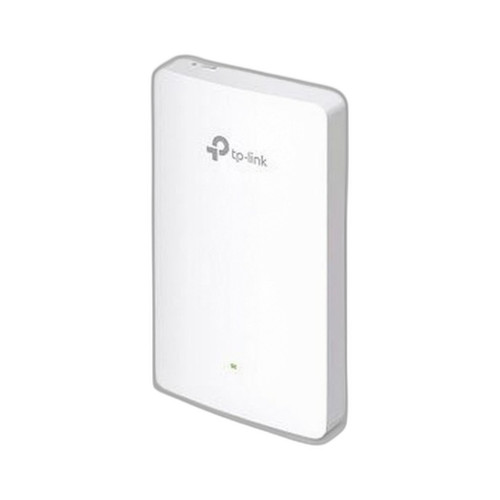
The EAP615-WALL and EAP610 are both TP-Link Wi-Fi 6 (802.11ax) AX1800 dual-band access points managed under the same Omada SDN platform, making them genuine cross-shop candidates for enterprise and SMB wireless deployments. The core distinction is physical form factor and deployment context: the EAP615-WALL is a wall-plate unit designed for in-room, flush-mount installation with downstream PoE passthrough, while the EAP610 is a ceiling-mount AP suited to open-plan coverage. Buyers choosing between them are typically deciding where the AP lives and whether in-wall port consolidation is required.
In This Guide
- Which form factor and mounting options fit the installation environment?
- How do the wired port counts, PoE input requirements, and passthrough capabilities compare?
- Are there differences in wireless speed, security protocols, and management between the two APs?
- Which should you choose: the EAP615-WALL or the EAP610?
- Side-by-Side Specs
- FAQ
Which form factor and mounting options fit the installation environment?
The EAP615-WALL is a wall-plate access point designed for flush in-wall mounting, with additional support for corner and rack mounting per spec. Its physical profile replaces a standard wall outlet faceplate, making it well suited to offices, conference rooms, and hospitality rooms where a ceiling drop is impractical or aesthetically undesirable.
The EAP610 is a ceiling-mount access point with a circular 160 × 160 × 33.6 mm puck profile. Per spec, it supports ceiling, wall, and junction-box mounting with kits included. Its omni-directional ceiling placement is optimized for open-plan coverage patterns where a centrally located overhead unit can serve a wider floor area.
Neither unit is rated for outdoor use per the provided specifications. The EAP610 lists an operating temperature range of 0 °C–60 °C (32 °F–140 °F); no operating temperature range is stated in the provided specs for the EAP615-WALL.
How do the wired port counts, PoE input requirements, and passthrough capabilities compare?
The EAP615-WALL spec lists 3 Ethernet ports (with a secondary reference to 2 ports — the 3-port figure is cited in the dedicated Ports field and is consistent with wall-plate APs in this family that typically provide one uplink and two downstream LAN ports). Critically, ETH3 supports PoE passthrough, allowing a downstream device such as an IP phone or camera to be powered directly from the wall plate without a separate PoE injector or switch port.
The EAP610 spec lists a single 1× Gigabit Ethernet port for uplink. A conflicting spec entry references a 10 Gbps Ethernet port, but no other field corroborates 10GbE capability on this model; the 1× Gigabit entry is consistent with the AX1800 tier. No PoE passthrough is specified.
Both units accept PoE+ (802.3at) input. The EAP615-WALL specifies 802.3af/at input compatibility and 13 W typical power consumption. The EAP610 spec references 802.3af minimum PoE input and additionally lists 802.3bt PoE or 12 V/4.5 A DC as a power supply option — though the 802.3bt reference may reflect a spec data inconsistency, as the throughput tier does not typically require that power level. Buyers should verify against the official datasheet.
Are there differences in wireless speed, security protocols, and management between the two APs?
Both APs deliver AX1800 aggregate throughput: 1201 Mbps on 5 GHz and 574 Mbps on 2.4 GHz. Both are Wi-Fi 6 (802.11ax) dual-band radios and both are managed via TP-Link Omada SDN, providing centralized configuration, VLAN, and SSID management across both units in a unified controller environment.
The EAP610 spec explicitly lists WPA3 encryption support (WPA3-Personal, WPA3-Enterprise, and WPA3-Enhanced Open/OWE), as well as legacy WPA2 and WPA modes. The EAP615-WALL spec does not enumerate supported encryption or security protocols in the provided data — buyers requiring confirmed WPA3 support on the wall-plate unit should verify against the EAP615-WALL datasheet before specifying.
The EAP610 spec also explicitly lists 802.11a/b/g/n/ac/ax operating modes, confirming backward compatibility with legacy client devices. This is not enumerated in the EAP615-WALL spec as provided. Both units share the same Omada SDN management plane, so mixed deployments of both models can be administered from a single controller.
Which should you choose: the EAP615-WALL or the EAP610?
Our take: The EAP615-WALL is the stronger choice when the installation calls for in-room, wall-level deployment with wired port consolidation — specifically, its 3-port design with PoE passthrough on ETH3 allows a downstream IP phone or IoT device to be powered from the same wall plate, eliminating an extra switch port or injector. The EAP610 is the stronger choice for open-plan areas where a single overhead AP must cover a broad floor zone, benefiting from its ceiling-mount form factor and junction-box kit inclusion. On wireless performance both units are identical at AX1800 (1201 Mbps / 574 Mbps). The EAP610 spec explicitly confirms WPA3 and 802.11a/b/g/n/ac/ax support; the EAP615-WALL spec does not enumerate these — verify the EAP615-WALL datasheet if WPA3 is a hard requirement. Both run on Omada SDN, so mixed-model deployments are fully supported under one controller.
Side-by-Side Comparison
Spec-for-spec, from manufacturer data.
| Specification | TP-Link EAP615-WALL | TP-Link EAP610 |
|---|---|---|
| Product Type | Wall Plate Wi-Fi 6 Access Point | Ceiling-Mount Wi-Fi 6 Access Point |
| Wi-Fi Generation | Wi-Fi 6 (802.11ax) | Wi-Fi 6 (802.11ax) |
| Aggregate Throughput | AX1800 | AX1800 |
| 5 GHz Speed | 1201 Mbps | — |
| 2.4 GHz Speed | 574 Mbps | — |
| Frequency Bands | 2.4 GHz + 5 GHz | 2.4 GHz + 5 GHz |
| PoE Input | 802.3af/at | 802.3af minimum |
| PoE Passthrough | Yes — ETH3 | — |
| Ethernet Ports | 3 | 1× Gigabit |
| Power Consumption | 13 W typical | — |
| Mount Types | Wall; Corner; Rack | Ceiling; Wall; Junction Box |
| Dimensions | — | 160 × 160 × 33.6 mm |
| Operating Temperature | — | 0 °C–60 °C (32 °F–140 °F) |
| WPA3 Support | — | Yes (Personal, Enterprise, OWE) |
| 802.11 Modes | — | 802.11a/b/g/n/ac/ax |
| Management | Omada SDN | Omada SDN |
Frequently Asked Questions
Which should you choose: the EAP615-WALL or the EAP610?
The EAP615-WALL is the stronger choice when the installation calls for in-room, wall-level deployment with wired port consolidation — specifically, its 3-port design with PoE passthrough on ETH3 allows a downstream IP phone or IoT device to be powered from the same wall plate, eliminating an extra switch port or injector. The EAP610 is the stronger choice for open-plan areas where a single overhead AP must cover a broad floor zone, benefiting from its ceiling-mount form factor and junction-box kit inclusion. On wireless performance both units are identical at AX1800 (1201 Mbps / 574 Mbps). The EAP610 spec explicitly confirms WPA3 and 802.11a/b/g/n/ac/ax support; the EAP615-WALL spec does not enumerate these — verify the EAP615-WALL datasheet if WPA3 is a hard requirement. Both run on Omada SDN, so mixed-model deployments are fully supported under one controller.
Can I use the EAP615-WALL and EAP610 together in the same Omada network?
Yes. Both the EAP615-WALL and EAP610 are Omada SDN-managed access points and can coexist in the same controller environment. This allows a deployment to use wall-plate units in offices or hotel rooms and ceiling-mount units in corridors or open areas, all managed from a single Omada controller interface.
Does the EAP615-WALL support PoE passthrough to power a desk phone or camera?
Yes, per the provided spec. The EAP615-WALL includes PoE passthrough on ETH3, enabling a downstream PoE device — such as an IP phone or small camera — to draw power through the wall plate. The EAP610 does not list PoE passthrough capability in its provided specifications.
Which AP is better suited to a hotel or conference room versus an open office floor plate?
The EAP615-WALL is purpose-built for room-level deployment: its flush wall-plate form factor, in-wall mount style, and downstream PoE passthrough make it the natural fit for hotel rooms, conference rooms, and private offices. The EAP610's ceiling-mount profile and omni-directional coverage pattern are better matched to open office floor plates, lobbies, and corridors where a single overhead unit must serve multiple users across a wider area.
More Wireless Access Point Comparisons
Get a Second Opinion on Your Camera Choice
Share your site layout, coverage goals, and budget. Our team will validate the camera selection, flag anything we would change, and recommend products that match the use case.