
NETGEAR WAX210-100NAS vs TP-Link EAP610-OUTDOOR: Specification Comparison
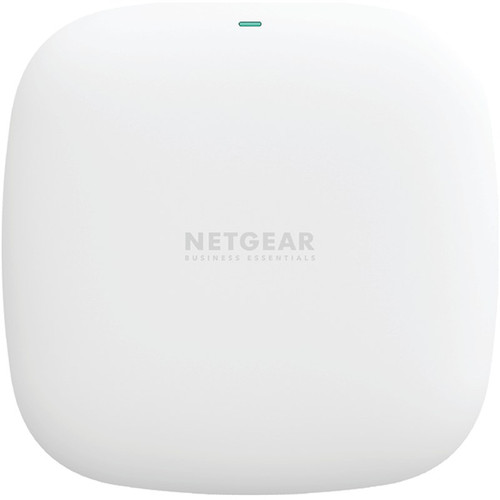
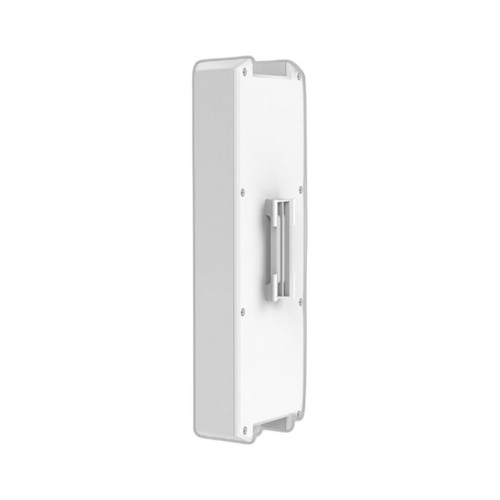
Both the NETGEAR WAX210-100NAS and the TP-Link EAP610-OUTDOOR are Wi-Fi 6 (802.11ax) AX1800 dual-band access points targeting small-to-medium deployments. The comparison centers on three axes most relevant to wireless infrastructure buyers: radio performance and throughput, physical deployment environment and power input, and management platform and integration. The WAX210-100NAS is positioned as an indoor ceiling or wall unit; the EAP610-OUTDOOR is rated for indoor and outdoor installation with an IP67 weather seal.
In This Guide
- How do the two APs compare on Wi-Fi 6 radio performance and aggregate throughput?
- Which access point is better suited for harsh or outdoor installation environments?
- How do the two units differ in power input, PoE standard, and management platform?
- Which should you choose: the WAX210-100NAS or the EAP610-OUTDOOR?
- Side-by-Side Specs
- FAQ
How do the two APs compare on Wi-Fi 6 radio performance and aggregate throughput?
Both units operate on the same AX1800 Wi-Fi 6 (802.11ax) tier across dual 2.4 GHz and 5 GHz bands. The NETGEAR WAX210-100NAS specifies an aggregate throughput of 1.8 Gbps. The TP-Link EAP610-OUTDOOR specifies 1,775 Mbps combined, broken out as 574 Mbps on 2.4 GHz and 1,201 Mbps on 5 GHz. The two figures are effectively identical within AX1800 class tolerances; neither product holds a meaningful radio-throughput advantage over the other based on the provided specifications.
The WAX210-100NAS ethernet uplink port is rated 100/1000 Mbps (Gigabit). The EAP610-OUTDOOR specifications list a 10 Gbps ethernet port, which — if accurate — would provide substantially more headroom for backhaul aggregation, though the radio tier itself caps practical throughput well below 10 Gbps. The EAP610-OUTDOOR also lists four internal antennas; antenna gain figures are not provided for either model.
WPA3 encryption is explicitly listed for the EAP610-OUTDOOR. The WAX210-100NAS specification sheet does not state WPA3 support in the provided data; buyers requiring WPA3 should confirm NETGEAR's firmware capability independently before specifying.
Which access point is better suited for harsh or outdoor installation environments?
This is the sharpest differentiation between the two products. The TP-Link EAP610-OUTDOOR carries an IP67 ingress-protection rating, meaning it is fully sealed against dust and rated for temporary immersion in water — making it suitable for exterior perimeter walls, covered outdoor spaces, parking structures, and similar exposed locations.
The NETGEAR WAX210-100NAS carries no IP rating in the provided specifications. Its operating temperature range is 0° to 40°C (32° to 104°F), which is standard indoor range. Storage temperature extends to -40° to 70°C, but that is a storage figure, not an operating one. The EAP610-OUTDOOR lists the same 0–40°C operating range, but the IP67 seal means it can sustain that range in rain, humidity, and airborne particulate environments that would damage an unsealed unit.
Mount options diverge as well: the WAX210-100NAS supports wall and ceiling mounting; the EAP610-OUTDOOR adds rack as a listed mount style. For any deployment with outdoor segments, perimeter coverage, or harsh-environment closets, the EAP610-OUTDOOR is the only appropriate choice of the two based on available specifications.
How do the two units differ in power input, PoE standard, and management platform?
Power input standards differ in a way that affects switch compatibility. The WAX210-100NAS accepts 802.3af PoE (15.4 W budget at the switch port), making it compatible with the large installed base of 802.3af and 802.3at switches. Its power adapter alternative is 12 V/1.5 A (30 W, included only with the WAX210PA bundle). The EAP610-OUTDOOR lists 802.3at PoE (15.4 W) or 12 V/4.5 A DC as its power supply; however, the spec sheet also lists 802.3bt PoE++ in the 'Poe Power' field, creating an internal inconsistency in the provided data. Buyers should verify the actual PoE standard against TP-Link's official datasheet before selecting a PSE switch.
Management platforms are entirely different ecosystems. The WAX210-100NAS is managed via a local Web GUI portal; no cloud or controller dependency is listed in the provided specifications. The EAP610-OUTDOOR is managed through TP-Link Omada SDN, which supports both cloud and hardware controller modes and enables centralized policy, roaming, and zero-touch provisioning across multi-site Omada deployments. It also lists Mesh as an operating mode alongside standard Access Point mode.
For sites already running an Omada controller infrastructure, the EAP610-OUTDOOR integrates natively. For sites preferring standalone, controller-free operation, the WAX210-100NAS's local Web GUI requires no external dependency. Neither product's specification lists SNMP, RADIUS, or 802.1X details in the data provided.
Which should you choose: the WAX210-100NAS or the EAP610-OUTDOOR?
Our take: The EAP610-OUTDOOR is the stronger choice when the deployment includes any outdoor or weather-exposed coverage zones, or when the site runs TP-Link Omada SDN. Its IP67 seal is the decisive specification for exterior installs where the WAX210-100NAS carries no rated ingress protection at all. The EAP610-OUTDOOR also lists a 10 Gbps uplink port versus the WAX210-100NAS's Gigabit port, offering greater backhaul headroom, and explicitly supports WPA3 and Mesh mode — neither of which is confirmed in the WAX210-100NAS spec sheet provided. Conversely, the WAX210-100NAS is the appropriate selection for indoor-only environments where 802.3af PoE switches are already deployed (the EAP610-OUTDOOR's PoE standard is ambiguously specified as both 802.3at and 802.3bt), and where a standalone Web GUI without a controller is preferred. Both units occupy the identical AX1800 radio tier with equivalent aggregate throughput.
Side-by-Side Comparison
Spec-for-spec, from manufacturer data.
| Specification | NETGEAR WAX210-100NAS | TP-Link EAP610-OUTDOOR |
|---|---|---|
| Wi-Fi Standard | Wi-Fi 6 (802.11ax) | Wi-Fi 6 (802.11ax) |
| AX Rating | AX1800 | AX1800 |
| Aggregate Throughput | 1.8 Gbps | 1,775 Mbps |
| 2.4 GHz / 5 GHz Breakdown | — | 574 Mbps / 1,201 Mbps |
| Frequency Bands | 2.4 GHz + 5 GHz | 2.4 GHz + 5 GHz |
| Ethernet Uplink Port | 1× 100/1000 Mbps (RJ-45) | 1× 10 Gbps (RJ45) |
| PoE Input Standard | 802.3af | 802.3at (802.3bt also listed — verify) |
| DC Power Alternative | 12 V / 1.5 A (30 W) | 12 V / 4.5 A |
| Power Consumption | 30 W | 15.4 W |
| IP Rating | — | IP67 |
| Operating Temperature | 0° to 40°C | 0° to 40°C |
| WPA3 Encryption | — | Yes |
| Operating Modes | Access Point | Access Point, Mesh |
| Management Platform | Web GUI (local portal) | Omada SDN |
| Mount Types | Wall, Ceiling | Wall, Ceiling, Rack |
| Antenna | — | Internal (4× antenna) |
Frequently Asked Questions
Which should you choose: the WAX210-100NAS or the EAP610-OUTDOOR?
The EAP610-OUTDOOR is the stronger choice when the deployment includes any outdoor or weather-exposed coverage zones, or when the site runs TP-Link Omada SDN. Its IP67 seal is the decisive specification for exterior installs where the WAX210-100NAS carries no rated ingress protection at all. The EAP610-OUTDOOR also lists a 10 Gbps uplink port versus the WAX210-100NAS's Gigabit port, offering greater backhaul headroom, and explicitly supports WPA3 and Mesh mode — neither of which is confirmed in the WAX210-100NAS spec sheet provided. Conversely, the WAX210-100NAS is the appropriate selection for indoor-only environments where 802.3af PoE switches are already deployed (the EAP610-OUTDOOR's PoE standard is ambiguously specified as both 802.3at and 802.3bt), and where a standalone Web GUI without a controller is preferred. Both units occupy the identical AX1800 radio tier with equivalent aggregate throughput.
Can I mount the EAP610-OUTDOOR on the exterior wall of a building exposed to rain?
Yes, based on the provided specifications. The EAP610-OUTDOOR carries an IP67 ingress-protection rating, which indicates full dust-tight sealing and the ability to withstand temporary water immersion. The WAX210-100NAS has no IP rating listed in its specifications and should not be installed in exposed outdoor locations.
Will either access point work with my existing 802.3af PoE switch?
The WAX210-100NAS explicitly lists 802.3af (802.3af, 15.4 W) compatibility, so it will power from a standard 802.3af port. The EAP610-OUTDOOR's power specification is inconsistent in the provided data — it lists both 802.3at and 802.3bt PoE — so buyers should confirm the actual minimum PoE standard with TP-Link's official datasheet before connecting it to an 802.3af-only switch.
Do I need a separate controller or cloud account to manage either of these access points?
The WAX210-100NAS is managed through a local Web GUI and does not require an external controller based on the provided specifications. The EAP610-OUTDOOR is managed through TP-Link's Omada SDN platform, which supports both hardware controller and cloud controller modes. Whether a dedicated controller is required for full feature access should be confirmed against TP-Link's Omada compatibility documentation, as controller-free operation may limit some Omada features.
More Wireless Access Point Comparisons
Get a Second Opinion on Your Camera Choice
Share your site layout, coverage goals, and budget. Our team will validate the camera selection, flag anything we would change, and recommend products that match the use case.