
NETGEAR WAX210-100NAS vs TP-Link EAP610: Specification Comparison
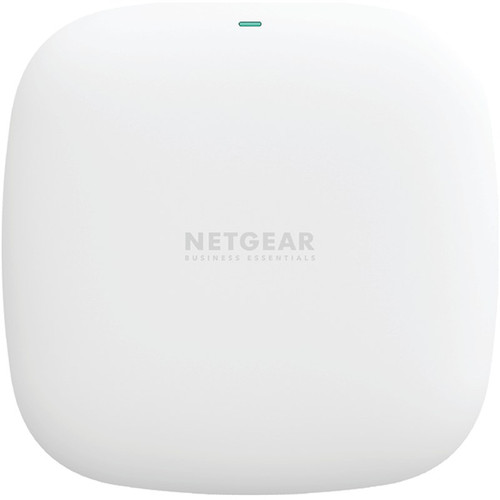
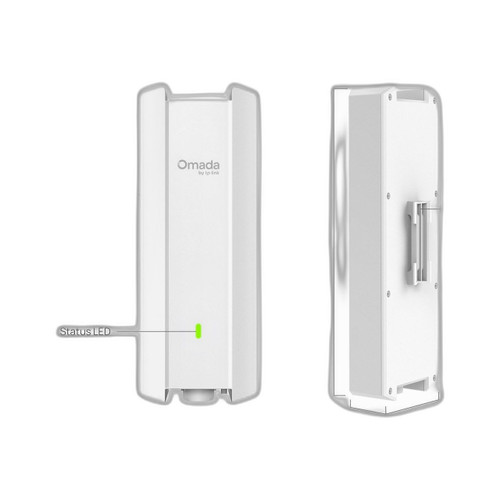
Both the NETGEAR WAX210-100NAS and the TP-Link EAP610 are dual-band Wi-Fi 6 (802.11ax) AX1800 access points targeting small-to-medium deployments with wall or ceiling mounting options and PoE-powered installation. This comparison examines the three dimensions that most directly affect purchasing decisions for ceiling/wall-mount Wi-Fi 6 APs: wireless performance and radio capabilities, power input and operating environment, and management platform and security standards.
In This Guide
- How do the WAX210-100NAS and EAP610 compare on wireless throughput and radio capabilities?
- How do the two APs differ in power input requirements and operating environment tolerance?
- How do the WAX210-100NAS and EAP610 compare on management platform and wireless security?
- Which should you choose: the WAX210-100NAS or the EAP610?
- Side-by-Side Specs
- FAQ
How do the WAX210-100NAS and EAP610 compare on wireless throughput and radio capabilities?
Both APs are rated AX1800, meaning an aggregate 1.8 Gbps across dual-band 2.4 GHz and 5 GHz radios under 802.11ax. Neither spec sheet discloses per-band MIMO stream counts or individual band throughput breakdowns, so granular radio comparison cannot be made from provided data.
The WAX210-100NAS explicitly lists a single 100/1000 Mbps (Gigabit) RJ-45 uplink port with Auto MDI-X. The EAP610 spec set is internally contradictory: one field lists '1x Gigabit Ethernet Port' while another states '1x 10Gbps Ethernet Port.' Because no 10 GbE claim appears in any other EAP610 field or the product title, the 10 Gbps figure should be treated as a data-entry error; the Gigabit uplink is the reliable value. Neither unit specifies a wired uplink that would not create a bottleneck relative to the 1.8 Gbps aggregate radio rating.
The EAP610 lists backward compatibility across 802.11a/b/g/n/ac/ax explicitly. The WAX210-100NAS spec does not enumerate legacy protocol support in the provided data, though AX1800 certification implies ax/ac/n backward compatibility by standard.
How do the two APs differ in power input requirements and operating environment tolerance?
The WAX210-100NAS is powered by 802.3af PoE (15.4 W maximum), or optionally by a 12 V/1.5 A (30 W) DC adapter included only with the WAX210PA bundle — not this SKU. The EAP610 accepts 802.3at PoE+ (up to 30 W) or a 12 V/4.5 A DC adapter. In mixed or legacy switch environments, the EAP610's 802.3at requirement means a PoE+ capable switch port is needed; the WAX210-100NAS will operate from a basic 802.3af port, a lower bar for infrastructure compatibility.
Operating temperature tolerance differs meaningfully: the WAX210-100NAS is rated 0° to 40°C (32°–104°F), limiting it to climate-controlled indoor environments. The EAP610 is rated 0°C to 60°C (32°–140°F), a 20°C wider upper bound that accommodates warmer spaces such as manufacturing floors, server rooms without precision cooling, or semi-conditioned spaces. Storage temperature for the WAX210-100NAS is specified at -40° to 70°C; no storage temperature is provided for the EAP610 in the supplied data.
Physical footprint: the WAX210-100NAS measures 4.5" × 4.5" × 1.2" (approximately 114 × 114 × 30 mm) and weighs 0.48 lb (0.219 kg). The EAP610 measures 160 × 160 × 33.6 mm (approximately 6.3" × 6.3" × 1.3") and weight is not specified in the provided data. Both support wall and ceiling mounting; the EAP610 additionally specifies junction box mounting with kits included.
How do the WAX210-100NAS and EAP610 compare on management platform and wireless security?
The WAX210-100NAS is managed via a local Web GUI portal. No cloud management platform, mobile app, or multi-AP controller is mentioned in the provided specifications. This is suitable for single-AP or very small deployments where centralized controller infrastructure is not required or desired.
The EAP610 is integrated into TP-Link's Omada SDN platform, which enables centralized management of multiple APs, switches, and gateways through a hardware controller, software controller, or cloud-based Omada Cloud. For multi-site or multi-AP deployments, Omada provides policy-based configuration, roaming management, and traffic analytics. The WAX210-100NAS offers no equivalent multi-device controller path based on the provided data.
On wireless security, the EAP610 explicitly supports WPA3-Personal, WPA3-Enterprise, WPA3 Enhanced Open (OWE), WPA2-Personal, WPA2-Enterprise, WPA-Personal, WPA-Enterprise, and WEP. The WAX210-100NAS specification does not enumerate supported security protocols in the provided data — no WPA3 claim or omission can be confirmed from the supplied specs alone.
Which should you choose: the WAX210-100NAS or the EAP610?
Our take: The EAP610 is the stronger choice when scalability, warmer operating environments, and explicit WPA3 security matter. The EAP610's Omada SDN integration enables centralized multi-AP management that the WAX210-100NAS's local Web GUI does not match, which is a decisive difference for deployments of two or more APs. The EAP610's 0–60°C operating range exceeds the WAX210-100NAS's 0–40°C ceiling by 20°C, directly relevant in non-climate-controlled spaces. The EAP610 also enumerates full WPA3 support including Enterprise and OWE modes; the WAX210-100NAS provides no comparable security protocol list in the provided specifications. Conversely, the WAX210-100NAS's 802.3af PoE input draws from a lower-power standard, making it compatible with older PoE switches where the EAP610 requires 802.3at PoE+. For a single-AP, climate-controlled office already running 802.3af infrastructure, the WAX210-100NAS is a viable, infrastructure-friendly option. For any multi-AP rollout, warmer site, or WPA3-required environment, the EAP610 is the more capable platform.
Side-by-Side Comparison
Spec-for-spec, from manufacturer data.
| Specification | NETGEAR WAX210-100NAS | TP-Link EAP610 |
|---|---|---|
| Wi-Fi Standard | Wi-Fi 6 (802.11ax) AX1800 | Wi-Fi 6 (802.11ax) AX1800 |
| Frequency Bands | Dual-band 2.4 GHz + 5 GHz | Dual-band 2.4 GHz + 5 GHz |
| Aggregate Throughput | 1.8 Gbps | AX1800 (1.8 Gbps rated) |
| Uplink Port | 1× 100/1000 Mbps RJ-45 (Auto MDI-X) | 1× Gigabit Ethernet (see note on contradictory 10G field) |
| PoE Input Standard | 802.3af (15.4 W) | 802.3at PoE+ (up to 30 W) |
| DC Adapter Option | 12 V/1.5 A, 30 W (WAX210PA bundle only) | 12 V/4.5 A DC |
| Operating Temperature | 0° to 40°C (32°–104°F) | 0° to 60°C (32°–140°F) |
| Storage Temperature | -40° to 70°C | — |
| Mount Types | Wall; Ceiling | Ceiling; Wall; Junction Box (kits included) |
| Dimensions | 4.5" × 4.5" × 1.2" (≈114 × 114 × 30 mm) | 160 × 160 × 33.6 mm (≈6.3" × 6.3" × 1.3") |
| Weight | 0.48 lb (0.219 kg) | — |
| Management Platform | Web GUI (local portal) | Omada SDN (controller / cloud) |
| WPA3 Support | — | WPA3-Personal, WPA3-Enterprise, OWE |
| Legacy Protocol Support | — | 802.11a/b/g/n/ac/ax |
| Encryption Listed | — | WEP, WPA2-PSK, WPA/WPA2/WPA3 Personal & Enterprise, OWE |
| Target Deployment Scale | Small-to-medium (single AP, local mgmt) | Scalable via Omada SDN multi-AP |
Frequently Asked Questions
Which should you choose: the WAX210-100NAS or the EAP610?
The EAP610 is the stronger choice when scalability, warmer operating environments, and explicit WPA3 security matter. The EAP610's Omada SDN integration enables centralized multi-AP management that the WAX210-100NAS's local Web GUI does not match, which is a decisive difference for deployments of two or more APs. The EAP610's 0–60°C operating range exceeds the WAX210-100NAS's 0–40°C ceiling by 20°C, directly relevant in non-climate-controlled spaces. The EAP610 also enumerates full WPA3 support including Enterprise and OWE modes; the WAX210-100NAS provides no comparable security protocol list in the provided specifications. Conversely, the WAX210-100NAS's 802.3af PoE input draws from a lower-power standard, making it compatible with older PoE switches where the EAP610 requires 802.3at PoE+. For a single-AP, climate-controlled office already running 802.3af infrastructure, the WAX210-100NAS is a viable, infrastructure-friendly option. For any multi-AP rollout, warmer site, or WPA3-required environment, the EAP610 is the more capable platform.
Can I power either of these APs from an older 802.3af PoE switch I already own?
The WAX210-100NAS is designed for 802.3af PoE (15.4 W) and will operate from a standard 802.3af port. The EAP610 requires 802.3at PoE+ (up to 30 W); an 802.3af-only switch may not deliver sufficient power. If your existing switch is 802.3af-only, the WAX210-100NAS is the compatible choice without infrastructure upgrades.
Is the WAX210-100NAS or EAP610 better suited for managing multiple access points across a building?
The EAP610 is the better choice for multi-AP deployments. It integrates with TP-Link's Omada SDN platform, which supports centralized configuration, roaming policies, and monitoring across multiple APs, switches, and gateways via hardware or software controller. The WAX210-100NAS is managed only through a local Web GUI; no multi-AP controller capability is listed in the provided specifications.
Which AP supports higher operating temperatures for a warehouse or non-climate-controlled space?
The EAP610 is rated for operation up to 60°C (140°F), versus the WAX210-100NAS's maximum of 40°C (104°F). For installations in warehouses, utility rooms, or other spaces where ambient temperatures may exceed typical office conditions, the EAP610's 20°C wider upper bound provides a meaningful margin. The WAX210-100NAS should be limited to climate-controlled environments based on its stated specification.
More Wireless Access Point Comparisons
Get a Second Opinion on Your Camera Choice
Share your site layout, coverage goals, and budget. Our team will validate the camera selection, flag anything we would change, and recommend products that match the use case.