
NETGEAR WAX610-100NAS vs TP-Link EAP610: Specification Comparison
Both the NETGEAR WAX610-100NAS and the TP-Link EAP610 are Wi-Fi 6 (802.11ax) dual-band ceiling/wall-mount access points targeting small-to-medium business deployments. A buyer evaluating either unit is typically weighing throughput class, PoE power input requirements, and how the AP fits into a broader network management strategy — whether standalone or controller-managed. This comparison examines radio performance and throughput, power and physical deployment, and management architecture across both units.
In This Guide
- Which AP delivers higher wireless throughput and what Wi-Fi 6 capabilities does each offer?
- How do the two APs differ in PoE power input, physical form, and operating environment?
- What management architecture and wireless security does each AP support?
- Which should you choose: the WAX610-100NAS or the EAP610?
- Side-by-Side Specs
- FAQ
Which AP delivers higher wireless throughput and what Wi-Fi 6 capabilities does each offer?
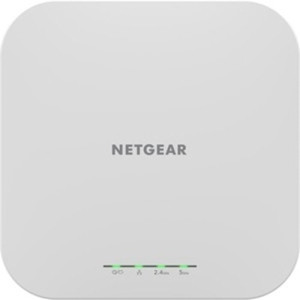
The NETGEAR WAX610-100NAS is spec'd with a WiFi 6 (802.11ax) radio and the marketing bullet cites up to 1.2 Gbps on 5 GHz for dense client environments. Its antenna gain is listed at 4.1 dBi / 4.6 dBi across bands. The spec block contains conflicting entries — one field reads 'WiFi 7' and another reads 'WiFi 6 (802.11ax)'; this comparison uses the 802.11ax (Wi-Fi 6) designation that appears in the product title and the Card_Bullet, as the WiFi 7 entry appears to be a data-entry error. The uplink port speed field also shows conflicting values (10G vs 100G vs Gigabit); the authoritative figure cannot be confirmed from the spec data alone.
The TP-Link EAP610 is rated AX1800, a combined dual-band figure (typically ~574 Mbps on 2.4 GHz + ~1201 Mbps on 5 GHz). It supports the full 802.11a/b/g/n/ac/ax protocol stack. No per-band antenna gain figure is provided in the supplied specs. The EAP610's Ethernet uplink port is listed contradictorily as both '1x Gigabit Ethernet Port' and '1x 10Gbps Ethernet Port' in different spec fields; neither can be confirmed as authoritative from the data provided.
Both units are Wi-Fi 6 dual-band APs. The WAX610-100NAS spec cites a higher per-band figure (1.2 Gbps on 5 GHz) versus the EAP610's combined AX1800 rating, though the underlying radio hardware specs are inconsistent across both data sets and buyers should verify against each manufacturer's published datasheet before specifying.
How do the two APs differ in PoE power input, physical form, and operating environment?
Power input is a meaningful differentiator. The NETGEAR WAX610-100NAS specifies PoE++ (802.3bt) as its PoE input standard in one field, while another field lists 802.3af (standard PoE). These are contradictory: 802.3bt delivers up to 60–90 W whereas 802.3af is capped at 15.4 W. Buyers must confirm the actual power draw requirement from NETGEAR's datasheet before selecting a switch or injector, as the wrong assumption could result in a unit that powers on but runs at reduced capability or not at all.
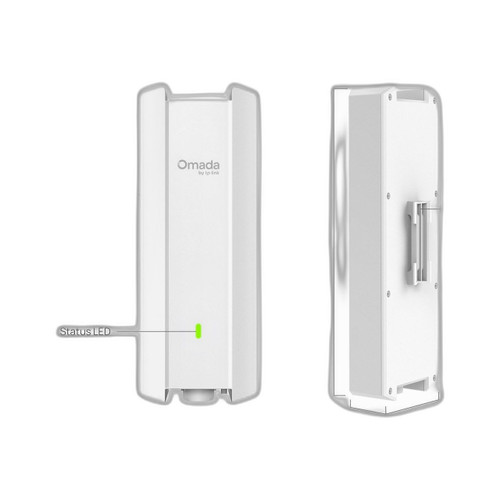
The TP-Link EAP610 specifies PoE+ (802.3at, up to 30 W) as its primary input, with an alternative of 12V/4.5A DC (54 W) via adapter. Its minimum PoE standard is noted as 802.3af. This gives installers flexibility: a standard 802.3at PoE+ switch port is sufficient, which is a widely available and cost-effective option.
Physically, the EAP610 publishes dimensions of 160 × 160 × 33.6 mm and includes ceiling-mount hardware; junction box mounting is also noted. The WAX610-100NAS lists Wall and Ceiling mount options but no physical dimensions are provided in the supplied specs. Both units use plastic enclosures. The EAP610 specifies an operating temperature range of 0 °C–60 °C; the WAX610-100NAS lists 'Industrial' as its operating temperature category without a numeric range in the supplied data.
What management architecture and wireless security does each AP support?
The NETGEAR WAX610-100NAS is described as 'Unmanaged' in one spec field yet the Card_Bullet and management field reference a standalone Web UI with per-SSID QoS and bandwidth management capability. The most operationally meaningful interpretation is that it operates in standalone mode without requiring an external controller — suitable for single-site or small multi-AP deployments managed individually. No cloud or SDN controller platform is referenced in the supplied specs.
The TP-Link EAP610 is explicitly managed via Omada SDN, TP-Link's centralized controller platform (hardware controller, software controller, or cloud-based). This makes it better suited to multi-site deployments where centralized policy, SSID management, and roaming coordination are required. Omada is a well-established SMB SDN ecosystem; buyers already invested in Omada infrastructure will find native integration.
On wireless security, the EAP610 explicitly lists WPA3 (Personal, Enterprise, and Enhanced Open / OWE) as well as WPA2-Personal/Enterprise and legacy WEP. The WAX610-100NAS spec does not enumerate supported security protocols in the supplied data — buyers should verify WPA3 support from the NETGEAR datasheet if that is a requirement. The EAP610 spec also notes a 'hide_reason: pricing_violation_2026-05-06' flag, which installers should note may affect current purchasing availability.
Which should you choose: the WAX610-100NAS or the EAP610?
Our take: The WAX610-100NAS is the stronger choice when deploying a standalone AP on a site where no SDN controller infrastructure exists and simpler per-device Web UI management is preferred. Its antenna gain spec (4.1/4.6 dBi) and cited 1.2 Gbps 5 GHz throughput suggest capable radio hardware, and a 5-year warranty versus the EAP610's unspecified warranty term is a concrete long-term support advantage. However, the WAX610-100NAS spec data contains significant internal contradictions (PoE standard, uplink speed, Wi-Fi generation) that must be resolved from the manufacturer datasheet before procurement. The EAP610 is the stronger choice for installers deploying into an existing Omada SDN environment: native controller integration, explicit WPA3/OWE security support, published physical dimensions, and a clearly defined PoE+ (802.3at) input requirement reduce deployment risk. Note that the EAP610 carries a pricing-violation flag that may affect availability.
Side-by-Side Comparison
Spec-for-spec, from manufacturer data.
| Specification | NETGEAR WAX610-100NAS | TP-Link EAP610 |
|---|---|---|
| Wi-Fi Standard | WiFi 6 (802.11ax) — conflicting 'WiFi 7' entry in specs | Wi-Fi 6 (802.11ax) |
| Throughput Rating | Up to 1.2 Gbps on 5 GHz (per spec bullet) | AX1800 combined dual-band |
| Frequency Bands | Dual-band (per product class; not explicitly stated in specs) | 2.4 GHz / 5 GHz dual-band |
| Protocol Support | Not enumerated in supplied specs | 802.11a/b/g/n/ac/ax |
| PoE Input Standard | Conflicting: PoE++ (802.3bt) and 802.3af both listed | PoE+ (802.3at); 802.3af minimum |
| Alternate Power | Not specified in supplied data | 12V / 4.5A DC adapter |
| Uplink Port Speed | Conflicting: 10G, 100G, and Gigabit all listed | Conflicting: Gigabit and 10Gbps both listed |
| Antenna Gain | 4.1 dBi / 4.6 dBi | Not specified in supplied specs |
| Wireless Security | Not enumerated in supplied specs | WPA3-Personal/Enterprise, WPA3 OWE, WPA2, WPA, WEP |
| Management Platform | Standalone Web UI; bandwidth management capable | Omada SDN (controller-based) |
| Mounting Options | Wall; Ceiling | Ceiling; Wall; Junction Box (kit included) |
| Enclosure Material | Plastic | Not specified in supplied specs |
| Dimensions | Not specified in supplied specs | 160 × 160 × 33.6 mm |
| Operating Temperature | Industrial (no numeric range in supplied specs) | 0 °C – 60 °C (32 °F – 140 °F) |
| Warranty | 5 years | Not specified in supplied specs |
| Availability Flag | None noted | pricing_violation_2026-05-06 (may affect purchasing) |
Frequently Asked Questions
Which should you choose: the WAX610-100NAS or the EAP610?
The WAX610-100NAS is the stronger choice when deploying a standalone AP on a site where no SDN controller infrastructure exists and simpler per-device Web UI management is preferred. Its antenna gain spec (4.1/4.6 dBi) and cited 1.2 Gbps 5 GHz throughput suggest capable radio hardware, and a 5-year warranty versus the EAP610's unspecified warranty term is a concrete long-term support advantage. However, the WAX610-100NAS spec data contains significant internal contradictions (PoE standard, uplink speed, Wi-Fi generation) that must be resolved from the manufacturer datasheet before procurement. The EAP610 is the stronger choice for installers deploying into an existing Omada SDN environment: native controller integration, explicit WPA3/OWE security support, published physical dimensions, and a clearly defined PoE+ (802.3at) input requirement reduce deployment risk. Note that the EAP610 carries a pricing-violation flag that may affect availability.
Do I need a special PoE switch to power the WAX610-100NAS or EAP610?
For the EAP610, a standard PoE+ (802.3at) switch port is sufficient per the supplied specs; 802.3af is listed as the minimum. For the WAX610-100NAS, the specs are contradictory — one field says PoE++ (802.3bt) and another says 802.3af. Verify the actual power draw from NETGEAR's published datasheet before selecting a switch or injector to avoid under-powering the unit.
Can I manage either AP without buying a separate controller?
The WAX610-100NAS is specified as standalone with a Web UI and per-SSID QoS — no external controller is required. The EAP610 is designed for Omada SDN management; while TP-Link's Omada software controller is free to download, a controller instance (hardware, VM, or cloud) is part of the intended deployment model. If you want zero-controller simplicity, the WAX610-100NAS aligns better with that requirement based on the supplied specs.
Which AP is better suited for a multi-site or larger deployment?
Based on the supplied specs, the EAP610's native Omada SDN integration makes it the more scalable choice for multi-site deployments where centralized SSID policy, roaming, and monitoring are needed. The WAX610-100NAS is specified for standalone operation; no multi-AP controller or cloud management platform is referenced in the supplied data, which limits its practical scale without additional tooling.
More Wireless Access Point Comparisons
Get a Second Opinion on Your Camera Choice
Share your site layout, coverage goals, and budget. Our team will validate the camera selection, flag anything we would change, and recommend products that match the use case.