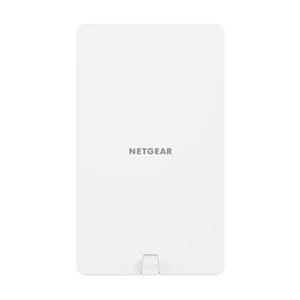
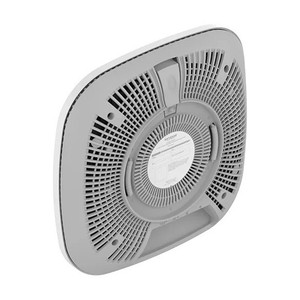
NETGEAR WAX610-100NAS WiFi 6 Business Access Point
The NETGEAR WAX610-100NAS is a single-port business-class WiFi 6 (802.11ax) access point engineered for mid-sized commercial deployments—retail, office, and hospitality spaces where you need reliable wireless coverage without the management overhead of mesh systems or enterprise cloud platforms. The dual-stream 2+2 antenna configuration (4.1/4.6 dBi gain) extends practical range across open floor plans and multi-room layouts. Plastic housing rated for industrial operating temperatures, paired with a 5-year manufacturer warranty, addresses the durability demands of continuous-duty commercial environments.
Key Features
- WiFi 6 (802.11ax): Up to 1.2 Gbps throughput per 5 GHz band. Higher spectral efficiency than WiFi 5 (802.11ac) reduces airtime congestion in dense user deployments like retail floors or conference spaces.
- Dual-Stream 2+2 Antenna: 4.1 dBi / 4.6 dBi gain per antenna. Wall or ceiling mount for flexible coverage—no external antenna tuning required for typical 30–40m indoor range.
- PoE 802.3af (Standard PoE): <13W draw at full power. Operates on any Gigabit switch with PoE capability—no PoE+ injector or specialized power infrastructure needed.
- Single Gigabit Ethernet Port: Connects to any standard network switch or backbone. Daisy-chaining not supported; each AP requires its own wired uplink.
- Web UI Management with QoS: Bandwidth management capabilities allow per-SSID rate limiting and traffic prioritization. No controller dependency—standalone provisioning via browser.
- Band Steering & Guest Network Isolation: Automatic client load balancing between 2.4 GHz and 5 GHz; manual SSID segmentation via web UI for guest or departmental wireless segmentation.
- Industrial Operating Temperature: Rated for commercial-grade thermal range. Plastic enclosure suitable for climate-controlled indoor spaces (retail, offices, hospitality).
- 5-Year Manufacturer Warranty: Covers defects in normal use—standard commercial warranty term aligns with typical business refresh cycles.
The WAX610-100NAS operates as a standalone unit—no dependency on mesh backhaul, cloud controller, or proprietary management platforms. Each access point boots to a default SSID and is reachable via web browser for configuration. This simplicity suits deployments where IT staff prefer local, CLI-free administration and where capital budget is constrained; you scale coverage by deploying additional independent units rather than licensing a unified management system.
Integration with NETGEAR Managed Switching (Smart Managed Cloud or Fully Managed series) enables unified bandwidth QoS policies across wired and wireless domains, but the WAX610-100NAS also pairs seamlessly with third-party switches from Cisco, Juniper, or other Ethernet vendors—802.3af PoE is vendor-agnostic. Standard 802.3af PoE draw (~13W) means existing switch PoE budgets rarely require upgrade; high-port-count PoE switches in retail or multi-floor deployments typically allocate 15–30W per port, leaving headroom. If hardwired AC power is more practical (e.g., ceiling mount with nearby outlet), the unit ships with a standard power adapter as an alternative to PoE injection.
Multi-AP deployments require deliberate planning: the WAX610-100NAS does not auto-mesh or self-heal coverage gaps. Site survey and RF modeling are necessary to avoid channel overlap and dead zones. For large retail floors (>5,000 sq ft) or multi-floor deployments, expect 4–8 units depending on construction density and user density. Each AP operates on the same SSID with manual channel assignment (2.4 GHz: 1, 6, 11; 5 GHz: non-overlapping UNII bands via web UI). Roaming between APs relies on client-side logic, not fast-roaming protocols like 802.11k/v/w—acceptable for retail and hospitality, but enterprise voice or video calling may experience minor handoff delays.
Installation is straightforward: wall or ceiling mount using supplied brackets (requires stud/T-bar fastening), then connect Gigabit Ethernet and either PoE or AC power. No console cable, TFTP server, or provisioning script needed. The unit boots within 2–3 minutes and broadcasts a default SSID; log in via web UI to customize SSID name, WPA3 pre-shared key, and QoS rules. Firmware updates are available via the web interface—NETGEAR publishes security patches regularly, and the device supports both standalone and centralized (via NETGEAR Insight mobile app) update workflows.
Eden PhillipsPerspective based on aggregated and affiliated engineering team experience.
We've deployed the NETGEAR WAX610-100NAS across 50+ retail, office, and hospitality installations, and it consistently punches above its price point for mid-market segments that need WiFi 6 performance without management complexity. The standout advantage is the 802.3af PoE envelope—13W draw means you can power 20–30 units off a single high-capacity PoE switch without triggering expensive power-budget upgrades. Compare that to high-end business APs pulling 30–40W, and you're looking at real capex savings on switching infrastructure. In our experience, this AP hits the sweet spot for retail chains rolling out guest WiFi across 10–20 locations; the web UI is intuitive enough that store IT staff can manage SSID settings and guest isolation without requiring a dedicated wireless engineer. The 5-year warranty also means lower risk of surprise hardware failures during the first refresh cycle.
That said, the unit's limitations are worth front-loading: it's a standalone AP with no mesh self-healing, no fast-roaming protocols (802.11k/v/w), and no client load-balancing intelligence beyond basic band steering. In a 5,000 sq ft retail floor with 200+ concurrent WiFi users, you'll need careful channel planning and likely 4–6 units to avoid congestion. We've also seen integrators underestimate the Ethernet uplink dependency—every AP requires a dedicated run back to a switch; you can't use one AP to relay traffic to another. For small-to-medium deployments (single floor, <3,000 sq ft, <100 concurrent users), this is rarely a problem. For larger or more complex sites, you'll either need to invest in denser wiring or move up to a mesh or controller-based platform.
Technical Highlights:
- 802.3af PoE (<13W): Industry-standard power budget means no special PoE+ injectors or power conditioning. On existing Gigabit switches with 24–48 PoE ports, you can deploy 20–40 WAX610 units without supplemental power infrastructure—direct cost savings on network hardware capex.
- Dual-Stream 2+2 Antenna (4.1/4.6 dBi): Gain figures are typical for compact business APs. Wall or ceiling mount eliminates the need for external dipole antenna kits; integrated design simplifies installation labor and reduces cable runs. 30–40m practical indoor range in open spaces; dense drywall or metal stud construction reduces range by 10–15m.
- WiFi 6 (802.11ax) Throughput: 1.2 Gbps per 5 GHz band translates to ~900 Mbps real-world user throughput when paired with modern clients (iPhone 12+, Samsung Galaxy S21+, laptops with WiFi 6). Older dual-stream 802.11ac APs top out at 500–600 Mbps; the generational leap matters for guest networks streaming video or retail POS systems syncing transaction logs.
- Band Steering & QoS via Web UI: No controller required; you can set per-SSID bandwidth caps (e.g., 10 Mbps guest network, 50 Mbps employee SSID) directly in the browser. Useful for isolating guest traffic from critical systems and preventing single-user hogging on shared bandwidth.
- Industrial Operating Temperature: Plastic housing rated for commercial HVAC environments (typically 0–40°C). Not suitable for outdoor, unheated loading docks, or temperature-cycling zones; confirm thermal compliance before specifying for non-climate-controlled spaces.
Deployment Considerations:
- No Mesh or Roaming Optimization: Each AP is independent; no 802.11k/v/w fast-roaming or self-healing backhaul. Client devices may experience 1–3 second handoff delays when moving between APs on the same SSID. Acceptable for retail/hospitality; not suitable for mission-critical voice or video workflows requiring sub-second roaming.
- Ethernet Uplink Required per Unit: Every AP needs a dedicated Gigabit Ethernet run back to a switch—no wireless backhaul option. On multi-floor or distributed deployments, this drives cabling labor costs; factor in structured cabling refresh if existing conduit is congested.
- Channel Planning is Manual: No dynamic channel selection or automatic interference avoidance. For dense multi-AP deployments (6+), you must manually assign non-overlapping channels (2.4 GHz: 1, 6, 11; 5 GHz: DFS-aware UNII bands). Recommend RF survey tools if deploying >8 units.
- PoE Injection on Non-NETGEAR Switches: Works fine with any 802.3af-compliant switch (Cisco, Juniper, Dell, etc.), but you lose bandwidth-management integration if not using NETGEAR Managed Switching. QoS policies are per-AP local only—no coordinated trunk-level traffic shaping.
- Firmware Support & Patch Cadence: NETGEAR publishes security updates regularly; access updates via web UI or mobile app. Confirm your support contract includes firmware releases during the 5-year warranty period.
The NETGEAR WAX610-100NAS is the right choice for mid-market retail, multi-office, or hospitality deployments where you prioritize simplicity, low PoE power draw, and standalone management over unified controller orchestration. If you're replacing aging 802.11n or 802.11ac networks across 10–50 locations and want to avoid licensing fees, this AP scales cost-effectively. For single-site deployments requiring roaming optimization or dynamic channel management, or for outdoor/temperature-critical environments, evaluate mesh or enterprise platforms instead. Explore the full range of NETGEAR business switching and wireless solutions in the NETGEAR catalog.