
NETGEAR WAX610-100NAS vs TP-Link EAP610-OUTDOOR: Specification Comparison
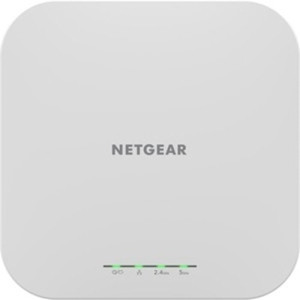
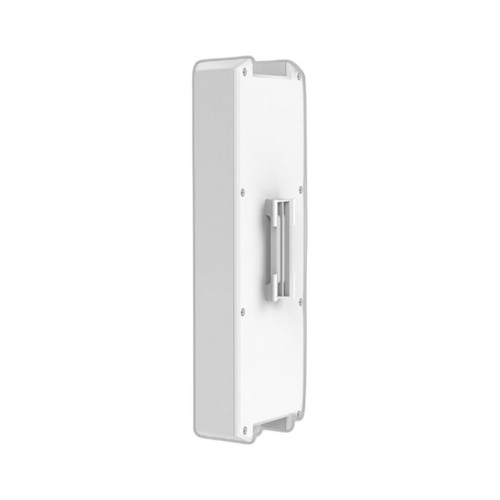
Both the NETGEAR WAX610-100NAS and the TP-Link EAP610-OUTDOOR are Wi-Fi 6 (802.11ax) dual-band access points targeting business and professional installations. The WAX610-100NAS is an indoor ceiling/wall-mount unit managed via standalone Web UI, while the EAP610-OUTDOOR is an IP67-rated unit designed for indoor and outdoor deployment under TP-Link's Omada SDN platform. Buyers choosing between them are weighing environmental ruggedization and cloud/controller management against standalone simplicity and indoor-optimized performance.
In This Guide
Which access point delivers more wireless throughput and RF coverage?
The NETGEAR WAX610-100NAS is specified as a Wi-Fi 6 (802.11ax) access point with antenna gains of 4.1 dBi on 2.4 GHz and 4.6 dBi on 5 GHz. Its card bullets cite up to 1.2 Gbps on 5 GHz, though a combined aggregate throughput figure is not provided in the supplied specs.
The TP-Link EAP610-OUTDOOR is also a Wi-Fi 6 (802.11ax) dual-band unit rated at AX1800, with a combined throughput of 1,775 Mbps — broken down as 574 Mbps on 2.4 GHz and 1,201 Mbps on 5 GHz. Antenna gain is listed only as 'Internal (4x antenna)' with no dBi value provided in the supplied specs.
On paper, the EAP610-OUTDOOR's 1,775 Mbps combined figure is a documented aggregate, whereas the WAX610-100NAS's 1.2 Gbps figure covers only the 5 GHz band. A direct like-for-like aggregate comparison cannot be made from the available specs, as the WAX610-100NAS combined total is not stated.
Which unit is better suited for harsh or outdoor deployment environments?
The TP-Link EAP610-OUTDOOR carries an IP67 ingress protection rating, meaning it is fully sealed against dust and capable of withstanding temporary water immersion. Its specified operating temperature range is 0–40°C. The unit is explicitly designed for outdoor perimeter installations. Housing material is not specified in the provided specs.
The NETGEAR WAX610-100NAS uses a plastic housing and is rated for 'Industrial' operating temperature per the supplied spec field, though no numeric temperature range (e.g., -20°C to 70°C) is provided in the available data. No IP ingress protection rating is listed for the WAX610-100NAS in the supplied specs.
For PoE input, the WAX610-100NAS is specified as 802.3af (standard PoE, up to 15.4 W). The EAP610-OUTDOOR accepts 802.3at PoE at 15.4 W or 12V/4.5A DC as its power input, and lists a power consumption of 15.4 W. Neither unit requires a PoE++ (802.3bt) source based on their respective input specs, despite both listing '802.3bt' in some spec fields — buyers should verify against each manufacturer's official datasheet.
How do the management and network integration models compare?
The NETGEAR WAX610-100NAS operates in standalone mode managed entirely through a local Web UI. It supports per-SSID QoS and bandwidth management with no controller dependency. This simplifies initial rollout but limits centralized multi-AP management unless paired with NETGEAR Insight (not referenced in the provided specs).
The TP-Link EAP610-OUTDOOR is managed via TP-Link's Omada SDN platform, which supports cloud-based and on-premises controller management, enabling centralized provisioning, monitoring, and firmware updates across multiple APs. It also supports Access Point and Mesh operating modes per the supplied specs.
WPA3 encryption is explicitly listed for the EAP610-OUTDOOR. The WAX610-100NAS spec set does not mention WPA3 support in the provided data. Buyers deploying multiple APs or requiring centralized policy management will find the Omada SDN ecosystem more capable; those needing quick single-site standalone deployment will favor the WAX610's controller-free Web UI.
Which should you choose: the WAX610-100NAS or the EAP610-OUTDOOR?
Our take: The EAP610-OUTDOOR is the stronger choice when the installation site includes outdoor coverage zones, mixed indoor/outdoor runs, or any environment exposed to weather and dust — its IP67 rating, DC power backup input, and Omada SDN controller support are purpose-built for those conditions. Concretely: the EAP610-OUTDOOR provides a documented combined throughput of 1,775 Mbps versus the WAX610-100NAS's stated 1.2 Gbps on 5 GHz only (aggregate not provided); it carries an IP67 environmental seal where the WAX610-100NAS lists no IP rating; and it supports WPA3 encryption where the WAX610-100NAS spec data does not confirm WPA3. The WAX610-100NAS is the more appropriate fit for straightforward indoor deployments where standalone Web UI management, plastic ceiling/wall mounting, and standard PoE switch compatibility are the priority and no ruggedization or SDN controller is required.
Side-by-Side Comparison
Spec-for-spec, from manufacturer data.
| Specification | NETGEAR WAX610-100NAS | TP-Link EAP610-OUTDOOR |
|---|---|---|
| Wi-Fi Standard | Wi-Fi 6 (802.11ax) | Wi-Fi 6 (802.11ax) |
| Max Combined Throughput | 1.2 Gbps (5 GHz only cited) | 1,775 Mbps (574 + 1,201 Mbps) |
| Frequency Bands | — | 2.4 GHz / 5 GHz |
| Antenna Gain | 4.1 dBi (2.4 GHz) / 4.6 dBi (5 GHz) | Internal (4x antenna, dBi not specified) |
| IP Rating | — | IP67 |
| Operating Temperature | Industrial (numeric range not specified) | 0–40°C |
| Housing Material | Plastic | — |
| PoE Input Standard | 802.3af (standard PoE) | 802.3at (PoE+) or 12V/4.5A DC |
| Power Consumption | — | 15.4 W |
| WPA3 Support | — | Yes |
| Encryption | — | WPA3 |
| Management Platform | Standalone Web UI | Omada SDN (cloud / on-premises controller) |
| Operating Modes | — | Access Point; Mesh |
| Mounting Options | Wall; Ceiling | Wall; Ceiling; Rack |
| LAN Port | 1x Ethernet (rate not confirmed in specs) | 1x Ethernet (rate not confirmed in specs) |
| Warranty | 5 years | — |
Frequently Asked Questions
Which should you choose: the WAX610-100NAS or the EAP610-OUTDOOR?
The EAP610-OUTDOOR is the stronger choice when the installation site includes outdoor coverage zones, mixed indoor/outdoor runs, or any environment exposed to weather and dust — its IP67 rating, DC power backup input, and Omada SDN controller support are purpose-built for those conditions. Concretely: the EAP610-OUTDOOR provides a documented combined throughput of 1,775 Mbps versus the WAX610-100NAS's stated 1.2 Gbps on 5 GHz only (aggregate not provided); it carries an IP67 environmental seal where the WAX610-100NAS lists no IP rating; and it supports WPA3 encryption where the WAX610-100NAS spec data does not confirm WPA3. The WAX610-100NAS is the more appropriate fit for straightforward indoor deployments where standalone Web UI management, plastic ceiling/wall mounting, and standard PoE switch compatibility are the priority and no ruggedization or SDN controller is required.
Can the NETGEAR WAX610-100NAS be installed outdoors?
Based on the provided specs, the WAX610-100NAS carries no IP ingress protection rating and is described with plastic housing and indoor mounting options (wall and ceiling). No outdoor-rated enclosure or weatherproofing is specified. The TP-Link EAP610-OUTDOOR, by contrast, is IP67-rated and explicitly designed for outdoor perimeter installs.
Do both access points require a controller to function?
No. The NETGEAR WAX610-100NAS is a standalone unit managed entirely through a local Web UI with no controller required. The TP-Link EAP610-OUTDOOR is designed for TP-Link's Omada SDN platform, which supports both cloud and on-premises controller management, though many Omada APs can also operate in standalone mode — buyers should confirm standalone capability with TP-Link's official documentation.
Which unit is easier to power from an existing PoE switch?
The NETGEAR WAX610-100NAS is specified to accept 802.3af (standard PoE, 15.4 W), which is supported by the widest range of existing PoE switches. The TP-Link EAP610-OUTDOOR is specified to accept 802.3at PoE (15.4 W) or 12V/4.5A DC. An 802.3at (PoE+) capable switch or injector is required for the EAP610-OUTDOOR. Both units list 802.3bt in some spec fields, but their primary power input specs indicate lower PoE tiers — verify against each manufacturer's official datasheet before purchasing switch infrastructure.
More Wireless Access Point Comparisons
Get a Second Opinion on Your Camera Choice
Share your site layout, coverage goals, and budget. Our team will validate the camera selection, flag anything we would change, and recommend products that match the use case.