
CipherLab A1000ACBU0001 vs CipherLab A1000ACWU0001: Specification Comparison
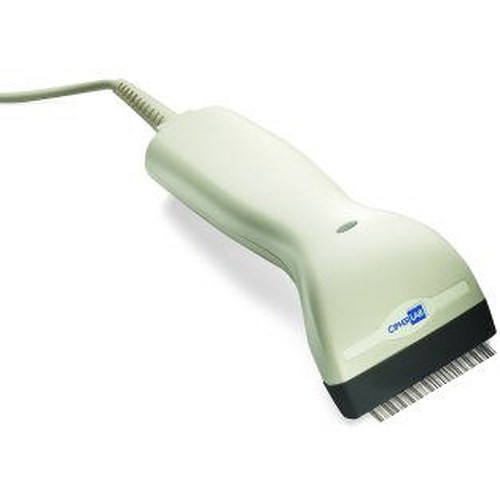
Both the CipherLab A1000ACBU0001 and A1000ACWU0001 are corded, handheld, USB-connected 1D barcode scanners built around the same Red LED (650 nm) linear scan engine. They share identical form factor, drop rating, print contrast tolerance, and warranty terms. This comparison is intended to help installers and IT buyers identify any meaningful specification differences between the two SKUs before committing to a purchase order, particularly where one model may carry a color or symbology advantage relevant to a specific deployment environment.

In This Guide
- Do the A1000ACBU0001 and A1000ACWU0001 differ in scan engine capability or supported symbologies?
- Are there any differences in physical durability, drop rating, or operating environment between the two models?
- Do the A1000ACBU0001 and A1000ACWU0001 differ in connectivity mode, color options, or intended deployment context?
- Which should you choose: the A1000ACBU0001 or the A1000ACWU0001?
- Side-by-Side Specs
- FAQ
Do the A1000ACBU0001 and A1000ACWU0001 differ in scan engine capability or supported symbologies?
Both units use an identical Red LED (650 nm) single-line fixed-pattern scan engine rated at 200 scans per second (primary rate) with secondary rates of 100 scans per second noted in multi-configuration listings. Neither model supports 2D or QR symbologies — both are strictly 1D linear scanners.
The A1000ACWU0001 specification lists its 1D symbology set with greater granularity, explicitly enumerating Italian Pharmacode and French Pharmacode as separate line items, whereas the A1000ACBU0001 groups them as 'Italian and French Pharmacodes.' Both models list Codabar, Code 39, Code 93, Code 128, GS1 DataBar (RSS), Industrial 2 of 5, Interleave 2 of 5, Matrix 2 of 5, MSI, Plessey, Telepen, UPC, EAN, and GS1-128. No functional symbology difference is confirmed by the provided specs — the difference appears to be a labeling convention, not a capability gap.
Minimum print contrast is 30% on both models. Neither spec sheet documents a minimum or maximum decode distance or depth-of-field range, so range performance cannot be compared from the provided data.
Are there any differences in physical durability, drop rating, or operating environment between the two models?
Both the A1000ACBU0001 and A1000ACWU0001 share a 1.0 m (3.3 ft) drop specification to concrete. The multi-configuration weight data listed for both is identical: 203 g / 7.2 oz. with cable, 148 g / 5.2 oz. (configuration 2), and 165 g / 5.8 oz. (configuration 3). Dimensions are also identical at 18.2" x 10.4" x 6.4" for both SKUs.
The environment field for both models notes '1.0 m / 3.3 ft. Drops' as the primary impact resistance rating, with a secondary reference to '2 m / 6.6 ft. Drops' appearing in the same field for both — this likely reflects multi-variant data carried in the same spec row and is not definitively attributable to a specific variant without additional documentation. Neither spec provides an IP ingress protection rating, operating temperature range, or humidity tolerance, so environmental hardening cannot be fully evaluated from the data provided.
Both units include an attached cable and are USB-powered with no battery requirement, eliminating battery maintenance as a deployment variable for either model.
Do the A1000ACBU0001 and A1000ACWU0001 differ in connectivity mode, color options, or intended deployment context?
Both scanners connect via USB. The A1000ACBU0001 spec explicitly identifies the interface as USB HID with keyboard emulation, meaning it presents to the host as a keyboard and requires no custom driver — this is confirmed in its datasheet annotation. The A1000ACWU0001 spec describes its connectivity as 'USB wired (standard USB port)' without explicitly stating keyboard emulation, though both are categorized identically as plug-and-play devices. Buyers requiring confirmed HID keyboard emulation should verify the A1000ACWU0001 interface mode against its datasheet at /content/product-datasheets/A1000ACWU0001.pdf.
Color options listed are identical for both models: Ivory or Black (primary), Ivory (secondary), and Light gray or Dark gray (tertiary) — consistent with multi-variant spec rows rather than a single-SKU color difference.
Neither spec provides information on host compatibility certifications (Windows, Linux, macOS), POS system qualification, or software bundling, so platform integration cannot be differentiated from the provided data.
Which should you choose: the A1000ACBU0001 or the A1000ACWU0001?
Our take: The A1000ACBU0001 is the stronger documented choice when confirmed USB HID keyboard emulation is a hard requirement, as its spec explicitly names that interface mode while the A1000ACWU0001 spec describes only 'USB wired' without the same confirmation. Beyond that single documented difference, the two SKUs are functionally identical across every provided spec: both use a Red LED (650 nm) engine at 200 scans per second, both carry a 1.0 m drop rating to concrete, both require 30% minimum print contrast, both list the same 1D symbology set (Codabar, Code 39/93/128, GS1-128, DataBar, UPC/EAN, MSI, Plessey, Telepen, and 2of5 variants), and both carry a 2-year warranty. For deployments where HID keyboard emulation is assumed but not confirmed on the WU0001 variant, installers should pull the A1000ACWU0001 datasheet before finalizing a substitution.
Side-by-Side Comparison
Spec-for-spec, from manufacturer data.
| Specification | CipherLab A1000ACBU0001 | CipherLab A1000ACWU0001 |
|---|---|---|
| Product Type | Barcode Scanner | Barcode Scanner |
| Form Factor | Handheld | Handheld |
| Scan Engine | Red LED (650 nm) | Red LED (650 nm) |
| Scan Pattern | Single-line fixed-pattern | Not specified in provided specs |
| Primary Scan Rate | 200 scans / second | 200 scans / second |
| Connectivity / Interface | USB HID (keyboard emulation) | USB wired (HID emulation not explicitly confirmed) |
| Power Source | USB-powered (no batteries) | USB-powered (no batteries) |
| Drop Rating | 1.0 m (3.3 ft) to concrete | 1.0 m (3.3 ft) to concrete |
| Min. Print Contrast | 30% | 30% |
| 1D Symbologies | Codabar, Code 39/93/128, GS1-128, DataBar, UPC/EAN, MSI, Plessey, Telepen, 2of5 variants, Pharmacodes | Codabar, Code 39/93/128, GS1-128, DataBar, UPC/EAN, MSI, Plessey, Telepen, 2of5 variants, Pharmacodes |
| 2D / QR Support | Not supported | Not supported |
| Weight (w/ cable) | 203 g / 7.2 oz. | 203 g / 7.2 oz. |
| Dimensions | 18.2" x 10.4" x 6.4" | 18.2" x 10.4" x 6.4" |
| Color Options | Ivory or Black; Light gray or Dark gray | Ivory or Black; Light gray or Dark gray |
| Warranty | 2-Year | 2-Year |
Frequently Asked Questions
Which should you choose: the A1000ACBU0001 or the A1000ACWU0001?
The A1000ACBU0001 is the stronger documented choice when confirmed USB HID keyboard emulation is a hard requirement, as its spec explicitly names that interface mode while the A1000ACWU0001 spec describes only 'USB wired' without the same confirmation. Beyond that single documented difference, the two SKUs are functionally identical across every provided spec: both use a Red LED (650 nm) engine at 200 scans per second, both carry a 1.0 m drop rating to concrete, both require 30% minimum print contrast, both list the same 1D symbology set (Codabar, Code 39/93/128, GS1-128, DataBar, UPC/EAN, MSI, Plessey, Telepen, and 2of5 variants), and both carry a 2-year warranty. For deployments where HID keyboard emulation is assumed but not confirmed on the WU0001 variant, installers should pull the A1000ACWU0001 datasheet before finalizing a substitution.
Is the A1000ACBU0001 or A1000ACWU0001 better for a warehouse with bright ambient lighting?
Both models use the same Red LED (650 nm) scan engine with a 30% minimum print contrast requirement, and the A1000ACBU0001 spec notes reduced ambient light sensitivity as a characteristic of its engine. The A1000ACWU0001 spec does not make this claim explicitly. Neither spec provides a lux tolerance figure, so a definitive lighting comparison cannot be made from the provided data alone.
Can I substitute the A1000ACWU0001 for the A1000ACBU0001 in a point-of-sale deployment that requires keyboard wedge / HID emulation?
The A1000ACBU0001 spec explicitly documents USB HID keyboard emulation. The A1000ACWU0001 spec describes USB wired connectivity but does not explicitly confirm HID keyboard emulation in the provided data. Before substituting, verify the interface mode in the A1000ACWU0001 datasheet at /content/product-datasheets/A1000ACWU0001.pdf.
Do the A1000ACBU0001 and A1000ACWU0001 support the same barcode types, including pharmacode for pharmaceutical environments?
Yes — based on the provided specs, both models list Italian Pharmacode and French Pharmacode among their supported 1D symbologies, along with Code 39, Code 93, Code 128, GS1-128, GS1 DataBar (RSS), Codabar, MSI, Plessey, Telepen, UPC, EAN, and all three 2of5 variants. No functional symbology difference is evident from the provided specification data.
More Barcode Scanner Comparisons
- Datalogic PM9100-910RB vs CipherLab A1000ACBU0001
- Datalogic PM9100-910RB vs CipherLab A1000ACWU0001
- Datalogic PM9100-910RB vs Zebra LI2208-SR7U2100AZW
- Datalogic PM9100-910RB vs CipherLab A8001RSC00025
- Datalogic PM9100-910RB vs Datalogic PM9100-D910RB
- Datalogic PM9100-910RB vs Datalogic QBT2500-BK
Barcode Scanner Buying Guides
Get a Second Opinion on Your Camera Choice
Share your site layout, coverage goals, and budget. Our team will validate the camera selection, flag anything we would change, and recommend products that match the use case.