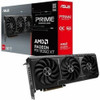
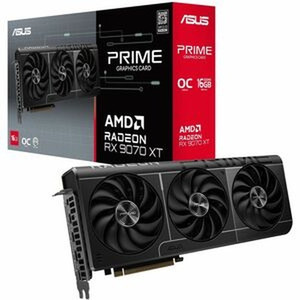
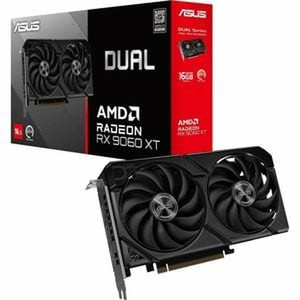
ASUS PRIME-RX9060XT-O16G Radeon RX 9060 XT 16GB GDDR6 OC Edition Graphics Card
The ASUS PRIME-RX9060XT-O16G puts AMD's Radeon RX 9060 XT GPU on a well-engineered PCIe 5.0 board with 16GB of GDDR6 frame buffer — a configuration that addresses a real gap in GPU-accelerated network video recorder workstations, AI-assisted analytics servers, and multi-display video wall controllers where a prior generation 8GB card runs out of headroom under simultaneous stream decoding loads. At 3.27 lb and 15.94 × 9.17 × 3.48 in, this is a full-size 2.5-slot card — plan your chassis clearance accordingly before ordering.
Key Features
- 16 GB GDDR6 Frame Buffer: 16GB on a 128-bit bus running up to 20 GB/s gives the decode pipeline enough headroom to buffer simultaneous high-bitrate streams without frame-drop artifacts. For VMS workstations decoding 32+ channels of H.265 at 4K, the extra memory directly reduces reliance on system RAM as a swap target.
- Radeon RX 9060 XT with 2048 Stream Processors: The 2048-core RDNA architecture handles parallel decode tasks that would serialize on a CPU-only workstation. GPU-accelerated decoding in supported VMS platforms (check your vendor's hardware acceleration compatibility list) offloads the host processor and keeps the UI responsive under load.
- 3310 MHz Boost Clock: The OC Edition boost clock of 3310 MHz means per-thread decode latency stays low — relevant when operators are scrubbing through forensic playback of multiple synchronized camera streams and need frame-accurate response.
- PCIe 5.0 Interface: PCIe 5.0 x16 doubles the available host bandwidth versus PCIe 4.0. In practice this matters most when the GPU is transferring large decoded frame buffers back to system memory for AI inference pipelines running on the host CPU. Backwards compatible with PCIe 4.0 and 3.0 slots at reduced bandwidth.
- Three Simultaneous Display Outputs (1× HDMI 2.1b + 2× DisplayPort 2.1a): Driving up to three monitors simultaneously at up to 7680 × 4320 (8K) native resolution means a single card can power a three-panel operator workstation or a tiled video wall without a second GPU. HDMI 2.1b and DisplayPort 2.1a both support high refresh rates at 4K — useful when operators need smooth pan/tilt feeds from PTZ cameras.
- 2.5-Slot Design with Axial-Tech Fans and Dual Ball Fan Bearings: The 2.5-slot footprint is a deliberate thermal compromise — wider than a standard dual-slot but narrower than most triple-slot flagship cards. Axial-tech fan blades and dual ball bearings (versus sleeve bearings) extend mean time between failures in 24/7 rack environments where the card runs continuously rather than in burst gaming workloads.
- Dual BIOS: A physical BIOS switch lets you toggle between performance and quiet profiles without software. In a security operations center where noise floor matters, flipping to the quiet BIOS profile reduces fan RPM at the cost of a modest thermal headroom reduction — a real option that doesn't require OS-level driver changes.
- ASUS GPU Guard: The PCIe slot reinforcement brace reduces mechanical stress on the motherboard connector from the card's 3.27 lb mass — relevant in rack-mounted workstations subject to vibration from nearby server fans or transport.
Integration & Compatibility
The PRIME-RX9060XT-O16G (often searched as PRIME RX9060XT O16G) installs into any PCIe 5.0, 4.0, or 3.0 x16 slot. Verify your workstation or server chassis provides at least 3.48 in of slot clearance in the horizontal axis and 9.17 in of depth from the I/O bracket. The card draws from the PCIe slot plus supplemental power connectors — confirm your PSU has adequate connectors and wattage headroom before deployment. AMD's RDNA architecture is supported by ROCm on Linux, which is the path for open-source GPU-accelerated inference workloads common in AI-analytics edge servers. For IP camera VMS platforms, check your VMS vendor's GPU acceleration support matrix — AMD decode acceleration is supported in Milestone XProtect, Genetec Security Center, and others, but the specific codec and channel-count limits vary by VMS version. This card does not support NVIDIA CUDA or parallel processing frameworks that require CUDA; workloads tied to CUDA-only SDKs require a different GPU family. Connect up to three displays via the rear I/O: one HDMI 2.1b and two DisplayPort 2.1a outputs, supporting a maximum of three active displays simultaneously. Maximum output resolution is 7680 × 4320 pixels. For operators building a video management workstation or expanding an existing analytics server, pairing this card with adequate NVMe storage and a PoE-capable network infrastructure keeps the full decode-and-display pipeline within a single chassis. See the ASUS hardware catalog for compatible ASUS workstation and motherboard options. For guidance on GPU selection in VMS environments, the VMS architecture guide covers GPU acceleration planning in detail.
Frequently Asked Questions
Q: Does the ASUS PRIME-RX9060XT-O16G support CUDA for AI analytics workloads?
A: No. The PRIME-RX9060XT-O16G is based on AMD's Radeon RX 9060 XT (RDNA architecture), which does not support NVIDIA CUDA. If your analytics software requires CUDA, you need an NVIDIA-based GPU. For AMD-compatible AI inference, ROCm on Linux is the supported path.
Q: How many monitors can the PRIME-RX9060XT-O16G drive simultaneously?
A: Up to three displays simultaneously — one via HDMI 2.1b and two via DisplayPort 2.1a. Maximum resolution per output is 7680 × 4320 (8K). This is sufficient to drive a three-panel operator workstation from a single card.
Q: Is the PRIME-RX9060XT-O16G compatible with PCIe 4.0 motherboards?
A: Yes. PCIe 5.0 is backwards compatible with PCIe 4.0 and PCIe 3.0 x16 slots, though at reduced bandwidth. The card will install and operate in older-generation slots; peak bandwidth is only achieved in a PCIe 5.0 x16 slot.
Q: What are the physical dimensions I need to plan for in my chassis?
A: The card measures 15.94 in (L) × 9.17 in (W) × 3.48 in (H) and weighs 3.27 lb. It occupies 2.5 expansion slots. Verify your chassis provides at least 2.5 slot clearances and sufficient depth and height clearance before installation.
Q: Does the PRIME-RX9060XT-O16G work with Milestone XProtect or Genetec Security Center for GPU-accelerated decoding?
A: AMD Radeon GPU acceleration is supported in several major VMS platforms including Milestone XProtect and Genetec Security Center, but supported codec types and maximum channel counts vary by VMS version and license tier. Verify your specific VMS version's hardware acceleration compatibility matrix before deploying.
Q: What is the memory configuration on the PRIME-RX9060XT-O16G?
A: 16 GB of GDDR6 memory on a 128-bit bus with a maximum bandwidth of 20 GB/s. This is the full 16GB variant — not the 8GB SKU — which provides more headroom for simultaneous high-resolution stream decoding and AI inference workloads.
When I spec a GPU for a VMS decode workstation, the first number I look at is frame buffer size — and the PRIME-RX9060XT-O16G's 16 GB of GDDR6 is the reason I'd pick this over the 8GB variants when the deployment involves 32+ simultaneous 4K streams or an AI inference pipeline running alongside the VMS client. At a 3310 MHz boost clock with 2048 stream processors on RDNA, there's real parallel throughput here, not just a large memory sticker.
Technical Highlights:
- 16 GB GDDR6 / 128-bit / 20 GB/s: Enough buffer depth to hold decoded frame queues for high-channel-count VMS workloads without thrashing system RAM. The 20 GB/s bandwidth is the practical ceiling for simultaneous read/write during multi-stream decode — plan channel counts accordingly.
- PCIe 5.0 Host Interface: Doubles host-to-GPU transfer bandwidth versus PCIe 4.0. Relevant when the host CPU is running an inference model that needs to pull decoded frames from GPU memory rapidly — latency-sensitive in real-time analytics pipelines.
- Three Outputs at up to 8K (HDMI 2.1b + 2× DP 2.1a): A three-panel 4K operator console from a single card slot is a clean deployment — no secondary GPU, no sync headaches. HDMI 2.1b handles the center AV-over-HDMI run to a monitor or video wall controller while the two DP outputs handle the flanking operator screens.
Deployment Considerations:
- At 15.94 in long, 9.17 in wide, and 2.5 slots thick, this card will not fit in compact 1U or short-depth chassis — verify physical clearance before ordering. The 3.27 lb mass means GPU Guard's PCIe slot reinforcement is doing real work in any rack subject to vibration.
- No CUDA support is the hard constraint: if your AI video analytics SDK, forensic tool, or GPU transcoder is CUDA-only (common in NVIDIA-centric VMS acceleration modules), this card is the wrong choice regardless of raw compute specs. Confirm your software stack's GPU framework requirement before committing.
This card is the right call for a dedicated VMS decode-and-display workstation or a three-monitor security operations console where AMD ROCm compatibility is confirmed and the 16 GB frame buffer is needed to sustain 24/7 multi-stream load — not a general-purpose procurement for every operator station in the building.