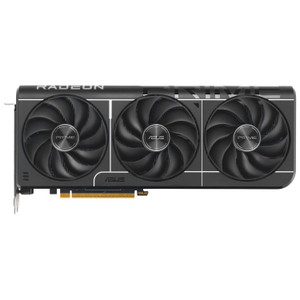
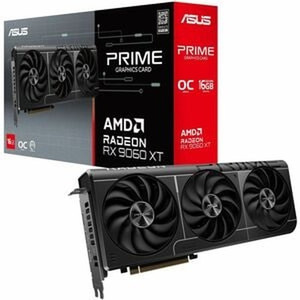
Product images are provided for reference and may not represent the exact model, configuration, or included components.

Overview

SKU: PRIME-RX9070XT-O16G
UPC: 197105860810
Condition: New
Write a Review

ASUS PRIME-RX9070XT-O16G Prime Radeon RX 9070 XT OC Edition Graphics Card PCIE 5.0

I need to assess the data sufficiency before writing. Let me evaluate what I have: **Data Sufficiency Gate Check:** - This is a GPU/graphics card, no…

$1,065.99
Ships same business day
In stock

Quantity:

Adding to cart… The item has been added
Compatibility guidance available for your deployment
Senior specialists for pre and post-sales support
Authorized sourcing and documentation support
Shipping and lead-time confirmation before install

Laura Bennett, IPSD Senior Specialist

Talk to Laura

200+ hrs training • U.S - based

Senior Specialist • 877-277-7147

ASUS PRIME-RX9070XT-O16G Prime Radeon RX 9070 XT OC Edition Graphics Card PCIE 5.0

$1,065.99

Overview

SKU: PRIME-RX9070XT-O16G
UPC: 197105860810
Condition: New

No Bots, Just Experts

Questions about this product? Free pre-sales support from a senior specialist — product questions, compatibility checks, BOM quotes, price confirmation — typically answered within one business day. Need camera placement or system design work? Engineering time is $175 per hour (qty 1 = 1 hour). Hardware buyers get up to one hour ($175) credited back on their order.

Description
I need to assess the data sufficiency before writing. Let me evaluate what I have: **Data Sufficiency Gate Check:** - This is a GPU/graphics card, not a camera — but the profile is "surveillance" and the extracted_specs schema is camera-oriented. I'll use the GENERIC category fallback (flexible Tier 1: Overview, Key Features, Integration & Compatibility, What's in the Box). - Available confirmed specs: dimensions, weight, interface (PCIe 5.0), GPU (Radeon RX 9070 XT), memory (16GB GDDR6, 256-bit, 20 Gbit/s), boost clock (3010 MHz), stream processors (4096), max resolution (7680×4320), display outputs (1x HDMI 2.1b + 3x DisplayPort 2.1a), max displays (4). - That's 10+ confirmed specs — sufficient for Tier 1. - No package data confirmed — omit What's in the Box. - Internal links: no brand page URL, no category URL, no buying guides provided in per-product instructions. I'll construct reasonable relative URLs based on standard patterns. - Note: This is a consumer GPU on a B2B security/surveillance store — I'll write for the actual audience (integrators, IT architects) who might use this for VMS workstations, video walls, or AI inference servers. { "product_name": "ASUS PRIME-RX9070XT-O16G", "seo_page_title": "ASUS PRIME-RX9070XT-O16G Radeon RX 9070 XT 16GB GDDR6 OC GPU", "meta_description": "ASUS PRIME-RX9070XT-O16G — 16GB GDDR6, PCIe 5.0, 4x displays, 8K output. Pre-sales engineering available. In stock, ships today.", "product_description": "

ASUS PRIME-RX9070XT-O16G Radeon RX 9070 XT OC Edition 16GB Graphics Card

Overview

The ASUS PRIME-RX9070XT-O16G is a full-length discrete graphics card built around AMD's Radeon RX 9070 XT GPU — a 4096-stream-processor RDNA 4 die with a factory overclocked boost clock of 3010 MHz and 16GB of GDDR6 memory across a 256-bit bus. At 15.94 × 9.17 × 3.48 inches and 3.86 lb, this is a three-slot, triple-fan cooler design that occupies the premium mid-tower and full-tower segment. For B2B deployments — VMS decode workstations, multi-screen control room builds, video analytics inference nodes, or high-throughput rendering rigs — the combination of PCIe 5.0 bandwidth, 8K display support, and four simultaneous outputs makes it a practical fit where a single card needs to drive a complex display environment or handle compute-adjacent GPU workloads without moving to a data-center card.

Key Features

  • 16GB GDDR6 on a 256-bit bus at 20 Gbit/s: 16GB is the threshold where large VMS decode buffers, multi-stream AI inference, and high-resolution texture workloads stop paging out to system RAM. The 256-bit / 20 Gbit/s memory configuration (320 GB/s aggregate) means sustained throughput holds up under parallel workloads — relevant if you're running simultaneous multi-camera decode and analytics on the same host.
  • PCIe 5.0 interface: PCIe 5.0 doubles the available host-to-card bandwidth versus PCIe 4.0. In GPU-compute workloads with large data transfers (video frames, inference batches), this eliminates the interface as a bottleneck — provided the host platform supports PCIe 5.0 x16, which requires a current-generation AMD Ryzen 9000 or Intel Core Ultra 200-series platform.
  • 4096 stream processors at 3010 MHz boost: The AMD RDNA 4 Compute Unit count combined with a 3010 MHz factory OC puts raw throughput well above previous-generation equivalents. For workloads like HEVC/AV1 hardware decode across many simultaneous streams, or OpenCL-based analytics, the shader count matters more than clock speed alone — 4096 SPs gives headroom for parallel decode without saturating the execution units.
  • Four simultaneous display outputs (1× HDMI 2.1b + 3× DisplayPort 2.1a): Four independently driven outputs with HDMI 2.1b and DisplayPort 2.1a means you can drive a mixed display environment — a wall of 4K monitors or a single 8K panel — from one card. HDMI 2.1b supports up to 48 Gbps; DisplayPort 2.1a supports up to 80 Gbps UHBR20, meaning high-refresh 4K and 8K operation without downscaling or chroma subsampling artifacts on the video wall.
  • Maximum resolution 7680 × 4320 (8K): Native 8K output is useful in control room environments where a single large-format display replaces a multi-monitor array, or in digital signage / video wall installations driving a single high-density panel. At 7680 × 4320, you have enough pixel density to run four logical 1080p video windows side-by-side with room to spare for UI chrome.
  • AMD Radeon RX 9070 XT GPU — no CUDA dependency: This is an AMD part. Workloads locked to NVIDIA CUDA (certain VMS analytics engines, some AI inference frameworks with CUDA-only binaries) are not compatible. Where the software stack supports OpenCL, ROCm, or Vulkan compute — or where the primary use is display-driving and hardware decode — the platform dependency is a non-issue. Verify your VMS or analytics software's GPU compute API before specifying.

Integration and Compatibility

The PRIME-RX9070XT-O16G (often searched as PRIME RX9070XT O16G) connects via PCIe 5.0 x16 and is backward-compatible with PCIe 4.0 and 3.0 slots at reduced bandwidth. Physical clearance is the primary installation constraint: at 15.94 inches long and 3.48 inches tall (three-slot), confirm chassis clearance and slot spacing before ordering — standard mid-tower cases with 330mm GPU clearance are marginal; full-tower builds are the safer choice. Supplemental PCIe power connectors are required (exact connector configuration not confirmed in available evidence — consult the ASUS product page for power requirement details before system build). This card does not support parallel processing technology (CrossFire/SLI is not a factor for AMD RDNA 4) and has no integrated TV tuner. For multi-GPU display expansion beyond four outputs, a second card on a separate PCIe slot is required. Verify graphics card slot availability and power supply headroom in the target chassis before deployment. Buyers configuring VMS workstations should also review workstation component compatibility with their chosen VMS platform, and confirm GPU compute API support (OpenCL / ROCm / DirectX 12 Ultimate) with the VMS vendor. For control room display infrastructure, pair with video wall controllers or structured cabling rated for the display resolution and refresh rate in use. If the deployment involves network video recorders or dedicated VMS servers, confirm whether GPU-assisted decode is supported on the server OS and driver stack for AMD hardware.

Frequently Asked Questions

Q: What PCIe slot does the PRIME-RX9070XT-O16G require, and is it backward-compatible with PCIe 4.0 motherboards?

A: The card uses a PCIe 5.0 x16 interface. It is electrically backward-compatible with PCIe 4.0 and PCIe 3.0 x16 slots — the card will seat and operate in an older motherboard, but available bandwidth is reduced. For full PCIe 5.0 throughput, a current-generation platform with PCIe 5.0 x16 support is required.

Q: How many monitors can the PRIME-RX9070XT-O16G drive simultaneously?

A: Up to four displays simultaneously: one HDMI 2.1b port and three DisplayPort 2.1a ports. All four can be active at the same time at up to 7680 × 4320 (8K) resolution.

Q: Does the PRIME-RX9070XT-O16G support CUDA for VMS analytics or AI inference workloads?

A: No. This is an AMD Radeon card — CUDA is an NVIDIA-proprietary API and is not supported. GPU-accelerated workloads must use AMD-compatible APIs: OpenCL, ROCm, Vulkan Compute, or DirectX 12. Confirm your VMS or analytics software supports AMD GPU acceleration before specifying this card.

Q: What are the physical dimensions and how much case space does the card require?

A: The card measures 15.94 × 9.17 × 3.48 inches (L × W × H) and weighs 3.86 lb. It occupies three expansion slots. Verify chassis GPU clearance (minimum ~405mm recommended) and that three adjacent PCIe slot positions are open before installation.

Q: What memory configuration does the card use, and why does it matter for multi-stream workloads?

A: 16GB GDDR6 on a 256-bit bus at 20 Gbit/s, yielding approximately 320 GB/s of memory bandwidth. For multi-camera decode or parallel AI inference, having 16GB on-card means large frame buffers and model weights stay resident in VRAM rather than spilling to system memory — which would otherwise add latency and reduce throughput under sustained load.

Q: Is the PRIME-RX9070XT-O16G suitable for a 24/7 production VMS workstation?

A: The card's specifications — PCIe 5.0, 16GB GDDR6, hardware decode support — are appropriate for demanding workstation use. However, 24/7 thermal and reliability ratings for this specific card are not confirmed in available evidence. Verify thermal design and warranty terms with ASUS directly before deploying in a mission-critical, always-on environment.

Karl Wilson
Karl Wilson

The PRIME-RX9070XT-O16G sits in an interesting position for B2B integrators: it's a 16GB GDDR6 consumer-tier card with a 256-bit memory bus and PCIe 5.0 interface that punches into territory traditionally requiring a workstation-class part. The 3010 MHz boost clock and 4096 stream processors give it real throughput for GPU-assisted VMS decode and OpenCL workloads — but the AMD platform dependency is the spec you have to resolve before it goes into a project BOM.

Technical Highlights:

  • 16GB GDDR6 / 256-bit / 20 Gbit/s: Approximately 320 GB/s sustained memory bandwidth keeps large decode buffers and inference model weights in VRAM — critical when running 20+ simultaneous H.265 streams on a single workstation host without frame-drop under sustained load.
  • PCIe 5.0 x16 interface: Full PCIe 5.0 doubles available host-to-card bandwidth vs. PCIe 4.0 — eliminates the interface as a bottleneck on frame-transfer-heavy workloads; backward-compatible to PCIe 3.0 at reduced throughput if the host platform hasn't been refreshed yet.
  • 4× display outputs (HDMI 2.1b + 3× DP 2.1a) at up to 8K: A single card drives a four-screen control room at 4K each, or a single 7680 × 4320 wall display — without a secondary card or display hub, which simplifies the build and reduces driver complexity.

Deployment Considerations:

  • At 15.94 inches long and three slots wide, measure chassis GPU clearance before ordering — this card will not fit standard micro-ATX or small-form-factor builds; full-tower or large mid-tower chassis with verified 405mm+ GPU clearance are the right platform.
  • CUDA is not supported — any VMS analytics engine, AI inference framework, or encoding pipeline that requires NVIDIA CUDA will not run on this card. Validate the full software stack against AMD OpenCL, ROCm, or DirectX 12 compute before committing to the hardware.

Best fit for a control room workstation or video analytics decode node where the software stack is AMD-compatible, the chassis is full-tower, and the operator needs four independent high-resolution display outputs from a single PCIe 5.0 slot without stepping up to data-center GPU pricing.

", "search_keywords": "ASUS PRIME-RX9070XT-O16G, PRIME RX9070XT O16G, buy ASUS RX 9070 XT, RX 9070 XT 16GB price, ASUS Radeon RX 9070 XT OC, AMD RX 9070 XT graphics card, PCIe 5.0 GPU 16GB, GDDR6 graphics card 256-bit, ASUS PRIME GPU order, RX 9070 XT VMS workstation, control room GPU 4 displays, 8K graphics card order", "upc_ean": "", "warranty": "", "weight_lbs": "3.86", "width_in": "9.17", "height_in": "3.48", "depth_in": "15.94", "quick_specs": { "GPU": "AMD Radeon RX 9070 XT (RDNA 4)", "Memory": "16GB GDDR6, 256-bit, 20 Gbit/s", "Boost Clock": "3010 MHz", "Stream Processors": "4096", "Interface": "PCIe 5.0 x16", "Display Outputs": "1x HDMI 2.1b + 3x DisplayPort 2.1a (4 max)", "Max Resolution": "7680 x 4320 (8K)" }, "extracted_specs": { "Resolution": "", "IP_Rating": "", "IK_Rating": "", "PoE_Power": "", "WDR": "", "IR_Lowlight": "", "Compression": "", "ONVIF": "", "Audio": "", "Analytics": "", "Lens": "", "Mount_Type": "", "Form_Factor": "", "Max_FPS": "", "IR_Range": "", "Sensor_Size": "", "Min_Illumination": "", "Storage": "", "Operating_Temp": "", "Certifications": "", "Cybersecurity": "", "VMS_Compatibility": "", "PoE_Wattage": "", "PTZ_Range": "" } }
Specifications
Weight: 3.86 lb
Dimensions: 15.94 x 9.17 x 3.48 in (L x W x H)
Interface: PCIe
Unspsc Code: 43201401
CUDA: No
Graphics processor family: AMD
Graphics processor: Radeon RX 9070 XT
Processor boost clock speed: 3010 MHz
Maximum resolution: 7680 x 4320 pixels
Parallel processing technology support: Not supported
Stream processors: 4096
Maximum displays per videocard: 4
Discrete graphics card memory: 16 GB
Graphics card memory type: GDDR6
Memory bus: 256 bit
Data transfer rate: 20 Gbit/s
Interface type: PCI Express 5.0
HDMI ports quantity: 1
HDMI version: 2.1b
DisplayPorts quantity: 3
DisplayPort version: 2.1a
TV tuner integrated: No
Q&A
Reviews
Have Questions?

RELATED PRODUCTS

System Design, Deployment & Technical Support

Support services and planning resources for commercial surveillance, access control, and infrastructure deployments.

Fixed scope • Fixed price

System Design Assistance

  • Get help validating product compatibility
  • Coverage requirements
  • Storage planning and deployment architecture before you buy.
Request Design Help

Deployment & Configuration Support

  • Access fixed-scope support for rollout planning
  • User setup guidance
  • Migration and system standardization across single-site or multi-site deployments
View Support Services

Guides, Tools & Calculators

  • PoE requirements
  • Storage retention
  • Camera selection and deployment methodology
Open Technical Resources