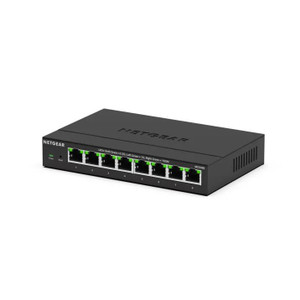
NETGEAR GS108MX-100NAS 8-Port Gigabit Switch with 10G/Multi-Gig Uplink
Overview
The NETGEAR GS108MX-100NAS is an unmanaged 8-port Gigabit switch with a dedicated 10G/Multi-Gig uplink port, built for edge compute clusters, AI inference pods, and enterprise camera or sensor networks where a single high-speed backhaul connection feeds multiple Gigabit clients. The model consolidates eight 1GbE downlink ports into a single 10G uplink — ideal when you need to aggregate traffic from multiple 1GbE devices without oversubscription penalties across a backbone link. Deploy this at the edge where local devices (cameras, NVRs, access control readers, compute modules) connect at Gigabit speed but must feed data upstream over a 10G trunk without bottlenecking.
Compatibility
The GS108MX-100NAS works with any device or system capable of 1GbE RJ-45 connection: IP cameras (Axis, Hikvision, Bosch, Hanwha, etc.), network video recorders, AI edge servers, warehouse automation sensors, and enterprise LANs. The 10G uplink port supports standard 10GBASE-T and Multi-Gig (2.5G, 5G capable) transceivers — pair it with 10G-capable network infrastructure (10GbE switches, routers, NAS arrays) or step down to 2.5G/5G uplinks if your backbone is Multi-Gig only. No special drivers or configuration required; plug and play unmanaged operation.
Installation Notes
Mount the compact chassis in a 19-inch rack, wall bracket, or shelf alongside your edge compute hardware. Standard RJ-45 cabling for all ports — use Cat6A or higher for the 10G uplink to avoid signal degradation over long distances (recommend ≤100 meters for full 10G performance). The unit requires 120V/240V AC input; no PoE support on this model, so powered devices on the downstream ports need independent power supplies. Unmanaged operation means no VLAN tagging, no QoS, no link aggregation — if you need those, step up to a managed switch.
What's in the Box
- 1x NETGEAR GS108MX-100NAS switch chassis
- 1x AC power cord (region-specific)
- 1x mounting bracket (for 19-inch or wall installation)
- 1x quick-start guide