Product images are provided for reference and may not represent the exact model, configuration, or included components.

Overview

SKU: VK224
UPC: 672792006739
Condition: New
Write a Review 39% OFF

ATEN 4-PORT Serial Expansion BOX FOR VK2100 - VK224

ATEN VK224 4-Port Serial Expansion Box for VK2100OverviewThe ATEN VK224 is a 4-port serial expansion box designed to extend the RS-232 and RS-485 cont…

$611.00 $373.99 SAVE $237
Ships same business day
In stock

Quantity:

Adding to cart… The item has been added
Compatibility guidance available for your deployment
Senior specialists for pre and post-sales support
Authorized sourcing and documentation support
Shipping and lead-time confirmation before install

Laura Bennett, IPSD Senior Specialist

Talk to Laura

200+ hrs training • U.S - based

Senior Specialist • 877-277-7147

ATEN 4-PORT Serial Expansion BOX FOR VK2100 - VK224

$611.00
$373.99

Overview

SKU: VK224
UPC: 672792006739
Condition: New

No Bots, Just Experts

Questions about this product? Free pre-sales support from a senior specialist — product questions, compatibility checks, BOM quotes, price confirmation — typically answered within one business day. Need camera placement or system design work? Engineering time is $175 per hour (qty 1 = 1 hour). Hardware buyers get up to one hour ($175) credited back on their order.

Description

ATEN VK224 4-Port Serial Expansion Box for VK2100

Overview

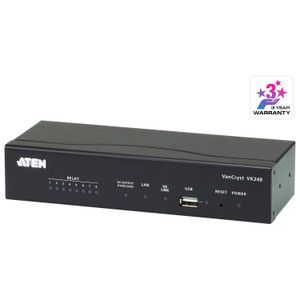
The ATEN VK224 is a 4-port serial expansion box designed to extend the RS-232 and RS-485 control port capacity of the VK2100 ATEN control system. If your AV or building-automation project requires more serial device connections than the VK2100 controller provides natively, the VK224 adds that capacity without replacing the host unit. An onboard 8-segment DIP switch sets the Expander ID, allowing multiple expansion boxes to coexist on the same controller without address conflicts. A semi-recessed reset pushbutton and a USB Type-A service port round out the front panel. Firmware is field-upgradeable — current release v4.2.413 (2026-05-18).

Compatibility

The VK224 is built specifically for the ATEN VK2100 control system platform. It is not a standalone device and cannot be used with third-party controllers or other ATEN product lines. RS-232 and RS-485 serial wiring follows a defined pinout: RS-232 uses Pin 2 (RX), Pin 3 (TX), Pin 5 (GND), Pin 7 (RTS), and Pin 8 (CTS); RS-485 uses Pin 3 (D+), Pin 4 (D−), Pin 5 (GND — strongly recommended for long runs — and Pin 4 TX−). Verify which serial mode each connected device requires before wiring; the two modes are not interchangeable at the connector level.

Installation Notes

The VK224 supports both recessed and rack-mount installation. ATEN notes that rack-mount products may express physical dimensions in L×W×H order rather than the conventional W×D×H — confirm orientation from the physical chassis before cutting a panel opening for recessed installs. For RS-485 long-distance runs, grounding Pin 5 on both ends is strongly recommended by the manufacturer to maintain signal integrity. Operating humidity limit is 0–80% RH, non-condensing; avoid installations in unventilated enclosures subject to condensation. Set the Expander ID switch before mounting — the semi-recessed reset button is accessible post-install but the DIP switch is easier to configure on the bench. Firmware upgrades are delivered via the USB Type-A port using the downloadable VK control software update package.

Specifications
Mount Type: Recessed; Rack
Pin2: RX: Pin3:D+
Pin3: TX: Pin 4:D-
Pin 5: GND: Pin 5: GND (Highly recommended for long-distance connectivity.)
Pin 7: RTS: Pin 4: TX-
Pin 8: CTS: Pin 5: GND
Expander Id: 1 x 8-segment Switch
Reset Button: 1 x Semi-recessed Pushbutton
Usb: 1 x USB Type A
Humidity: 0 - 80% RH, Non-Condensing
Firmware Upgrade: v4.2.413
s: Description
Q&A
Reviews
Have Questions?

RELATED PRODUCTS

System Design, Deployment & Technical Support

Support services and planning resources for commercial surveillance, access control, and infrastructure deployments.

Fixed scope • Fixed price

System Design Assistance

  • Get help validating product compatibility
  • Coverage requirements
  • Storage planning and deployment architecture before you buy.
Request Design Help

Deployment & Configuration Support

  • Access fixed-scope support for rollout planning
  • User setup guidance
  • Migration and system standardization across single-site or multi-site deployments
View Support Services

Guides, Tools & Calculators

  • PoE requirements
  • Storage retention
  • Camera selection and deployment methodology
Open Technical Resources