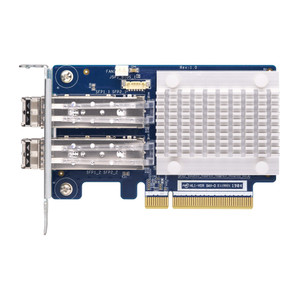
Product images are provided for reference and may not represent the exact model, configuration, or included components.

Overview

SKU: QXP-1630S-3816
UPC: 885022032082
Condition: New
Write a Review

QNAP 4-PORT Minisas HD Host BUS Adapter - QXP-1630S-3816

QNAP QXP-1630S-3816 Quad-Port SAS 12Gb/s PCIe 4.0 Host Bus AdapterOverviewThe QXP-1630S-3816 is a PCIe 4.0 x8 host bus adapter built to scale raw stor…

$704.99
Ships same business day
In stock

Quantity:

Adding to cart… The item has been added
Compatibility guidance available for your deployment
Senior specialists for pre and post-sales support
Authorized sourcing and documentation support
Shipping and lead-time confirmation before install

Laura Bennett, IPSD Senior Specialist

Talk to Laura

200+ hrs training • U.S - based

Senior Specialist • 877-277-7147

QNAP 4-PORT Minisas HD Host BUS Adapter - QXP-1630S-3816

$704.99

Overview

SKU: QXP-1630S-3816
UPC: 885022032082
Condition: New

No Bots, Just Experts

Questions about this product? Free pre-sales support from a senior specialist — product questions, compatibility checks, BOM quotes, price confirmation — typically answered within one business day. Need camera placement or system design work? Engineering time is $175 per hour (qty 1 = 1 hour). Hardware buyers get up to one hour ($175) credited back on their order.

Description

QNAP QXP-1630S-3816 Quad-Port SAS 12Gb/s PCIe 4.0 Host Bus Adapter

Overview

The QXP-1630S-3816 is a PCIe 4.0 x8 host bus adapter built to scale raw storage capacity on compatible QNAP NAS systems by connecting external TL-series SAS JBOD enclosures. Powered by the Broadcom Aero SAS3816 chipset, it delivers four external SAS 12Gb/s ports — enough aggregate bandwidth to prevent the expansion shelf from becoming a bottleneck in high-throughput recording or archive workflows. Maximum addressable capacity reaches 4.6PB, making the QXP-1630S-3816 a practical fit for multi-enclosure builds where a single NAS chassis has exhausted its native bay count. The PCIe Gen 4 interface and reduced form factor compared to its predecessor means it installs in a broader range of QNAP NAS PCIe slots without requiring the largest chassis in the lineup.

Compatibility

This card is designed for use with QNAP NAS storage systems that expose a PCIe 4.0 x8 (or compatible) slot for expansion cards. It connects to QNAP TL-series SAS JBOD enclosures — the intended downstream devices. Confirm your specific NAS model's PCIe slot availability and slot generation before ordering; PCIe 4.0 x8 physical fitment is required for full-bandwidth operation. The smaller form factor broadens slot compatibility versus the prior-generation QXP card, but verify your NAS model's expansion card compatibility list on QNAP's hardware compatibility pages. Not intended for use with non-QNAP hosts or third-party JBOD shelves without independent validation.

Installation Notes

Install into a free PCIe 4.0 x8 slot inside the NAS chassis with the unit powered off. SAS 12Gb/s cabling (SFF-8644 or SFF-8088 depending on enclosure port type) connects the card's external ports to the TL-series JBOD. Verify QTS or QuTS hero firmware supports the QXP-1630S-3816 before deployment — check QNAP's compatibility notes for your NAS model and OS version. Port configuration is flexible, so multi-enclosure daisy-chain or direct per-enclosure wiring is possible depending on JBOD model and cabling topology.

Specifications
Interface Type: PCIe 4.0 x8
Port Configuration: Quad-port external SAS 12Gb/s
Chipset: Broadcom Aero SAS3816
Max Storage Expansion: 4.6PB
Brand: QNAP
MPN: QXP-1630S-3816
Type: Power Supply
Q&A
Reviews
Have Questions?

RELATED PRODUCTS

System Design, Deployment & Technical Support

Support services and planning resources for commercial surveillance, access control, and infrastructure deployments.

Fixed scope • Fixed price

System Design Assistance

  • Get help validating product compatibility
  • Coverage requirements
  • Storage planning and deployment architecture before you buy.
Request Design Help

Deployment & Configuration Support

  • Access fixed-scope support for rollout planning
  • User setup guidance
  • Migration and system standardization across single-site or multi-site deployments
View Support Services

Guides, Tools & Calculators

  • PoE requirements
  • Storage retention
  • Camera selection and deployment methodology
Open Technical Resources