Product images are provided for reference and may not represent the exact model, configuration, or included components.

No Bots, Just Experts

Questions about this product? Free pre-sales support from a senior specialist — product questions, compatibility checks, BOM quotes, price confirmation — typically answered within one business day. Need camera placement or system design work? Engineering time is $175 per hour (qty 1 = 1 hour). Hardware buyers get up to one hour ($175) credited back on their order.

Description

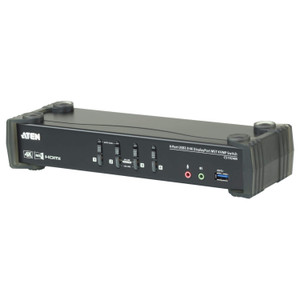
ATEN CS1953 3-Port USB-C and DisplayPort KVMP Switch

Overview

The ATEN CS1953 is a 3-port KVMP switch that lets you drive a single USB-C or DisplayPort monitor and shared USB peripherals from up to three computers — consolidating keyboard, mouse, display, and USB hub access at one workstation. Operators managing a mix of laptops (USB-C) and desktop workstations (DisplayPort) can share one monitor and one USB setup without replugging, which matters on dense security operations desks or control rooms where three active sources are common. The CS1953 supports video up to 4096 x 2160 @ 60Hz, keeping 4K content sharp, and holds 2560 x 1440 @ 144Hz for high-refresh workflows. Built-in USB 3.1 Gen 1 hub provides two Type-A ports (one front, one rear) for shared peripherals like CAC readers or storage devices — both rated at Gen 1 speeds so transfers won't bottleneck on a thumb drive or dongle.

Compatibility

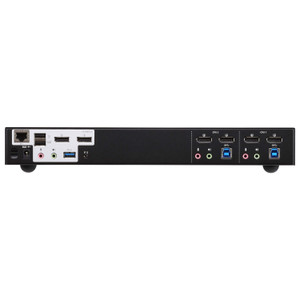
Connects up to three computers via KVM switch inputs combining USB-C and DisplayPort video paths — consult the ATEN CS1953 datasheet for per-port video connector types. Output drives a single DisplayPort or USB-C monitor supporting the 4K and QHD resolutions above. Port selection works four ways: front-panel pushbutton, hotkey sequence, mouse (scroll-wheel or click), or an optional ATEN remote port selector — useful when the switch is mounted out of reach in a rack. A slide switch on the unit controls USB device mode. Firmware is field-upgradeable (current release v1.1.102); update via the cs1953-v1.1.102.zip package. For broader ATEN KVM solutions, this model fits the CS-series desktop and compact-rack line. If your deployment requires more than three sources, evaluate higher-port-count models in the same ATEN CS family. For KVM over IP requirements or matrix switching, different ATEN product lines apply.

Installation Notes

Rack-mount form factor — physical dimensions follow ATEN's LxWxH format for rack products; verify rack unit height before ordering. Operating humidity limit is 0–80% RH non-condensing, so avoid installations in high-moisture environments like unventilated server closets with active condensation risk. Scan interval is configurable 1–99 seconds (default 5 sec) for auto-scan mode across the three connected sources.

Specifications
Resolution: 4096x2160
Mount Type: Rack
Computer Connections: 3
Port Selection: Hotkey, Pushbutton, Mouse, Remote Port Selector
Usb Hub: 2 x USB3.1 Gen1 Type A Female (Blue; 1 x front, 1 x rear)
Mode Switch: 1 x Slide Switch
Usb: 3 (Green)
Keyboard / Mouse: USB
Video: Up to 4096 x 2160 @ 60Hz, 2560 x 1440 @ 144Hz
Scan Interval: 1-99 Seconds (Default: 5 sec.)
Humidity: 0-80% RH, Non-condensing
Cs1953-User-Manual-W.Pdf (1.84 Mb: 2023-06-28
Firmware Upgrade: v1.1.102
Q&A
Reviews
Have Questions?

ATEN 3-PORT 4K Usb-c and Displayport Kvmp - CS1953

$576.00
$401.99

RELATED PRODUCTS

Save $169.01
ATEN 2-PORT USB 3.0 4K Dual Display Displayport Kvmp Switch
Add to Cart The item has been added

ATEN CS1942DP

ATEN 2-PORT USB 3.0 4K Dual Display Displayport Kvmp Switch - CS1942DP

2-port KVMP switch engineered for dual-monitor 4K DisplayPort workstation environments where a single operator needs clean, fast control of two

    In stock · Ships same business day Free shipping over $499
    $454.00 $284.99 Save $169.01
    The item has been added Add to quote
    $454.00 $284.99 Save $169.01
    Save $169.01 Add to cart Add to quote

    System Design, Deployment & Technical Support

    Support services and planning resources for commercial surveillance, access control, and infrastructure deployments.

    Fixed scope • Fixed price

    System Design Assistance

    • Get help validating product compatibility
    • Coverage requirements
    • Storage planning and deployment architecture before you buy.
    Request Design Help

    Deployment & Configuration Support

    • Access fixed-scope support for rollout planning
    • User setup guidance
    • Migration and system standardization across single-site or multi-site deployments
    View Support Services

    Guides, Tools & Calculators

    • PoE requirements
    • Storage retention
    • Camera selection and deployment methodology
    Open Technical Resources