ATEN CS82U 2-Port PS/2-USB KVM Switch
Overview
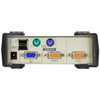
The ATEN CS82U is a 2-port KVM switch that bridges legacy PS/2 infrastructure and modern USB peripherals — letting a single keyboard, monitor, and mouse control two computers without rewiring your workspace. If you manage a mix of older servers with PS/2 ports alongside newer USB-based workstations, the ATEN KVM line addresses exactly that transition gap. The CS82U supports a maximum video resolution of 2048 x 1536 at 60 Hz with DDC2B display detection, which means your high-resolution monitor communicates its capabilities directly to each connected computer — no manual resolution mismatches when switching between hosts.
Port switching is available three ways: front-panel pushbuttons (two dedicated buttons, one per port), hotkey sequences from the keyboard, or a USB mouse-based trigger — whichever fits your workflow. The KVM switch category covers a range of port counts and interface types; the CS82U is specifically optimized for two-computer setups where you need both PS/2 and USB flexibility in a single compact unit.
Key Features
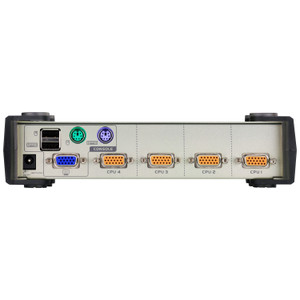
- Dual-Interface Keyboard and Mouse Support (PS/2 + USB): Connecting computers with different peripheral interfaces is handled natively — one PS/2 host and one USB host can share the same keyboard and mouse without adapters on the peripheral side. This matters when decommissioning legacy hardware on a phased timeline rather than all at once.
- 2048 x 1536 @ 60 Hz Maximum Resolution with DDC2B: Most KVM switches in this class cap at 1920 x 1200. The CS82U's 2048 x 1536 ceiling keeps high-res workstation monitors fully supported, and DDC2B auto-negotiation eliminates the common problem of a monitor defaulting to a lower resolution after a KVM switch.
- Three Port-Selection Methods: Pushbutton, hotkey, and USB mouse switching give you control options suited to different work patterns. Hotkey switching keeps your hands on the keyboard; mouse-based switching is useful when the KVM unit is mounted away from arm's reach — relevant in rack-mounted configurations.
- Configurable Auto-Scan with Four Intervals: The CS82U's auto-scan cycles through connected ports at 3, 5, 10, or 20-second intervals (default 5 seconds). For monitoring or light-touch supervision scenarios where you want both systems visible in rotation, this removes the need to manually switch back and forth.
- DC Jack Power Input: The unit draws power from a single DC jack — no USB bus-power dependency on the host. This keeps operation stable regardless of whether connected systems are in sleep or low-power states.
- Firmware Upgradeable: The CS82U shipped with firmware v1.2.111 (released 2025-04-24), available as a downloadable update. Field-upgradeable firmware means compatibility improvements or bug fixes can be applied without replacing hardware — relevant for long-lifecycle deployments in server rooms or control stations.
- Operating Humidity Tolerance: Rated for 0–80% RH non-condensing, the CS82U handles typical office, server closet, and light industrial environments without concern. This isn't a sealed industrial unit, so avoid environments with condensation risk.
Integration and Compatibility
The CS82U supports both PS/2 and USB keyboard/mouse connections on the computer side, making it compatible with a wide range of server and workstation hardware — including systems that predate USB-only peripheral support. The DDC2B video standard ensures monitor EDID data passes correctly to each host, which is particularly important when using high-resolution displays that need accurate capability reporting to drive their native resolution. For environments running two computers that need shared KVM access, this unit handles the interface translation without requiring any software drivers. Rack-mount compatibility is noted in the product documentation — note that ATEN uses an LxWxH dimension format for rack products, which differs from the standard WxDxH convention; factor this in when planning rack unit allocation. For larger multi-port or multi-user KVM deployments, consider stepping up within the ATEN catalog to higher-port-count models in the CS series.
Frequently Asked Questions
Q: What video resolution does the CS82U support?
A: The CS82U supports a maximum resolution of 2048 x 1536 at 60 Hz with DDC2B display detection, which auto-negotiates monitor capabilities with each connected computer.
Q: How do I switch between the two connected computers?
A: The CS82U offers three switching methods: dedicated front-panel pushbuttons (one per port), keyboard hotkey sequences, or a USB mouse trigger — all three are supported simultaneously so you can use whichever is most convenient.
Q: Does the CS82U support both PS/2 and USB computers at the same time?
A: Yes. The CS82U is designed to connect one PS/2-interface computer and one USB-interface computer simultaneously, sharing a single keyboard, monitor, and mouse between them — no adapters required on the computer side.
Q: What is the auto-scan interval on the CS82U?
A: The CS82U auto-scan feature cycles through connected ports at selectable intervals of 3, 5, 10, or 20 seconds. The factory default is 5 seconds.
Q: Can the CS82U firmware be updated in the field?
A: Yes. The CS82U supports field firmware upgrades. The current firmware version is v1.2.111, released 2025-04-24, available as a downloadable installer package.
Q: Is the CS82U suitable for rack mounting?
A: The CS82U is listed as rack-compatible. ATEN notes that rack mount product dimensions are expressed in LxWxH format rather than the standard WxDxH — account for this when planning rack space.
The CS82U is one of those products that solves a very specific real-world problem cleanly: you have two machines — one older PS/2-era server or workstation and one modern USB system — and you need a single console to manage both without buying two sets of peripherals or running a software KVM that adds latency and driver dependencies. The 2048 x 1536 @ 60 Hz ceiling with DDC2B is the detail that separates this from cheaper two-port switches that cap at 1920 x 1200 and silently drop your monitor to a lower resolution on every switch event.
Technical Highlights:
- Dual PS/2 + USB Interface: Native support for both interface types on the computer side means no passive PS/2-to-USB adapters — those introduce their own compatibility headaches with certain keyboard firmware. The CS82U handles the translation internally.
- 2048 x 1536 DDC2B Video: DDC2B passes monitor EDID data to each host independently — when you switch ports, the connected computer reads actual display capabilities rather than falling back to a generic 1024 x 768 safe mode. Relevant for any workstation running high-res CAD, monitoring dashboards, or multi-window server consoles.
- Field-Upgradeable Firmware (v1.2.111): The April 2025 firmware update confirms this product is actively maintained. For a unit likely installed in a server closet and forgotten, knowing firmware can be pushed without hardware replacement extends the useful lifecycle significantly.
Deployment Considerations:
- The three switching methods (pushbutton, hotkey, USB mouse) all work concurrently — but if you rack-mount this unit in a position where the front panel isn't easily accessible, test your hotkey sequence before finalizing the install. Muscle memory for the hotkey is the practical fallback in a rack environment.
- This is not a KVM-over-IP device — switching is local only. If your use case requires remote access to either connected machine, you'll need a separate out-of-band management solution alongside the CS82U.
The CS82U is the right fit for a server room or operations workstation where one legacy PS/2 machine and one USB workstation need shared console access on a desk or in a shallow rack — specifically where budget doesn't justify a full IP-KVM and local physical access is the norm.