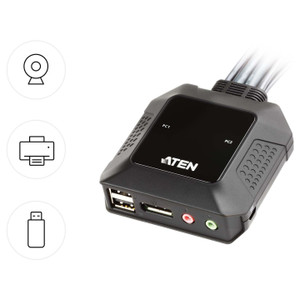
ATEN CS692 2-Port USB HDMI KVM Switch with HD Audio
Overview
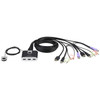
The ATEN CS692 is a 2-port desktop KVM switch designed for professionals managing two computers from a single HDMI display, USB keyboard and mouse, and a shared audio setup. Whether you're running a dual-workstation editing suite, a side-by-side development environment, or a compact control room console, the CS692 eliminates the cable clutter and desk sprawl that comes with maintaining separate peripherals per machine. It supports video up to 1920x1200 at 60 Hz — enough headroom for WUXGA monitors used in broadcast, CAD, and AV production environments where standard 1080p falls just short.
Port switching on the CS692 is handled three ways: keyboard hotkeys, a physical remote port selector (connected via a 1.8 m cable), or mouse-based toggling — giving you flexibility depending on whether your hands are on the keyboard, the desk, or neither.
Key Features
- Dual HDMI Ports at up to 1920x1200 @ 60 Hz: Supports both standard 1080p (1920x1080) and WUXGA (1920x1200) resolutions at 60 Hz. If you're running a 16:10 WUXGA monitor — common in broadcast and design workstations — you won't lose those extra 120 vertical pixels the way you would with KVMs that cap at 1080p.
- Full HD Audio Switching (3.5 mm Stereo + Mic): Each KVM port carries two 3.5 mm jacks — one green (speaker/headphone) and one pink (microphone) — so your headset or studio monitors follow the active computer automatically. No reaching behind machines to swap audio cables when you switch workstations.
- USB Keyboard and Mouse: Both peripheral connections use standard USB Type-A, so virtually any wired or USB-wireless keyboard and mouse combination will work without driver installation or compatibility concerns.
- Three Switching Methods: Hotkey sequences, a connected remote port selector (1.8 m cable included), and mouse-click switching give you three independent ways to change the active computer. The remote selector is particularly useful when the KVM itself is tucked behind a monitor or inside a shallow rack shelf.
- Configurable Auto-Scan: The scan interval is selectable at 3, 5, 10, or 20 seconds (default 5 seconds). For monitoring scenarios where you want the display to cycle between two sources automatically — think NOC secondary display or demo kiosks — you can tune the dwell time to match the content refresh rate on each machine.
- Firmware Upgradeable: The CS692 supports firmware upgrades (current release v1.3.128, dated 2025-11-13). That means ATEN can push compatibility and feature improvements post-deployment — useful in environments where USB HID or HDMI timing requirements evolve with new hardware.
- Non-Condensing Humidity Tolerance (0–80% RH): Rated for environments up to 80% non-condensing humidity. Suitable for most temperature-controlled server rooms, broadcast trucks, and commercial office environments without additional enclosure protection.
Integration and Compatibility
The CS692 connects to any computer with a standard HDMI video output and USB Type-A ports — no proprietary dongles or adapters required on the host side. The 2 x HDMI Male (Black) KVM connectors pair with the 2 x USB Type-A Male (Purple) keyboard/mouse ports and 2 x USB Type-A Male (Black) additional USB connections per port. Audio integration is passive analog — the 3.5 mm jacks are compatible with any standard headset, powered speaker, or studio monitor with a 3.5 mm input.
The remote port selector connects via a 1.8 m cable, giving you roughly six feet of reach between the selector button and the KVM body — enough for most desk configurations without an extension. For a deeper look at the ATEN KVM and peripheral switching line, including multi-port and multi-display variants, the full catalog covers options up through 4K and DisplayPort configurations.
If you're evaluating KVM infrastructure alongside display and switching hardware, the KVM switches category includes both desktop and rackmount models across multiple video standards. For environments that combine KVM access with broader AV distribution needs, pairing this switch with a compatible AV extender can extend the HDMI signal beyond the typical 1.8 m cable run. If your deployment also involves IP-based KVM or out-of-band management, reviewing a KVM over IP solution alongside the CS692 helps clarify where each fits in the stack.
Frequently Asked Questions
Q: What is the maximum video resolution supported by the CS692?
A: The CS692 supports up to 1920x1200 at 60 Hz (WUXGA) as well as 1920x1080 at 60 Hz (1080p Full HD). It does not support 4K or DisplayPort signals.
Q: Does the CS692 switch audio along with video and USB?
A: Yes. Each port includes a 3.5 mm stereo output (green) and a 3.5 mm microphone input (pink). When you switch the active computer, the audio connection follows automatically — no separate audio switching step required.
Q: How do I switch between computers on the CS692?
A: The CS692 supports three switching methods: keyboard hotkey sequences, a physical remote port selector (connected via the included 1.8 m cable), and mouse-based switching.
Q: Can I use the auto-scan feature on the CS692 and how fast does it cycle?
A: Yes. The scan interval is configurable at 3, 5, 10, or 20 seconds. The default is 5 seconds. This allows the display to cycle through both connected computers automatically.
Q: Is the CS692 firmware upgradeable in the field?
A: Yes. ATEN provides firmware updates for the CS692; the current release is v1.3.128 (released 2025-11-13). Firmware upgrade files are available from ATEN directly.
Q: What USB peripheral types does the CS692 support?
A: The CS692 supports USB keyboards and mice via standard USB Type-A connections. No proprietary USB format is required on the peripheral side.
The CS692 is a straightforward 2-port HDMI KVM that earns its place in dual-workstation setups where WUXGA resolution matters — specifically the 1920x1200 support that many 16:10 monitors in broadcast and design environments require. Most budget KVMs quietly top out at 1080p and silently crop that resolution; the CS692 doesn't. It's also worth noting that firmware v1.3.128 is actively maintained as of late 2025, which suggests ATEN is still servicing this SKU — relevant if you're deploying it in a managed environment where USB HID compatibility with new OS releases matters.
Technical Highlights:
- 1920x1200 @ 60 Hz HDMI: Covers WUXGA panels used in CAD, broadcast, and design — the extra 120 vertical lines over 1080p are meaningful for multi-window workflows where screen real estate is constrained.
- Analog HD Audio per Port (3.5 mm stereo + mic): Both audio channels switch with the active computer automatically. No separate audio matrix needed for a standard headset or studio monitor — keeps the cable count down in compact workstation setups.
- Configurable Auto-Scan (3–20 s): The dwell time flexibility matters for monitoring use cases. At 20 seconds, a single display can passively watch two machines for status updates without operator intervention.
Deployment Considerations:
- The remote port selector cable is 1.8 m. If the KVM is racked or tucked under a deep desk, measure before assuming the selector will reach your preferred hand position — there is no extension option noted in the evidence.
- The CS692 is rated for 0–80% RH non-condensing. It's suitable for standard office and light industrial environments, but it is not designed for high-humidity or outdoor-adjacent installations without enclosure protection.
The CS692 is the right pick for a two-machine workstation running a WUXGA 16:10 display — specifically where the operator needs full audio switching alongside video and USB without adding a separate audio switcher. Broadcast edit suites, dual-PC CAD stations, and compact NOC secondary consoles are the deployment scenarios where this unit's feature set aligns tightly with the requirement.