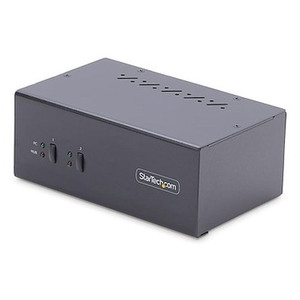
StarTech C2-DD46-UA2-CBL-KVM 2-Port Dual-Monitor DisplayPort KVM Switch
Overview
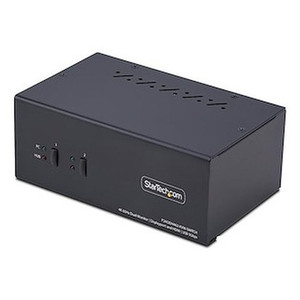
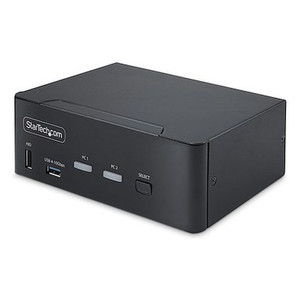
The StarTech C2-DD46-UA2-CBL-KVM is a 2-port dual-monitor DisplayPort KVM switch built for IT administrators, engineers, and power users who need to control two computers across two displays from a single keyboard, mouse, and monitor setup — without reaching for a second set of peripherals or swapping cables. At 1.3 lb and just 4.9 × 3.5 × 1.0 inches, it sits flat on a desk without consuming meaningful workspace, and because it draws power directly from the connected USB host ports, there is no external power adapter to manage or lose.
Port switching is handled via front-panel push button, configurable hotkeys, or software — whichever fits your workflow. With a rated MTBF of 419,293 hours, this is a unit you can deploy and largely forget about.
Key Features
- Dual DisplayPort outputs (2 monitors per source): Both connected computers share two DisplayPort displays simultaneously. When you switch sources, both screens flip together — no partial switching, no hunting for a second button. This is the architecture that matters for engineering workstations, trading desks, or security monitoring stations where losing half your screen real estate on a switch defeats the purpose.
- 2-port host capacity: Designed specifically for a two-computer workflow — a workstation and a laptop, a production machine and a test box, or a Windows PC and a Mac. Adding a third host requires a different unit; size this correctly before ordering.
- USB 2.0 at 480 Mbps: Keyboard, mouse, and peripheral data move at full USB 2.0 bandwidth. Adequate for HID devices, USB headsets, and low-speed storage. Not intended as a hub for USB 3.0 drives or high-bandwidth peripherals — the interface is USB 2.0 by design.
- Three switching methods: Front push button for manual toggling, hotkey sequences for hands-on-keyboard users, and software control for scripted or automated switching. The flexibility means the unit adapts to your workflow rather than dictating one.
- Bus-powered operation: Power is drawn from the connected USB Type-A host ports — no wall adapter, no IEC cable, no power strip position consumed. This matters in clean desk environments and traveling setups where cable clutter is a real concern.
- Analog stereo audio on both hosts and console: Four 3.5mm stereo female jacks on the host side (one mic, one headphone per host) plus two 3.5mm stereo female jacks on the console side carry DisplayPort audio alongside standard analog stereo — covering both digital audio through the DisplayPort signal and a physical headphone/mic loop for the active computer. Two-channel stereo only; this is not a multi-channel audio solution.
- Broad OS compatibility: Windows, macOS, ChromeOS, and Linux are all supported. Mixed-OS setups — a Windows workstation and a Linux server, for example — switch cleanly without driver conflicts. The KVM presents as standard HID to each host.
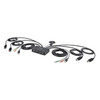
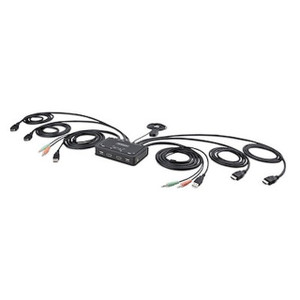
- Compact ABS enclosure with integrated cables: The 4.9 ft (1.5 m) attached cables eliminate the need to source separate KVM cable sets. The black ABS housing blends into standard office and rack-adjacent environments. Operating range is 0°C to 40°C (32°F to 104°F), appropriate for conditioned office and data center edge environments.
- MTBF of 419,293 hours: Approximately 47.9 years of calculated mean time between failures. In practical terms, this is a component you should not need to replace on any reasonable deployment timeline. Factor it out of your maintenance schedule.
Integration and Compatibility
The C2-DD46-UA2-CBL-KVM (often searched as C2 DD46 UA2 CBL KVM) connects to any computer with a DisplayPort output and USB Type-A host port. DisplayPort is the video interface — HDMI or VGA sources are not directly compatible without an active adapter, which may affect signal quality and resolution support. Verify that both connected computers expose DisplayPort natively before ordering.
The USB 2.0 interface supports standard HID peripherals — keyboards, mice, and compatible input devices. USB 3.0 SuperSpeed peripherals connected through this switch will operate at USB 2.0 speeds. If your workflow requires USB 3.0 throughput for a shared peripheral (e.g., an external SSD or high-frame-rate webcam), plan for a separate USB 3.0 switch or hub alongside this unit.
Audio switching follows the video/USB switch — when you toggle to Computer 1, the console audio jacks connect to Computer 1's audio path. The 3.5mm analog stereo jacks support standard headsets with a single 3.5mm TRRS connector using a splitter, or separate mic and headphone connectors directly.
For KVM switches in more complex configurations — four-port, multi-monitor 4K, or IP-based KVM for remote access — review the broader StarTech KVM and connectivity line to find the right fit. If your primary concern is IP camera monitoring across multiple workstations, pairing this KVM with a purpose-built video management software workstation gives you a cleaner operator experience than splitting display duties ad-hoc. For structured cabling and peripheral management, see the cables and adapters category for complementary runs.
Frequently Asked Questions
Q: Does the C2-DD46-UA2-CBL-KVM require an external power supply?
A: No. It is fully bus-powered, drawing power from the USB Type-A host ports on the connected computers. No wall adapter or external power source is needed.
Q: What video interface does this KVM use — is HDMI supported?
A: The C2-DD46-UA2-CBL-KVM uses DisplayPort exclusively for video on both the host and console sides. HDMI is not natively supported. An active DisplayPort-to-HDMI adapter may allow connection, but native DisplayPort on both computers is strongly recommended for full compatibility.
Q: Can I switch between a Windows PC and a Mac?
A: Yes. The KVM supports Windows, macOS, ChromeOS, and Linux. Mixed-OS pairs — including Windows and macOS — are supported, as the unit presents as standard USB HID to each host.
Q: What is the USB data transfer speed for peripherals connected through this KVM?
A: USB 2.0 at up to 480 Mbps. USB 3.0 devices will connect but operate at USB 2.0 speeds. For high-bandwidth peripherals, plan a separate USB 3.0 solution alongside this unit.
Q: What is the warranty on the C2-DD46-UA2-CBL-KVM?
A: StarTech provides a 2-year manufacturer warranty on this unit.
Q: How do I switch between computers — is a remote control included?
A: Switching is supported via three methods: the front-panel push button, configurable hotkey sequences on the keyboard, and software control. No remote control is included or required.
The C2-DD46-UA2-CBL-KVM sits in a specific and well-defined niche: two computers, two monitors, one operator position — and a hard requirement for DisplayPort throughout. The 419,293-hour MTBF figure is not marketing shorthand; for a device in constant daily use at a shared workstation, that reliability curve matters more than almost any other spec on the sheet.
Technical Highlights:
- Dual-monitor architecture: Four DisplayPort host connectors (two per computer) and two DisplayPort console outputs mean both screens switch simultaneously — no independent display management needed per monitor.
- Bus-powered via USB 2.0: 480 Mbps USB 2.0 with no external adapter required. The power draw comes entirely from the host USB ports, keeping the deployment footprint minimal and eliminating an external PSU as a failure point.
- Six-method audio loop: Four 3.5mm stereo female jacks on the host side and two on the console side support both DisplayPort digital audio and analog stereo simultaneously — useful in operator environments where a headset needs to follow the active computer without manual re-plugging.
Deployment Considerations:
- Confirm DisplayPort native output on both host computers before procurement. Many workstations expose DisplayPort natively, but compact form-factor PCs and some laptops may require active adapters — test this before committing to the KVM architecture.
- USB 2.0 is the ceiling here — 480 Mbps is sufficient for keyboards, mice, and headsets, but any shared peripheral requiring USB 3.0 throughput (high-res webcams, external storage) will need a separate path. Plan accordingly if the workstation doubles as a video capture or storage station.
This unit is the right call for a dual-workstation security monitoring position or a developer hot-desk where two machines — say, a production Windows box and a Linux build server — share a single dual-DisplayPort console. The compact 4.9 × 3.5 × 1.0-inch ABS enclosure and integrated 1.5 m cables keep the desk clean without a separate cable kit order.