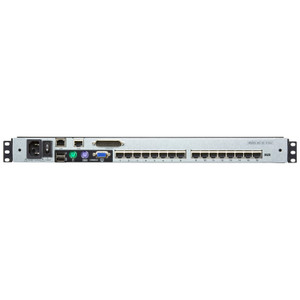
Product images are provided for reference and may not represent the exact model, configuration, or included components.

Overview

SKU: KL1516AM
UPC: 672792400636
Condition: New
Write a Review 29% OFF

ATEN 17 16-PORT CAT5 LCD KVM - KL1516AM

ATEN KL1516AM 16-Port Cat5 LCD KVM SwitchOverviewThe KL1516AM is a 1U rackmount LCD KVM switch that gives you local console control over 16 servers fr…

$1,821.00 $1,285.99 SAVE $535
Ships same business day
In stock

Quantity:

Adding to cart… The item has been added
Compatibility guidance available for your deployment
Senior specialists for pre and post-sales support
Authorized sourcing and documentation support
Shipping and lead-time confirmation before install

Laura Bennett, IPSD Senior Specialist

Talk to Laura

200+ hrs training • U.S - based

Senior Specialist • 877-277-7147

ATEN 17 16-PORT CAT5 LCD KVM - KL1516AM

$1,821.00
$1,285.99

Overview

SKU: KL1516AM
UPC: 672792400636
Condition: New

No Bots, Just Experts

Questions about this product? Free pre-sales support from a senior specialist — product questions, compatibility checks, BOM quotes, price confirmation — typically answered within one business day. Need camera placement or system design work? Engineering time is $175 per hour (qty 1 = 1 hour). Hardware buyers get up to one hour ($175) credited back on their order.

Description

ATEN KL1516AM 16-Port Cat5 LCD KVM Switch

Overview

The KL1516AM is a 1U rackmount LCD KVM switch that gives you local console control over 16 servers from a single integrated keyboard, display, and touchpad — no separate console hardware required. Daisy-chain up to 31 additional KL1508A or KL1516A units to scale control to 512 ports total, making this a practical fit for mid-size data centers or server rooms that need to grow without re-cabling. Port selection via OSD menu, hotkey sequences, or front-panel pushbuttons keeps access fast regardless of how deep your rack stack runs. The integrated LCD supports a second console output at up to 1920×1200 @ 60 Hz — full WUXGA resolution means you're not squinting at compressed output when doing detailed system work.

Compatibility

The KL1516AM connects to servers using PS/2, USB, or Serial KVM adapter cables — covering the widest range of server generations in a mixed-hardware environment. Compatible daisy-chain peers are limited to ATEN KL1508A and KL1516A units; do not mix with non-ATEN KVM switches in the chain. The front USB Type-A port accommodates a USB mouse for local use without reconfiguring the rear console stack. Firmware v1.7.161 (released 2025-06-17, file: kl1508a-kl1516a-v1.7.161.zip) applies to both the KL1508A and KL1516A families and is field-upgradeable.

Installation Notes

Accepts 100–240V AC, 50–60 Hz at 1A maximum — no voltage selection required, suitable for international rack deployments. Keep ambient humidity below 80% RH non-condensing; this is not rated for high-humidity environments without additional enclosure protection. The LED illumination light assists in low-light rack conditions without requiring a separate task light. Scan interval is configurable from 1 to 255 seconds, so auto-scan sweeps can be tuned to your monitoring cadence rather than defaulting to a fixed interval that generates unnecessary console churn. Note that physical dimensions for this product follow an L×W×H format per ATEN rack-mount convention — verify rack depth clearance before ordering.

Specifications
Mount Type: Rack
Function: KL1516AN
Maximum: 512 (via Daisy-chain)
Port Selection: OSD, Hotkey, Pushbutton
External Mouse Port: 1 x USB Type A Female (Front)
Lcd Power: 1 x LED Pushbutton
Led Illumination Light: 1 x LED Illumination Light
Luminance: 250 cd/m²
Second Console: 1920 x 1200 @ 60 Hz
Scan Interval: 1–255 sec.
Keyboard / Mouse: PS/2, USB, Serial
Maximum Input Power Rating: 100-240V AC; 50-60Hz; 1A
Humidity: 0–80% RH, Non-condensing
Firmware Upgrade: v1.7.161
Q&A
Reviews
Have Questions?

RELATED PRODUCTS

System Design, Deployment & Technical Support

Support services and planning resources for commercial surveillance, access control, and infrastructure deployments.

Fixed scope • Fixed price

System Design Assistance

  • Get help validating product compatibility
  • Coverage requirements
  • Storage planning and deployment architecture before you buy.
Request Design Help

Deployment & Configuration Support

  • Access fixed-scope support for rollout planning
  • User setup guidance
  • Migration and system standardization across single-site or multi-site deployments
View Support Services

Guides, Tools & Calculators

  • PoE requirements
  • Storage retention
  • Camera selection and deployment methodology
Open Technical Resources