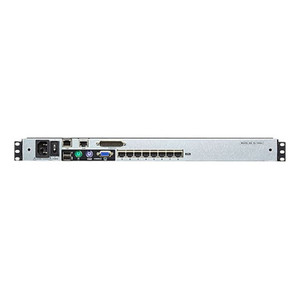
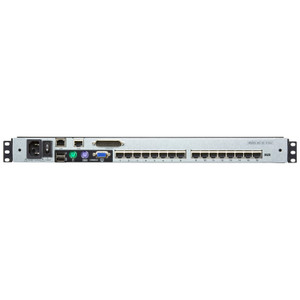
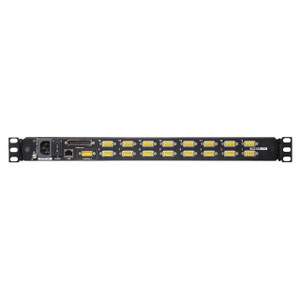
Product images are provided for reference and may not represent the exact model, configuration, or included components.

No Bots, Just Experts

Questions about this product? Free pre-sales support from a senior specialist — product questions, compatibility checks, BOM quotes, price confirmation — typically answered within one business day. Need camera placement or system design work? Engineering time is $175 per hour (qty 1 = 1 hour). Hardware buyers get up to one hour ($175) credited back on their order.

Description

ATEN KL1516AIN 16-Port Dual Rail LCD KVM over IP Switch

Overview

The ATEN KL1516AIN is a 16-port, 1U rack-mount KVM switch with an integrated dual-rail LCD console and IP-based remote access — built for data center and server room environments where local and out-of-band remote control must coexist on a single 1U footprint. The KL1516AIN supports up to 256 nodes when daisy-chained with compatible ATEN KVM switches, making it a practical backbone for mid-to-large server farms that outgrow standalone 8- or 16-port deployments without restructuring the rack. Port selection runs three ways — OSD, hotkey, or front-panel pushbuttons — so operators can switch targets from the local console or from a remote session without interrupting the other. The built-in LCD panel runs at 250 cd/m² luminance with 4-button adjustment, delivering adequate brightness in typical data center lighting. Power input accepts 100–240V AC at 50–60 Hz via an IEC 60320/C14 connector, so it drops into any standard PDU without an adapter.

Compatibility

The KL1516AIN connects to servers via PS/2 or USB KVM adapter cables (sold separately), covering the full range of legacy and current server hardware. It is designed to daisy-chain with ATEN's KL1508AiN and other compatible ATEN Cat5 KVM switches to extend to a maximum of 256 managed nodes. Remote IP access is handled by the integrated IP card (firmware v1.6.155); local console firmware ships at v1.7.163. Compatible KVM adapter cable families include ATEN's KA7-series (PS/2 and USB variants) — verify the appropriate KA-series adapter for your specific server's port type before ordering.

Installation Notes

Rack mounting follows standard 1U EIA-310 rail dimensions; note that ATEN expresses physical dimensions in L×W×H format rather than the conventional W×D×H — confirm rail depth clearance before installation. Operating humidity tolerance is 0–80% RH non-condensing; avoid installations near cooling vents that generate condensation cycles. Scan interval is configurable from 1 to 255 seconds via OSD, which controls how long the auto-scan dwells on each port during unattended monitoring sweeps.

Specifications
Mount Type: Rack
Operating System: Description | Ver. | Release Date | File Name
Function: KL1516AiN
Remote: 1
Maximum: 256 (via Daisy-chain)
Port Selection: OSD, Hotkey, Pushbuttons
Power: 1 x IEC 60320/C14
Lcd Adjustment: 4 x Pushbutton
Lock: 1 x Num Lock (Green)1 x Caps Lock (Green)1 x Scroll Lock (Green)
Luminance: 250 cd/m²
Keyboard / Mouse: PS/2; USB
Scan Interval: 1–255 sec.
Maximum Input Power Rating: 100–240V AC, 50-60Hz, 1A
Humidity: 0–80% RH, Non-condensing
Ip Card: v1.6.155
Local: v1.7.163
Os: Description
Q&A
Reviews
Have Questions?

ATEN 16-PORT 19 Dual Rail LCD IP CAT5 KVM - KL1516AIN

$2,750.00
$1,941.99

RELATED PRODUCTS

Save $741.01
ATEN 8-PORT 19 Dual Rail LCD IP CAT5 KVM
Add to Cart The item has been added

ATEN KL1508AIN

ATEN 8-PORT 19 Dual Rail LCD IP CAT5 KVM - KL1508AIN

1U rack-mount, dual-rail LCD KVM switch that consolidates local and remote access to up to 8 directly connected servers from a single console — with

    In stock · Ships same business day Free shipping over $499
    $2,523.00 $1,781.99 Save $741.01
    The item has been added Add to quote
    $2,523.00 $1,781.99 Save $741.01
    Save $741.01 Add to cart Add to quote

    System Design, Deployment & Technical Support

    Support services and planning resources for commercial surveillance, access control, and infrastructure deployments.

    Fixed scope • Fixed price

    System Design Assistance

    • Get help validating product compatibility
    • Coverage requirements
    • Storage planning and deployment architecture before you buy.
    Request Design Help

    Deployment & Configuration Support

    • Access fixed-scope support for rollout planning
    • User setup guidance
    • Migration and system standardization across single-site or multi-site deployments
    View Support Services

    Guides, Tools & Calculators

    • PoE requirements
    • Storage retention
    • Camera selection and deployment methodology
    Open Technical Resources