NETGEAR WBE710-100NAS Tri-Band WiFi 7 PoE Access Point
Overview
The NETGEAR WBE710-100NAS is a tri-band wireless access point purpose-built for enterprise deployments requiring high-density wireless coverage with integrated PoE power delivery. This model combines WiFi 7 throughput with wired network switching capability, positioning it as a convergence point for both wireless clients and wired infrastructure in medium-to-large network segments.
Key positioning: if you're deploying a network switch and need wireless in the same appliance, this bridges that gap. If you need pure wireless only, a dedicated access point without switching fabric may be more cost-effective.
Port configuration and throughput
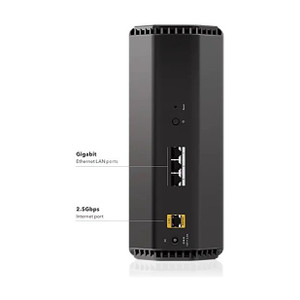
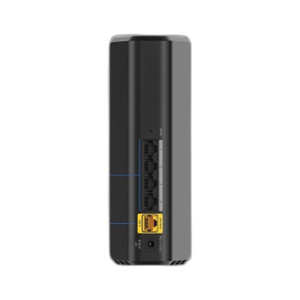
The WBE710-100NAS provides 96 ports with 10G speed capacity. On a practical level, this means the device can serve as both a wired switching backplane and a wireless hub in a single physical unit. The 9.4 Gbps total wireless throughput (tri-band aggregation) is a headline figure — real-world per-client performance depends heavily on channel utilization, client count, and RF environment. Expect this to saturate in dense deployments (50+ simultaneous clients on a single AP) or when clients are scattered across multiple frequency bands.
Tri-band architecture means the device divides clients across three radio bands (typically 2.4 GHz + two 5 GHz or 6 GHz segments in WiFi 7 capable systems). This reduces congestion compared to dual-band designs but requires clients that support the band split — older devices may anchor to 2.4 GHz only, negating the benefit.
PoE delivery
The WBE710-100NAS accepts 2.5G PoE input, meaning single-cable power delivery is native to the device. You won't need a separate PoE injector for this access point itself. However, verify your upstream switch or injector supports 2.5G PoE output — older 802.3af (15W) or 802.3at (30W) PoE sources won't work. Budget power capacity carefully if daisy-chaining additional PoE endpoints (cameras, other APs) from this device.
Management and monitoring
The WBE710-100NAS is unmanaged, meaning it operates without CLI, Web GUI, or SNMP configuration. Power it on, connect uplink, and it bridges wired and wireless traffic automatically. This simplifies deployment but eliminates granular control over VLAN assignment, QoS tagging, or bandwidth throttling per client. Bandwidth management is enabled at the hardware level, providing basic traffic shaping but not application-aware policies.
Environmental ratings
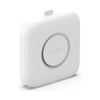
Industrial-grade operating temperature range indicates tolerance for non-climate-controlled spaces (warehouses, outdoor-adjacent deployments). Plastic housing is lightweight and reduces shipping cost but offers lower impact resistance than metal chassis — avoid placement in high-traffic or mechanical-hazard zones. The device supports both wall and ceiling mounting, offering flexibility in retrofit scenarios.
Installation notes
Mount on wall or ceiling with provided bracket hardware. Ensure adequate airflow clearance around the device — tri-band radios generate sustained heat. Antenna gain of 4.1/4.6 dBi across bands provides moderate coverage extension; assume 50–80 ft typical indoor range under clear line-of-sight, shorter through dense walls. Position centrally in the target area rather than at building edges to optimize signal distribution across all three bands.
When to choose a different model
If you need managed switching with detailed VLAN or QoS control, consider a managed access point or separate switch + AP topology. If your existing infrastructure is 802.3af-only and cannot support 2.5G PoE, a lower-power WiFi 6 access point may be a better fit. If you need multi-node coordination or mesh-style roaming, this single-node design won't provide that — evaluate enterprise controller-based systems instead.
Frequently Asked Questions
Q: Does the WBE710-100NAS require a separate management controller?
A: No. As an unmanaged access point, it operates independently. Multiple units can be deployed without central oversight, but you won't have centralized client handoff or band steering.
Q: Can I use standard 802.3af PoE with the WBE710-100NAS?
A: No. The device requires 2.5G PoE input. Standard 802.3af (15W max) will not power this unit. Verify your upstream injector or switch supports High-Power PoE or 2.5G PoE variants.
Q: What WiFi 7 standard does it support?
A: The evidence confirms WiFi 7 tri-band operation (IEEE 802.11be). Full specification details on supported channels and bandwidth modes are not detailed in the available documentation.
Q: Is the warranty transferable if I resell the unit?
A: The WBE710-100NAS includes a 5-year warranty from NETGEAR. Transferability depends on NETGEAR's terms — contact the manufacturer for details on second-owner coverage.
Q: What's the maximum number of wireless clients per unit?
A: The specification sheet does not state a hard client limit. Practical performance remains strong to approximately 50–70 simultaneous clients; beyond that, throughput per client drops noticeably.
The WBE710-100NAS is a convergence play: it bundles 96-port switching with tri-band WiFi 7 in one form factor. That's useful if you're consolidating access points and wired uplinks in space-constrained deployments — think small server rooms or edge-office installs. The 2.5G PoE input is the constraint; if your infrastructure is still 802.3af-only, this won't integrate without an intermediate injector that supports the higher power budget.
Technical Highlights:
- 96 10G ports: Extreme port density — larger than most enterprise access points. Useful for environments where a single device must serve as both wireless hub and wired switching fabric, but overkill if you only need a dozen or so wired endpoints.
- Tri-band WiFi 7 with 9.4 Gbps aggregate: The 9.4 Gbps is theoretical ceiling across all three bands combined; single-band clients see roughly 1/3 of that. Meaningful in high-density environments (warehouses, conference centers) where client load justifies the investment. In small offices, dual-band WiFi 6 is usually sufficient.
- 2.5G PoE input: Single-cable simplicity, but verify your PoE source supports it. A backwards-compatibility mismatch here wastes time on site.
- Unmanaged operation: Plug and play, but no VLAN or QoS granularity. Bandwidth management at the device level is crude compared to managed alternatives.
Deployment Considerations:
- Power sourcing: 2.5G PoE is not standard on every enterprise switch. Confirm your power infrastructure before committing. Many older deployments will require an intermediate injector module, adding cost and complexity.
- Tri-band client support: Clients must explicitly support tri-band splitting to benefit. Older or budget devices will anchor to 2.4 GHz only, bypassing the performance gains entirely.
- Heat and airflow: Industrial-grade temp rating is a plus, but plastic chassis and high-density ports mean active cooling requirements. Don't mount in dead air pockets.
Deploy the WBE710-100NAS where you need dense wired + wireless convergence and can guarantee 2.5G PoE availability upstream. Warehouse automation, small data centers, and edge-office network refreshes are good fits. Retail or open-office spaces with light wired needs will overspend on the 96-port capability.