StarTech SV231DPUCA 2-Port USB-C DisplayPort KVM Switch
Overview
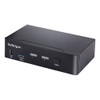
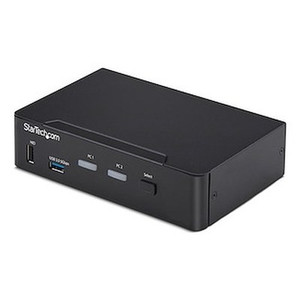
The StarTech SV231DPUCA is a two-port KVM switch built for users who need to control two USB-C computers from a single 4K DisplayPort monitor, keyboard, mouse, and audio setup — without unplugging anything between sessions. It targets developers, engineers, and IT professionals running dual workstations or a workstation-plus-laptop combination at the same desk. The SV231DPUCA handles DisplayPort 1.2 video at up to 4K 60Hz, passes USB data at up to 5 Gbps, and switches a full six-port USB hub plus analog/digital audio in a single button press or hotkey sequence. If you're tired of manually swapping cables between a desktop and a MacBook Pro or a Windows workstation, this is the switch to look at.
Key Features
- 4K 60Hz DisplayPort 1.2 via USB-C Alt-Mode: Both connected computers attach over USB-C using DisplayPort Alternate Mode — meaning you get a single-cable connection per computer that carries video, USB data, and power negotiation without a separate DP cable. At 4K 60Hz you're running at full UHD with no frame-rate compromise, which matters for CAD, video editing timelines, and color-critical work.
- HDCP 2.2 Compliance: The switch passes HDCP 2.2-protected content correctly, so streaming platforms and DRM-locked video playback won't black out or throw decryption errors when you switch between computers. This is the version required for 4K content — earlier HDCP revisions top out at 1080p protection.
- 6-Port USB-A Hub at 480 Mbps: Six USB-A ports follow the active computer, so your keyboard, mouse, webcam, USB audio interface, and USB storage all switch together. At Hi-Speed USB 2.0 (480 Mbps) these ports handle every HID and peripheral device class you'd realistically attach to a KVM — the 480 Mbps ceiling won't bottleneck keyboards, mice, or webcams, which is the right tradeoff for a hub that switches without re-enumeration delays.
- 5 Gbps USB Data Channel (USB4 / Thunderbolt 3/4 Compatible): The upstream USB-C connection supports USB 3.2 Gen 1 data rates at 5 Gbps and is electrically compatible with USB4 and Thunderbolt 3/4 hosts. That means you can connect a Thunderbolt MacBook or a USB4 workstation without a compatibility adapter — the switch negotiates correctly at the highest supported speed.
- Analog and Digital Audio Switching with Microphone Input: A 3.5mm combo jack handles both stereo output (2-channel analog or digital) and microphone input. When you switch computers, your speakers and mic follow — you won't need a separate audio matrix or manual headset re-plugging. Useful in any dual-workstation environment where you're on video calls from either machine.
- Hotkey or Push-Button Switching: Switch between computers with a front-panel push button or a keyboard hotkey sequence. The hotkey method is faster in practice — no reaching across the desk — and keeps the switch itself tucked away under or behind the monitor.
- Universal AC Power Input (100–240V): The included power supply accepts any mains voltage from 100 to 240V AC at 1.2A input, delivering 12V DC at 3A output. You can deploy this unit in any country without a voltage converter, and the 36W output budget is sufficient to power the USB hub ports and the switch electronics without a separate power brick per port.
- Compact Desktop Footprint: At 6.3 × 5.5 × 1.6 inches and 1.4 lb, the SV231DPUCA sits flat on a desk or can be tucked behind a monitor stand. It won't dominate your workspace the way rackmount KVMs do.
Integration and Compatibility
The SV231DPUCA is designed for USB-C hosts running DisplayPort Alternate Mode — this is native on most modern laptops and workstations (Apple M-series, AMD Ryzen mobile, Intel Alder Lake and later, and Thunderbolt 3/4 docks). Thunderbolt 3 and 4 hosts connect without adapters since Thunderbolt is a superset of USB-C. USB4 hosts are similarly compatible. Legacy machines with only HDMI or full-size DisplayPort outputs are not supported without a dedicated active adapter on the host side — the SV231DPUCA is a USB-C-native device, not a multi-protocol converter.
The six downstream USB-A ports run at Hi-Speed USB 2.0 (480 Mbps). External SSDs or high-speed USB 3.x storage drives will connect and function, but will be limited to 480 Mbps on those ports specifically. If passing full USB 3.2 Gen 1 speeds to storage is a priority, plan for direct host connections for that device rather than routing it through the hub.
Operating temperature range is 0°C to 40°C (32°F to 104°F) — standard office and data-center ambient range. Storage is rated to -10°C to 60°C. Humidity tolerance runs to 80% RH non-condensing, so standard climate-controlled office environments are fully within spec. This unit is not rated for industrial or outdoor environments.
Frequently Asked Questions
Q: Can I use the SV231DPUCA with a Thunderbolt 4 laptop?
A: Yes. Thunderbolt 3 and Thunderbolt 4 ports are electrically and mechanically compatible with USB-C, and the SV231DPUCA is rated as compatible with both Thunderbolt 3 and Thunderbolt 4 hosts. Video and USB data will switch normally.
Q: Does the SV231DPUCA support 4K at 60Hz, or only 30Hz at 4K?
A: The switch supports 4K 60Hz via DisplayPort 1.2 over USB-C Alt-Mode. You are not limited to 30Hz at UHD resolution — both connected computers can run 4K 60Hz on the shared monitor.
Q: What is the warranty on the SV231DPUCA?
A: StarTech covers the SV231DPUCA with a 2-year manufacturer warranty.
Q: Will my USB 3.x external SSD run at full speed through the built-in USB hub?
A: The six downstream USB-A hub ports operate at Hi-Speed USB 2.0 (480 Mbps). A USB 3.x SSD will enumerate and function, but throughput will be capped at 480 Mbps on those ports. For full USB 3.x speeds to storage, connect the drive directly to the host rather than through the KVM hub.
Q: Does the SV231DPUCA switch audio along with video and USB?
A: Yes. A 3.5mm combo jack on the unit handles both stereo audio output (2-channel analog/digital) and microphone input. Both switch together with the active computer — your speakers and mic follow without manual reconnection.
Q: Can I switch between computers without using the physical button?
A: Yes. In addition to the front-panel push button, the SV231DPUCA supports hotkey switching from the keyboard. The hotkey method lets you switch without reaching the unit physically, which is the preferred method when the switch is mounted out of easy reach.
The SV231DPUCA comes up regularly when engineers and developers ask about dual-workstation setups where both machines are modern USB-C or Thunderbolt hosts. The 4K 60Hz DisplayPort 1.2 over Alt-Mode spec is the key differentiator here — you're not compromising on frame rate at UHD, which matters if one of your machines is doing video work or you're using a high-refresh 4K display and don't want the KVM to be the bottleneck.
Technical Highlights:
- DisplayPort 1.2 at 4K 60Hz: Full UHD at 60 frames per second with no resolution or frame-rate step-down — relevant if you're driving a professional 4K display and need consistent performance across both hosts.
- HDCP 2.2: Handles 4K DRM-protected content without decryption failures — the version required for 4K streaming. Earlier HDCP versions (1.4, 2.0) cap out at 1080p protection and will cause black screens on 4K content.
- 12V DC / 3A included power supply: The 36W external power supply keeps USB hub ports reliably powered regardless of host power negotiation state — you won't see hub devices drop when you switch between computers.
Deployment Considerations:
- Both host ports require USB-C with DisplayPort Alternate Mode support. Verify this on each machine before ordering — not every USB-C port on every laptop supports DP Alt-Mode even if it supports data and charging. Check the host machine's spec sheet for explicit DP Alt-Mode or Thunderbolt capability.
- The downstream USB-A hub ports are limited to 480 Mbps (USB 2.0 Hi-Speed). If either workstation needs to access high-speed USB 3.x storage through the KVM hub, those drives will be throttled. Route storage drives directly to the host for full-speed access.
The SV231DPUCA is the right fit for a two-machine engineering or creative workstation setup where both hosts are USB-C or Thunderbolt laptops/desktops, you're running a single 4K display, and you want audio, peripherals, and video to follow a single button press or hotkey without any manual cable swapping.