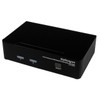
StarTech SV231DPUA 2-Port DisplayPort KVM Switch with USB and Audio
Overview
The StarTech SV231DPUA is a two-port DisplayPort KVM switch built for engineers, IT architects, and workstation power users who need single-monitor control over two PCs without sacrificing display quality. Native resolution support hits 2560 x 1600 at 60Hz — enough pixel density for CAD work, security monitoring dashboards, or side-by-side application windows — while the steel enclosure keeps this from being a desktop toy. If you manage dual workstations at a physical console and don't want two keyboards, two mice, and two sets of speakers cluttering your desk, the SV231DPUA is the direct answer.
Key Features
- 2560 x 1600 Native Resolution at 60Hz: This is true WQUXGA output — enough for 30-inch class displays without scaling artifacts. You get the full panel resolution, not a compromised signal, which matters when reviewing high-detail footage or working across dense spreadsheets. Maximum resolution ceiling reaches 3840 x 2400 for future-proofing.
- USB 2.0 at 480 Mbps: Keyboard, mouse, and peripheral switching runs at full USB 2.0 bandwidth. Switching a connected USB drive or input device between hosts happens without the lag or dropped packets associated with slower passive switches.
- Audio Switching: Integrated audio support means your speakers and headset follow the active PC — you're not manually swapping audio cables or managing OS audio routing when you switch hosts.
- Push-Button and Hotkey Port Selection: Front-panel button gives you physical, visible control. Hotkey switching lets you stay on the keyboard without reaching across the desk. Both methods are available simultaneously — no configuration required to enable either.
- Steel Enclosure: At 1.4 lb and a compact 6.3 x 1.6 x 3.9-inch footprint, the chassis is dense enough to stay put without Velcro but light enough for rack-adjacent shelf placement.
- Universal AC Input (100–240V): The 24W power supply accepts any mains voltage worldwide, so this unit travels without a step-down transformer and works equally in North American and European deployments.
- 0°C to 40°C Operating Range: Rated for standard office and equipment room environments. Not designed for unheated closets or outdoor enclosures — plan accordingly if your console area runs warm.
- 3-Year Manufacturer Warranty: Backed by StarTech's standard three-year coverage — longer than the two-year terms common on consumer-grade KVM products.
Integration and Compatibility
The SV231DPUA connects via DisplayPort and USB on both host ports. Any PC with a native DisplayPort output and standard USB-A port is a compatible host — no adapters required in that configuration. For hosts using HDMI or Mini DisplayPort, passive adapters work at the port, though verify your adapter's resolution ceiling matches the 2560 x 1600 target before committing. Audio uses standard 3.5mm analog — compatible with virtually all desktop speakers and headsets. Hotkey switching functions without driver installation, making this viable on locked-down enterprise images where you cannot push software to the endpoint.
Frequently Asked Questions
Q: What is the native resolution supported by the SV231DPUA?
A: The SV231DPUA supports a native resolution of 2560 x 1600 at 60Hz, with a maximum ceiling of 3840 x 2400.
Q: Does the SV231DPUA require driver installation to switch between computers?
A: No. Hotkey and push-button switching both function without installing drivers, making it compatible with locked-down enterprise workstation images.
Q: What is the warranty on the SV231DPUA?
A: The SV231DPUA carries a 3-year manufacturer warranty.
Q: Does the SV231DPUA support audio switching?
A: Yes. The SV231DPUA includes integrated audio support so speakers and headsets follow the active PC when you switch between hosts.
Q: What is the USB speed supported by the SV231DPUA?
A: USB 2.0 at 480 Mbps — sufficient for keyboard, mouse, and standard peripheral switching without signal degradation.
Q: What power supply does the SV231DPUA use?
A: It uses an external power supply with 100–240V AC input, 12V DC output at 2A, consuming up to 24 watts — compatible with both North American and international mains voltages.
The spec that defines this unit for me is the 2560 x 1600 native output at 60Hz. The SV231DPUA isn't a budget KVM that quietly drops your display to 1080p when you're not watching — it passes the full WQUXGA signal without scaling, which is exactly what you need when one of your connected machines is running a multi-pane security monitoring interface or a high-resolution design application where pixel accuracy matters.
Technical Highlights:
- 2560 x 1600 @ 60Hz Native Output: Full WQUXGA passthrough at 60Hz means no resolution compromise on either connected host — both machines share the same crisp output your display was bought to deliver.
- USB 2.0 at 480 Mbps: Peripheral bandwidth is adequate for keyboards, mice, and most USB-connected input devices without perceptible latency on switchover.
- 100–240V AC Input at 24W: The universal input range and compact steel chassis make this straightforward to deploy at international sites without separate power conditioning.
Deployment Considerations:
- Operating temperature tops out at 40°C — if your console station is in a server closet that runs warm, verify ambient temps before mounting this on a shelf directly above heat-generating equipment.
- This is a single-monitor KVM — if your workflow requires extending across two displays simultaneously from either host, you need a dual-head variant; the SV231DPUA drives one monitor only.
The SV231DPUA fits cleanly in a physical security operations center where two workstations — one running a VMS client, one handling administrative tasks — share a single high-resolution display and a common keyboard, mouse, and audio setup. The driverless hotkey switching is particularly useful in that environment where the OS image is locked down and software installation isn't an option.