


StarTech SV231DPUCA 2 Port USB C DisplayPort KVM
In stock · Ships same business day
Free shipping over $499
$275.99

Manufacturer-verified compatible cameras, recorders, mounts, accessories, and licenses for this product. Adjust quantities and add the entire bundle to your cart in one click.
Questions about this product? Free pre-sales support from a senior specialist — product questions, compatibility checks, BOM quotes, price confirmation — typically answered within one business day. Need camera placement or system design work? Engineering time is $175 per hour (qty 1 = 1 hour). Hardware buyers get up to one hour ($175) credited back on their order.
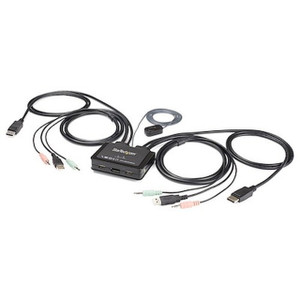
The StarTech SV231DPU34K is a two-port DisplayPort KVM switch built for workstation environments where you need to control two computers from a single 4K display, keyboard, and mouse — without re-cabling or reaching behind a monitor. It supports resolutions up to 3840x2160 at 60Hz, which means you're not dropping to 30Hz when you switch sources, and it includes a four-port USB 3.2 Gen 1 hub on the console side so your USB peripherals don't become a second switching headache. If you're running a dual-workstation security operations desk, a trading floor, or an engineering station where two machines need to share a single 4K display, this is a compact, direct solution. Explore the broader range of KVM switches if you need more ports or multi-monitor configurations.
The SV231DPU34K connects to host PCs via standard DisplayPort 1.2 and USB 3.2 Type-B cables. It complies with USB 3.0 and DisplayPort 1.2 industry standards, which means compatibility with any modern workstation GPU that exposes a native DisplayPort output. The USB hub on the console side is backward compatible with USB 2.0 and USB 1.1 peripherals, though those devices will operate at their native speed rather than 5Gbps. HDCP 2.2 support extends compatibility to DRM-protected content pipelines. Operating temperature range is 0°C to 40°C — standard for climate-controlled office or control room environments. For pairing with an appropriate DisplayPort cable rated for 4K@60Hz, confirm cables are certified for HBR2 bandwidth. See the KVM switch buying guide for guidance on selecting the right port count and video standard for your environment. If you're building out a full workstation desk, pairing this with a USB hub or monitor arm keeps cable management clean.
Q: What is the maximum resolution the SV231DPU34K supports?
A: The SV231DPU34K supports up to 3840x2160 (4K UHD) at 60Hz over DisplayPort 1.2. It also supports 2560x1600, 2560x1440, 1920x1200, 1920x1080, 1280x720, and 1024x768.
Q: Does the SV231DPU34K support audio switching?
A: Yes. Each host PC connects via a dedicated 3.5mm mini-jack audio input. A single 3.5mm output at the console carries audio from the active source to your headphones or speakers.
Q: How do you switch between the two connected computers?
A: You can switch using either the physical push button on the unit or keyboard hotkey sequences — both methods are supported simultaneously.
Q: How many USB ports are available on the console side?
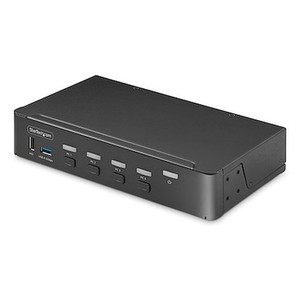
A: Four USB Type-A ports are available on the console side via the integrated USB 3.2 Gen 1 hub. All four switch together with the active source.
Q: What is the warranty on the SV231DPU34K?
A: The SV231DPU34K carries a 2-year manufacturer warranty.
Q: Does the SV231DPU34K require an external power supply?
A: Yes. The unit has an internal power supply that accepts 100–240V AC input and outputs 12V DC at 1.5A. A power connection is required for operation.

The detail I keep coming back to on the SV231DPU34K is the full 60Hz delivery at 3840x2160 — a lot of two-port KVM units in this price tier quietly cap 4K output at 30Hz, which is fine for static dashboards but noticeable the moment you're scrolling through logs or moving windows. If your operators are spending eight hours in front of this switch, 60Hz matters.
Technical Highlights:
Deployment Considerations:
The SV231DPU34K is the right pick for a dual-workstation security operations desk or a two-machine engineering station where both seats need access to a shared 4K display and a common set of USB peripherals — and where the operator cannot afford the friction of re-cabling to switch contexts.

Manufacturer-verified compatible cameras, recorders, mounts, accessories, and licenses for this product. Adjust quantities and add the entire bundle to your cart in one click.


Looking for more StarTech products? Shop the full StarTech catalog →
Support services and planning resources for commercial surveillance, access control, and infrastructure deployments.
Fixed scope • Fixed price