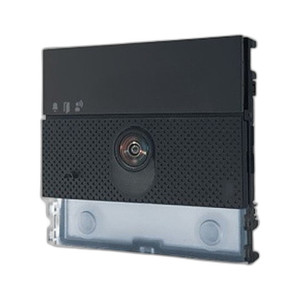
Comelit UT9240 Ultra Information Module
The Comelit UT9240 is an information and interface module designed to extend system capability and data presentation in Comelit integrated security installations. This compact accessory bridges display and control functionality across networked Comelit components, enabling operators and residents to access system status, alerts, and configuration data from a centralized point. The UT9240 is engineered for both residential multi-family and small commercial deployments where modular expansion and information access are required without dedicated dedicated workstations or control panels.
Key Features
- Compact Footprint: 3.94" W × 3.54" H × 1.38" D. Fits standard wall cutouts and mounting rails, enabling flexible placement in common areas, lobbies, or maintenance closets without requiring large cabinet space.
- Comelit System Integration: Native compatibility with Comelit security and access-control architectures. Connects directly to Comelit backbone infrastructure without adapters or protocol conversion.
- Information Display & Status Access: Centralizes alarm status, door/gate control, and system diagnostics in one interface. Reduces the need for multiple monitoring points and simplifies operator workflow during active incidents.
- Modular Expansion: Acts as an extension node for multi-unit residential or campus installations. Add information displays without enlarging the central control room footprint.
- Durable Construction: Built for sustained operation in high-traffic areas. Standard materials and enclosure design ensure long-term reliability in both indoor residential and light commercial environments.
- Straightforward Installation: No specialized training or custom cabling required. Standard mounting and wiring protocols align with typical Comelit system commissioning workflows.
The UT9240 operates as a distributed information and interface point within Comelit's networked architecture. Rather than centralizing all display and control functions in a main panel, operators and building staff can query system status, arm/disarm zones, and monitor events from the UT9240's mounted location. This distribution model reduces cable runs in larger properties and improves operational flexibility. In multi-family residential buildings, for example, a concierge or property manager can place the UT9240 in the lobby for guest-facing access confirmations and emergency signaling, while the primary control panel remains in a secure back-office location.
Comelit's modular design philosophy centers on backward compatibility and straightforward integration. The UT9240 inherits this approach — it communicates via Comelit's standard system bus, requiring no custom drivers, VMS connectors, or third-party middleware. Network and access-control administrators appreciate this simplicity: adding the UT9240 to an existing installation involves mounting the chassis, running power and data lines per Comelit documentation, and configuring access permissions in the central panel. No firmware updates or credential negotiation needed.
The module's primary operational role is information display and quick-access control. It is not a recording device, a motion sensor, or a video display—it is a status interface. Integrators should spec the UT9240 into deployments where building staff or tenants need to check system health, respond to alerts, or trigger area access without reaching the main control panel. In contrast, if the requirement is video monitoring, event recording, or advanced analytics, pair the UT9240 with Comelit's IP camera and NVR modules separately.
Marty AllisonPerspective based on aggregated IP Security Depot and affiliated engineering team experience.
We've found the Comelit UT9240 to be a pragmatic choice for multi-unit residential projects and smaller commercial sites where distributed system visibility matters. The module shines in scenarios where building management, concierge staff, or facility teams need to see alarm status and control zone access without walking to a locked server room. In one 80-unit apartment complex we worked on, placing the UT9240 in the main lobby allowed the concierge to instantly confirm access grants for delivery personnel and contractors—no more phone calls to the back-office manager. The compact dimensions (3.94" × 3.54") fit neatly into a recessed wall box or under a counter, which pleases architects and property owners who want to avoid visible kiosk hardware. That said, the UT9240 is not a replacement for a full control workstation or a video display system. It is a status and quick-command interface, nothing more. If your project spec calls for continuous video monitoring, real-time event playback, or advanced automation rules, you'll need to pair this with Comelit's IP recording and camera modules. We've also observed that integrators sometimes over-spec the UT9240 into projects where a simple hardwired keypad or a mobile app would suffice—understand the actual workflow before committing to hardware installation.
Technical Highlights:
- Native Comelit System Bus Connectivity: Communicates directly with Comelit control panels and networked nodes. No gateway, protocol translation, or custom firmware required. Drop-in integration accelerates commissioning and reduces troubleshooting surface area in a heterogeneous system.
- Compact Mounting Profile: 3.94" W × 3.54" H × 1.38" D fits standard electrical rough-ins and surface-mount plates. Avoids the need for oversized enclosure modifications, a real cost saver on renovation and retrofit projects where wall space is constrained.
- Distributed Information Architecture: Operates as an extension node, not a master controller. Centralizes status visibility across multiple zones and areas without increasing load on the primary panel. Operationally, this means faster response times during incidents because information is available locally rather than requiring a phone call or VPN into a back-office system.
- Residential & Light Commercial Duty Cycle: Engineered for indoor environments with standard power and data infrastructure. Not rated for outdoor, industrial, or high-vibration settings. Know the deployment context before ordering; if you need harsh-environment monitoring, Comelit offers hardened alternatives.
Deployment Considerations:
- System Bus Power & Data Runs: The UT9240 draws power and carries data on a single Comelit backbone. Ensure the main panel's bus capacity is sufficient before adding multiple UT9240 modules in parallel. We've seen installations bog down when integrators cascaded 4+ units without checking upstream power budgets. Review your panel's manual or contact Comelit support before expanding.
- Not a Video or Recording Interface: The UT9240 displays status and alarm text, not video streams or event thumbnails. If your end-user expects to pull up camera footage from the UT9240, you'll need to educate them early or add a separate video interface. Prevents post-installation disappointment and change-order requests.
- Wall Mounting & Rough-In Preparation: Standard electrical box and plate. No special HVAC, cooling, or isolated power circuit required. Makes installation straightforward in lobbies, hallways, and common areas. Just confirm the location has reliable Comelit network drops; a weak or noisy bus connection will cause intermittent display lag.
- Access Control & User Permissions: Operator access levels (who can arm/disarm zones, who can only view status) are defined in the main Comelit panel. The UT9240 inherits those rules. Plan credential and role strategy during system design to avoid over-privileging building staff or under-restricting guest access.
The UT9240 is right for integrators building Comelit-centric security deployments where distributed status visibility and local access control eliminate workflow friction. It pairs well with Comelit's residential apartment and small commercial access-control stacks. For deep detail on system architecture and module compatibility, check the Comelit catalog.