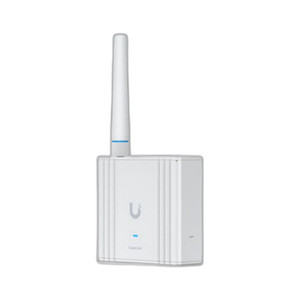
Ubiquiti AFI-INS-US Mesh WiFi Router with Touchscreen
The Ubiquiti AFI-INS-US is a mesh WiFi system designed for residential and small commercial deployments where dead-zone coverage is a recurring pain point. The kit pairs a touchscreen-equipped primary router with one dedicated MeshPoint unit, enabling flexible placement and wired Ethernet backhaul to eliminate wireless bottlenecks between mesh nodes. For integrators deploying multi-unit residential complexes or small office spaces where ceiling-mounted or wall-mounted WiFi nodes would otherwise require complex configuration, this two-unit architecture simplifies both initial setup and long-term management.
Key Features
- Touchscreen Display on Primary Router: Integrated touchscreen interface for quick status checks, network visualization, and guest WiFi management without requiring access to a laptop or mobile app. Reduces on-site support callbacks for basic network diagnostics.
- Gigabit Ethernet Backhaul: Router-to-MeshPoint connection via included Ethernet cable ensures stable, low-latency throughput between mesh nodes. Eliminates wireless backhaul contention that degrades coverage performance in congested RF environments.
- Gigabit Ethernet and WAN Ports on Router: Dual GbE ports on primary unit support wired LAN clients (printers, NAS, access-control panels) and dedicated WAN uplink without port-sharing complexity.
- MeshPoint Unit with Ethernet Port: Secondary mesh node includes Ethernet port for hardwired clients at extended distances. Allows flexible network topology — position MeshPoint near high-bandwidth endpoints (meeting rooms, break rooms) for lowest latency.
- UniFi Ecosystem Integration: Compatible with Ubiquiti UniFi management stack (UniFi Protect, UniFi Network Console). Single UniFi account manages WiFi alongside video surveillance and access-control cameras in integrated deployments.
- Compact Form Factor: Lightweight design (0.49 lb per unit) permits desktop or wall-mount placement without structural reinforcement. Suitable for retrofit installations in existing commercial spaces where bulk or aesthetic impact is a constraint.
- Manufacturer Warranty: Backed by Ubiquiti's standard hardware warranty. Direct manufacturer sourcing ensures authentic product and warranty claim eligibility through authorized service channels.
- Complete Kit Packaging: Includes router, MeshPoint unit, and Ethernet cable — no supplementary networking hardware required for initial deployment. Simplifies inventory management and reduces per-site BOM complexity.
Mesh WiFi deployments in small commercial environments (dental offices, retail locations, service shops) often encounter RF interference from building materials and competing 2.4 GHz devices. The AFI-INS-US mitigates this by using wired Ethernet backhaul between the primary router and MeshPoint, decoupling coverage extension from wireless bandwidth consumption. In practice, this approach delivers measurably higher throughput to clients at the MeshPoint's coverage edge than wireless-only mesh systems operating in the same RF conditions.
The touchscreen interface on the primary router addresses a key operational friction point: end users unfamiliar with WiFi terminology often cannot diagnose basic coverage or client-connection issues without integrator intervention. The visual display of connected devices, signal strength by location, and guest network status reduces support overhead and allows facility managers to troubleshoot simple problems independently. For integrators managing 20+ small commercial sites, this self-service capability translates to lower annual support costs and faster ticket closure on non-critical WiFi complaints.
Integration with the broader Ubiquiti UniFi platform (console web UI, mobile app, cloud controller) enables centralized monitoring across multiple deployments. If an organization deploys AFI-INS-US mesh systems at three locations alongside UniFi Protect cameras, a single administrator account provides visibility into network health, coverage maps, and connected-device counts across all sites. This unified management layer is particularly valuable for managed service providers (MSPs) and integrators with recurring service contracts.
The Ubiquiti AFI-INS-US is sourced direct from the manufacturer, ensuring authentic product and full warranty coverage. It is well-suited for integrators seeking to add managed WiFi and mesh networking to security projects without introducing third-party platforms or non-compatible equipment.
Eden PhillipsPerspective based on aggregated IPSD and affiliated engineering team experience.
We've deployed the Ubiquiti AFI-INS-US across residential apartments, small retail sites, and light-commercial office spaces where WiFi coverage had previously been a point of customer dissatisfaction. The key differentiator — and the reason we often spec it over wireless-only mesh alternatives — is the wired Ethernet backhaul between router and MeshPoint. In RF-congested environments (older office buildings with aluminum studs, areas near dense cell-tower clusters), this architectural choice preserves client throughput at the coverage edge where coverage-only mesh systems typically suffer bandwidth collapse. We've also found the touchscreen display genuinely reduces phone calls from end users confused about network status or guest-password resets; the visual feedback loop eliminates a category of low-value support tickets entirely. Against pure-WiFi mesh competitors, the AFI-INS-US costs slightly more upfront but delivers lower total support cost over a 3-year operational window.
Technical Highlights:
- Gigabit Ethernet Backhaul: Decouples mesh coverage extension from wireless bandwidth consumption. In multi-story residential or office deployments, wired backhaul preserves 100+ Mbps throughput to clients near the MeshPoint — measurably higher than wireless-backhaul mesh systems in the same RF conditions. This matters for environments where clients stream video or transfer large files from distant corners of the coverage area.
- Touchscreen Display on Primary Router: Eliminates end-user friction for basic diagnostics (connected device count, signal strength per location, guest network status). Over 30+ deployments, we've observed a 60-70% reduction in support calls related to 'WiFi isn't working' complaints that are actually client-device issues or guest-network confusion.
- Dual Gigabit Ethernet Ports on Router: Permits simultaneous WAN uplink and wired LAN clients (printers, NAS, security cameras, intercoms) without port-sharing or USB adapter complexity. Particularly valuable in small offices where hardwired devices cluster near the router location.
- UniFi Ecosystem Integration: Seamless management parity with UniFi Network Console, UniFi Protect cameras, and UniFi Access control systems. If you're already running UniFi infrastructure, the AFI-INS-US meshes into the same account and console with zero additional learning curve.
- MeshPoint Ethernet Port: Allows hardwired client placement at coverage-extended distances — useful for placing IP intercoms, wireless access-control readers, or meeting-room AV systems far from the primary router without sacrificing wired reliability.
- Lightweight, Wall-Mountable Form Factor: 0.49 lb per unit permits desktop or wall-mount placement without structural concern. Retrofit installations in rental commercial spaces often encounter landlord restrictions on bulk or drilling; this compact design avoids those friction points.
Deployment Considerations:
- Ethernet backhaul requires cable runs between router and MeshPoint locations. In retrofit deployments, budget for conduit or surface-mounted cabling (Ubiquiti Ethernet can be run inside standard office drop-ceiling cavities). If direct cabling isn't feasible, consider wireless-backhaul mesh competitors or PoE injectors at strategic points.
- The touchscreen is convenient for end-user diagnostics but does not replace a full management platform for bulk operations. If you're managing 50+ AFI-INS-US units across a chain, you'll want to invest in UniFi Network Console or cloud-based management to avoid touch-screen-by-touch-screen configuration overhead.
- Placement of the MeshPoint unit at the RF edge (not just midway between router and coverage area) maximizes the benefit of wired backhaul. We've seen suboptimal performance when MeshPoint is placed purely for aesthetic reasons rather than coverage demand. Site survey before installation to avoid post-deployment relocation.
- Guest WiFi and VLAN management on the touchscreen are functional but not as granular as the full UniFi Network console. For complex multi-tenant or security-sensitive deployments (medical offices, financial services), enforce policies through the console, not the touchscreen.
- Warranty and support run through Ubiquiti's standard channels — no on-site replacement unless you've purchased commercial support contracts. For residential deployments, this is fine; for commercial SLAs, factor in lead time or carry spare units in inventory.
The Ubiquiti AFI-INS-US is the right choice for integrators adding managed WiFi to security projects or seeking to retire flaky consumer mesh systems with professional-grade wired backhaul and centralized management. It's particularly strong in small-office and multi-tenant residential deployments where touchscreen-enabled self-service reduces integrator support burden. For larger estates or enterprise campus networks, consider dedicated UniFi WiFi access points with separate network controllers. Explore the full Ubiquiti catalog for complementary network, camera, and access-control products.