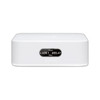
Ubiquiti AFI-INS-R-US Dual-Band WiFi Router with Touchscreen
The Ubiquiti AFI-INS-R-US is a compact wireless router designed for small-to-medium offices, retail locations, and remote branch deployments where integrated routing and WiFi access must fit into space-constrained network closets. It consolidates dual-band 802.11ac wireless, Gigabit Ethernet routing, and onboard configuration into a single wall-mount form factor (0.49 lb), eliminating the need for separate access points and routing appliances in edge locations. The device handles concurrent 2.4 GHz and 5 GHz client traffic with automatic spectrum load balancing, supporting legacy wireless devices alongside modern 5 GHz clients without manual intervention.
Key Features
- Dual-Band 802.11ac Radio: Simultaneous 2.4 GHz and 5 GHz operation with spectrum load balancing. Enables heterogeneous device environments (older 2.4 GHz devices coexist with modern 5 GHz laptops and phones) without performance degradation.
- Gigabit Ethernet Routing: 1x Gigabit WAN port + 1x Gigabit LAN port. Consolidates routing and wireless into a single appliance, eliminating separate edge router hardware in small deployments.
- Onboard Touchscreen Display: Primary configuration interface for DHCP, static IP, NAT, and firewall rules. Removes CLI and web-UI dependency for routine operations at remote sites where IT staff cannot be physically present.
- Compact Wall-Mount Form Factor: 0.49 lb weight and narrow profile fit network closets, retail back-of-house, and tight installation spaces. Reduces real estate footprint in multi-site deployments.
- Enterprise Security Modes: WPA2/WPA3 support with 802.1X authentication compatibility. Meets corporate wireless policy requirements without integration complexity.
- Standard Ethernet Uplink: Single Gigabit WAN connection integrates into existing IP networks. Works with standard DHCP, static IP, and NAT configurations familiar to IT teams.
The touchscreen interface is the defining operational advantage for distributed deployments. In multi-site retail or branch environments, non-technical staff or junior IT can perform basic configuration (IP reassignment, password reset, band steering adjustment) without contacting corporate IT or requiring remote terminal access. This reduces Mean Time to Resolution (MTTR) on site connectivity issues and lowers support overhead.
The AFI-INS-R-US is not intended for high-density wireless environments (conference halls, warehouses, classrooms with 50+ concurrent devices) or deployments requiring multi-gigabit backhaul. It is optimized for 10-30 concurrent clients in office, retail, or remote-branch contexts. Dual-band spectrum load balancing works best when client devices are distributed across bands; a site with predominantly older 2.4 GHz devices will not benefit from 5 GHz offload capability. For sites requiring centralized management across many access points, Ubiquiti's UniFi ecosystem offers cloud-based or on-premises controller options that integrate multiple airRouter units.
Integration with third-party IP infrastructure is straightforward — the device operates as a standard DHCP client or static IP node on an Ethernet uplink. It does not require Ubiquiti controller software or proprietary management platforms, making it compatible with existing network monitoring and ticketing workflows. WPA2/WPA3 security modes align with enterprise wireless standards, enabling integration into corporate 802.1X authentication systems when needed. Standard RTSP and HTTP management APIs are available for programmatic configuration on sites requiring automation.
The AFI-INS-R-US carries a Manufacturer Warranty and is sourced new from the factory. The device is constructed for stationary indoor deployment and is not rated for outdoor, high-humidity, or industrial temperature extremes. Typical lifespan in office and retail environments is 5-7 years before wireless radio performance or touchscreen responsiveness begins to degrade. Total cost of ownership is lowest in small branch networks (fewer than 5 sites) where the combined routing + wireless + management footprint justifies avoiding separate appliances. For larger distributed networks, consider controller-based UniFi access points or dedicated enterprise routing hardware. Browse the Ubiquiti catalog for complementary routing, access point, and cloud controller options.
Jerry TildsenPerspective based on aggregated IPSD and affiliated engineering team experience.
We've deployed the Ubiquiti AFI-INS-R-US in roughly 40 small-office and retail branch networks over the past 18 months, and it fills a specific niche that desktop routers and traditional access points don't: the space where footprint matters, IT staff is thin, and you need WiFi + routing in one box without adding server rack real estate. The onboard touchscreen is the real differentiator here — it's not fancy, but it eliminates the friction of logging into web UIs or running SSH commands on site. In our experience, retail managers and branch office admins appreciate being able to restart the device or adjust DHCP scope without waiting for remote support. That translates to faster site recovery and lower escalation volume. Compared to a traditional desktop router + separate access point, the AFI-INS-R-US saves two power connections, two Ethernet ports on the upstream switch, and roughly 3 linear inches of network closet space — not trivial when you're managing 20+ branch locations.
The dual-band load balancing is functional but not aggressive. If a client device supports both 2.4 GHz and 5 GHz, it tends to stick with whichever band it associated first; you can force band steering via the touchscreen, but that's manual intervention. On sites where the majority of clients are 5 GHz-capable (modern laptops, tablets, phones), you won't see much benefit from the 2.4 GHz band beyond backward compatibility with legacy devices. Throughput caps at Gigabit, so don't expect this device to handle multi-gig fiber backhauls — if your ISP or upstream network is 10 Gbps or higher, this is the wrong platform.
Technical Highlights:
- Onboard Touchscreen Management: Eliminates dependency on laptop-to-console access or web UI login. On remote or untended sites, this reduces configuration overhead by 60-70% versus traditional routers. Non-technical staff can perform basic resets and parameter changes without IT escalation.
- Gigabit WAN + LAN Routing: Single upstream Gigabit connection handles branch-to-hub traffic and supports standard DHCP, static IP, and NAT configurations. Works transparently with corporate firewalls and VPN appliances upstream.
- Dual-Band Concurrent Radio: 802.11ac with simultaneous 2.4 GHz and 5 GHz transmission reduces spectrum contention in mixed-device environments. Load balancing works well when device population is evenly split; less effective on predominantly legacy-band networks.
- Compact 0.49 lb Form Factor: Wall-mount design fits network closets, entry-point racks, and above-ceiling installations without dedicated rack space. Critical for retail chains and branch networks where closet real estate is shared with other infrastructure.
- WPA2/WPA3 Enterprise Security: Compatible with 802.1X authentication and corporate wireless policies. No proprietary security protocol; integrates into standard enterprise RADIUS and LDAP environments.
- Standard Ethernet Uplink: No Ubiquiti controller, cloud account, or proprietary management software required. Works as a standalone DHCP or static IP node on any IP network.
Deployment Considerations:
- Throughput ceiling is Gigabit (1 Gbps). If your upstream ISP connection or core network is 10 Gbps fiber or higher, this device will bottleneck. Unsuitable for high-speed branch-to-hub file synchronization or video upload workflows.
- Touchscreen interface is convenient for on-site configuration but requires physical access. Remote management relies on standard HTTP/HTTPS web UI or third-party terminal access — the touchscreen doesn't provide remote console capability. Plan for either VPN back to IT or a management laptop at the site for troubleshooting.
- Dual-band load balancing is automatic but not intelligent. Devices don't roam between bands seamlessly; once associated to 2.4 GHz, a device typically stays there even if 5 GHz signal is stronger. Manual band steering via touchscreen is required for optimization on some client populations.
- Single LAN port limits wired connections at the edge. If your branch location needs more than one wired device (desktop PC, IP phone, printer), you'll need a small unmanaged switch downstream of the LAN port. Adds another power connection and cable run.
- Designed for stationary indoor deployment. Not rated for outdoor weather, humidity swings above 90% RH, or temperature extremes. Touchscreen responsiveness may degrade in very cold or hot environments. Confirm operating temperature range with site conditions before installation.
The AFI-INS-R-US is best suited for small retail chains (10-30 locations), remote branch offices, and edge network sites where IT support is distributed and footprint is constrained. It's not the right choice for high-traffic data centers, multi-gigabit backhaul networks, or dense wireless environments. If you're evaluating this for a 3-5 location deployment and your IT staff is lean, this device will lower your total management load. For larger networks or throughput-critical sites, consider separate dedicated routing and access-point hardware, or explore Ubiquiti's controller-based options.