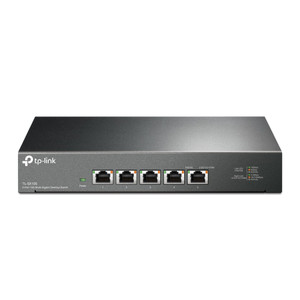
Product images are provided for reference and may not represent the exact model, configuration, or included components.

Overview

SKU: TL-SG1024S
Condition: New
Availability: Backorder Available — Contact for ETA
Warranty Manufacturer Warranty
Write a Review

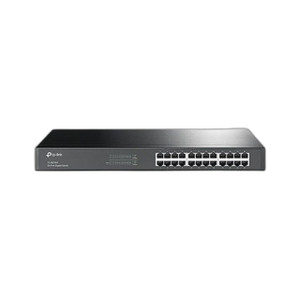
TP-Link TL-SG1024S Switch 24-Port Gigabit Desktop/Rackmount

TP-Link TL-SG1024S 24-Port Gigabit SwitchOverviewThe TL-SG1024S is an unmanaged network switch with 24 Gigabit Ethernet ports, available in both deskt…

$103.99
Special Order
Usually Ships in 2-3 Weeks

Quantity:

Adding to cart… The item has been added
Compatibility guidance available for your deployment
Experts for pre and post-sales support
Technical and documentation support
Shipping and lead-time confirmation before install

Laura Bennett, IPSD Senior Specialist

Talk to Laura

Specialized training • U.S - based

Senior Specialist • 877-277-7147

TP-Link TL-SG1024S Switch 24-Port Gigabit Desktop/Rackmount

$103.99

Overview

SKU: TL-SG1024S
Condition: New
Availability: Backorder Available — Contact for ETA
Warranty Manufacturer Warranty

No Bots, Just Experts

Questions about this product? Free pre-sales support from a senior specialist — product questions, compatibility checks, BOM quotes, price confirmation — typically answered within one business day. Need camera placement or system design work? Engineering time is $175 per hour (qty 1 = 1 hour). Hardware buyers get up to one hour ($175) credited back on their order.

Description

TP-Link TL-SG1024S 24-Port Gigabit Switch

Overview

The TL-SG1024S is an unmanaged network switch with 24 Gigabit Ethernet ports, available in both desktop and rackmount enclosures. Unmanaged operation means zero configuration — plug ports into your wireless access point, IP camera, or network segment and traffic flows immediately. This model fits small-to-medium IP security deployments where you need to extend Gigabit connectivity to cameras, NVRs, or field devices without VLAN isolation, QoS tuning, or managed features.

Deployment Context

At 24 ports, the TL-SG1024S absorbs modest camera clusters and mixed device networks. Each port delivers full 1000 Mbps throughput — sufficient for multiple HD and 4K streams per port depending on bitrate. The dual form factor (desktop or rackmount) accommodates both cabinet installations and on-shelf wiring closet placement. No power budget or PoE capabilities; use a separate PoE injector or dedicated PoE switch if you need remote power delivery to cameras.

Compatibility and Limitations

The TL-SG1024S connects any device with an RJ-45 Gigabit port — cameras, NVRs, access points, storage, workstations. No management interface; you cannot configure port mirroring, VLANs, or storm control. If your design requires traffic isolation between camera zones or per-port monitoring, step up to a managed variant in the same family. The unmanaged design eliminates operational overhead but trades flexibility for simplicity.

When to Choose a Different Model

If you require managed features (VLAN segmentation, QoS, port-based redundancy), consider a managed Gigabit switch from the same TP-Link line. If you need integrated PoE power delivery, evaluate a PoE-capable variant instead of managing external injectors separately.

Specifications
Source: 1
Product Type: Unmanaged Ethernet Switch
Type: Switch
Managed: No (Unmanaged)
Ports: 24
Speed: 1 Gbps (Gigabit)
Brand: TP-Link
MPN: TL-SG1024S
Connectivity: Ethernet
Power: PoE
Q&A
Reviews
Have Questions? Ask an Expert.

RELATED PRODUCTS

System Design, Deployment & Technical Support

Support services and planning resources for commercial surveillance, access control, and infrastructure deployments.

Fixed scope • Fixed price

System Design Assistance

  • Get help validating product compatibility
  • Coverage requirements
  • Storage planning and deployment architecture before you buy.
Request Design Help

Deployment & Configuration Support

  • Access fixed-scope support for rollout planning
  • User setup guidance
  • Migration and system standardization across single-site or multi-site deployments
View Support Services

Guides, Tools & Calculators

  • PoE requirements
  • Storage retention
  • Camera selection and deployment methodology
Open Technical Resources