TP-Link ARCHER T4U PLUS AC1300 Wireless USB Adapter
Overview
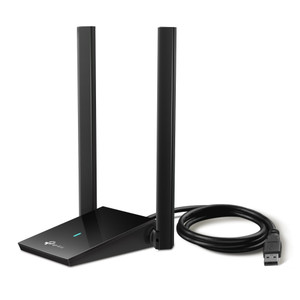
The ARCHER T4U PLUS is an AC1300 dual-antenna USB wireless adapter that adds or extends 802.11ac Wi-Fi connectivity to surveillance cameras, NVRs, edge recorders, and other devices where Ethernet is impractical or unavailable. The dual high-gain antennas deliver directional coverage suitable for backhaul links between infrastructure or as a wireless bridge for temporary deployments. Deploy this when your surveillance device has a USB 2.0 or 3.0 port and you need reliable wireless connectivity without running cable—typical use cases include remote camera locations, temporary monitoring setups, or redundant connectivity to fixed recorders in areas where PoE drops are difficult to route.
Compatibility
The ARCHER T4U PLUS works with any surveillance camera, NVR, or mobile device equipped with a USB 2.0 or USB 3.0 port that supports external wireless adapters. Most industrial-grade fixed cameras and recorders do not support USB wireless adapters—verify your target device documentation before purchase. The adapter operates on both 2.4 GHz and 5 GHz bands and is compatible with dual-band or single-band networks. Power is drawn entirely from the USB port (no external power supply required); confirm your device's USB port can supply adequate current—typically 500 mA minimum for USB 2.0 or 900 mA for USB 3.0. If your device cannot supply sufficient power, the adapter will not initialize.
Installation Notes
Position the dual antennas perpendicular to each other or aligned toward your access point to maximize signal strength. Mount the adapter within 2–3 feet of the camera or device housing to minimize mechanical stress on the USB connector. Use a right-angle USB extension cable if needed to avoid strain. Keep the adapter clear of metal enclosures, brackets, and RF-reflective materials—these degrade signal. On outdoor or IP66-rated devices, protect the USB connection point and adapter body with a weatherproof cable gland or enclosure to prevent moisture ingress.