Product images are provided for reference and may not represent the exact model, configuration, or included components.

Overview

SKU: ARCHER T2U
Condition: New
Availability: Backorder Available — Contact for ETA
Warranty Manufacturer Warranty
Write a Review

TP-Link ARCHER T2U AC600 Dual Band WiFi USB Adapter

TP-Link ARCHER T2U AC600 Dual Band WiFi USB Adapter Overview The ARCHER T2U is a compact USB wireless adapter delivering AC600 speeds (433Mbps on 5GH…

$23.99
Special Order
Usually Ships in 2-3 Weeks

Quantity:

Adding to cart… The item has been added
Compatibility guidance available for your deployment
Experts for pre and post-sales support
Technical and documentation support
Shipping and lead-time confirmation before install

Laura Bennett, IPSD Senior Specialist

Talk to Laura

Specialized training • U.S - based

Senior Specialist • 877-277-7147

TP-Link ARCHER T2U AC600 Dual Band WiFi USB Adapter

$23.99

Overview

SKU: ARCHER T2U
Condition: New
Availability: Backorder Available — Contact for ETA
Warranty Manufacturer Warranty

No Bots, Just Experts

Questions about this product? Free pre-sales support from a senior specialist — product questions, compatibility checks, BOM quotes, price confirmation — typically answered within one business day. Need camera placement or system design work? Engineering time is $175 per hour (qty 1 = 1 hour). Hardware buyers get up to one hour ($175) credited back on their order.

Description

TP-Link ARCHER T2U AC600 Dual Band WiFi USB Adapter

Overview

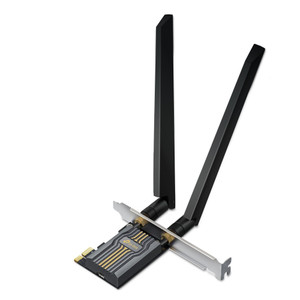
The ARCHER T2U is a compact USB wireless adapter delivering AC600 speeds (433Mbps on 5GHz, 150Mbps on 2.4GHz) via dual-band 802.11ac/a/b/g/n support. Built on MediaTek 1T1R chipset with internal antenna, it's designed to add WiFi connectivity to surveillance equipment, edge recorders, or monitoring stations where wired Ethernet isn't practical. Plug into a USB 2.0 port and configure a wireless uplink — useful for temporary deployments, mobile command vehicles, or remote cabinet installations where running Cat5/6 would add cost and complexity.

Compatibility

The ARCHER T2U connects via standard USB 2.0, making it compatible with any surveillance NVR, DVR, or industrial PC that exposes a USB port and supports wireless drivers for Linux/Windows environments. Confirm driver availability for your specific OS version before deployment — TP-Link supplies drivers for Windows (XP through 10/11) and limited Linux distributions. If your VMS or recorder runs proprietary firmware without USB driver support, this adapter will not function. Works with any 802.11ac or backward-compatible WiFi network; no special SSID or security protocol restrictions.

Installation Notes

Mount the adapter in a location with line-of-sight or minimal obstruction to the target WiFi access point. The internal antenna has typical 2–5 meter indoor range at AC600 speeds; range drops with distance and interference. USB 2.0 supplies adequate power (no external power supply required). Install driver software on the host device before plugging in the adapter. If the recorder or PC runs a locked-down embedded OS, USB driver installation may not be possible — verify driver compatibility with your manufacturer before purchase. Avoid mounting directly against metal enclosures, which degrade RF performance significantly.

What's in the Box

  • 1x TP-Link ARCHER T2U USB WiFi Adapter
  • 1x Quick Start Guide
  • 1x Driver CD (Windows/Linux)
Specifications
Source: 1
Brand: TP-Link
MPN: ARCHER T2U
Type: Power Supply
Connectivity: USB
Power: 11V AC
Ir Lowlight: 850nm
Q&A
Reviews
Have Questions? Ask an Expert.

RELATED PRODUCTS

System Design, Deployment & Technical Support

Support services and planning resources for commercial surveillance, access control, and infrastructure deployments.

Fixed scope • Fixed price

System Design Assistance

  • Get help validating product compatibility
  • Coverage requirements
  • Storage planning and deployment architecture before you buy.
Request Design Help

Deployment & Configuration Support

  • Access fixed-scope support for rollout planning
  • User setup guidance
  • Migration and system standardization across single-site or multi-site deployments
View Support Services

Guides, Tools & Calculators

  • PoE requirements
  • Storage retention
  • Camera selection and deployment methodology
Open Technical Resources