TP-Link ARCHER TBE400E BE6500 WiFi 7 Bluetooth Adapter
Overview
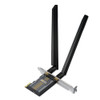
The ARCHER TBE400E is a PCI Express WiFi 7 adapter that adds tri-band wireless and Bluetooth 5.4 to desktop or workstation systems. It delivers 2880 Mbps across the 6 GHz band, 2880 Mbps on 5 GHz, and 688 Mbps on 2.4 GHz — totaling 6.5 Gbps aggregate throughput. This adapter fits standard PCIe slots and deploys in environments where you need WiFi 7 edge speeds without replacing network infrastructure; it bridges devices to WiFi 7 networks or acts as a secondary wireless NIC for redundancy or isolated traffic segmentation.
Compatibility
The ARCHER TBE400E installs in any desktop or server with a standard PCIe 3.0 or higher slot. It works with Windows, Linux, and macOS systems that support generic PCIe WiFi adapters and have driver availability for this chipset. Because it is a standard PCI Express card, it is not limited to specific motherboard brands — any system with an available full-height or half-height PCIe x1 slot can host it. Confirm driver support for your OS before purchase; TP-Link provides drivers for common Windows and Linux distributions, and macOS support depends on chipset compatibility.
Installation Notes
Install the ARCHER TBE400E into an available PCIe slot, secure the bracket to the case, and attach the two external tri-band antennas provided. No additional power connector is required — the card draws power from the PCIe bus itself. Ensure adequate clearance around the antenna placement to avoid RF shadowing from the case or adjacent components. After physical installation, load the chipset driver before connecting to a WiFi 7 network. Multi-RU and MLO (Multi-Link Operation) require compatible WiFi 7 access points; standard WiFi 6/6E networks will fall back to legacy band operation.
What's in the Box
- 1x TP-Link ARCHER TBE400E PCIe WiFi 7 Adapter
- 2x High-gain tri-band external antennas
- 1x PCI bracket and installation hardware
- Driver CD and documentation