
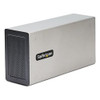

Startech 4-Slot Pcie Expansion Chassis - 4PCIE-Pcie-Enclosure
In stock · Ships same business day
Free shipping over $499
$450.99

Manufacturer-verified compatible cameras, recorders, mounts, accessories, and licenses for this product. Adjust quantities and add the entire bundle to your cart in one click.
Questions about this product? Free pre-sales support from a senior specialist — product questions, compatibility checks, BOM quotes, price confirmation — typically answered within one business day. Need camera placement or system design work? Engineering time is $175 per hour (qty 1 = 1 hour). Hardware buyers get up to one hour ($175) credited back on their order.
The StarTech 2TBT3-PCIE-ENCLOSURE is an external Thunderbolt 3 PCIe expansion enclosure that gives you two full-size PCI Express 3.0 x16 slots over a single TB3 cable — a practical solution when your laptop or compact workstation needs GPU acceleration, a capture card, or a specialized interface card without a dedicated tower chassis. With up to 40Gbps of raw Thunderbolt 3 bandwidth and 32Gbps shared across the PCIe fabric, this enclosure targets creative workstations, field-deployed engineering systems, and any scenario where PCIe expansion on a mobile or space-constrained host is the constraint. It ships with a 1-meter Thunderbolt 3 cable and supports both macOS and Windows — covering most professional workstation environments without additional driver packages.
The 2TBT3-PCIE-ENCLOSURE requires a Thunderbolt 3 port on the host system. Thunderbolt 3 uses the USB-C physical connector, but not every USB-C port supports Thunderbolt — verify your host has a certified TB3 controller (Intel Titan Ridge or Alpine Ridge generation or later). The enclosure does not support Thunderbolt 4 or USB4 in a backward-compatible mode per available evidence; confirm host compatibility before purchase. PCIe card compatibility depends on the card vendor's driver support for the target OS. Cards designed for workstation towers generally install and operate normally, but some cards with aggressive power management or platform-specific firmware may behave differently in an external enclosure — test in your environment if the application is mission-critical. For network video recorders and video workstations in IP camera deployments, this enclosure can host a capture card or additional NIC to extend a compact workstation's throughput without replacing the host machine. Storage expansion via network switches or direct-attached PCIe NVMe cards is another documented use pattern. Buyers planning PoE switch integration or high-channel NVR builds should review their PCIe card's bandwidth requirements against the 21.6Gbps per-slot maximum to confirm no throughput ceiling will be hit at full channel load. A surveillance camera system's capture card in particular should be evaluated for sustained write bandwidth under 24/7 recording conditions.
Q: What is the maximum bandwidth available to a single PCIe card in the 2TBT3-PCIE-ENCLOSURE?
A: A single card can access up to 21.6Gbps. The total shared bandwidth across both slots is 32Gbps — so if both slots are populated with active cards, bandwidth is split between them. The Thunderbolt 3 link itself runs at 40Gbps, but PCIe overhead accounts for the difference.
Q: Can the 2TBT3-PCIE-ENCLOSURE power high-TDP workstation GPUs?
A: The enclosure provides up to 25W per PCIe slot and up to 40W per card total (combining PCIe and SATA supplemental power). Cards with TDPs significantly above 40W are not supported by the enclosure's power budget. The internal PSU provides 120W total at 12V/10A — shared across both slots and SATA ports.
Q: Does the 2TBT3-PCIE-ENCLOSURE work with Thunderbolt 4 or USB4 hosts?
A: Available evidence does not confirm backward compatibility with Thunderbolt 4 or USB4 hosts. Verify Thunderbolt 3 support on your specific host port before ordering. Thunderbolt 3 uses a USB-C connector, but not all USB-C ports support Thunderbolt.
Q: What operating systems are supported?
A: The enclosure supports macOS and Windows. Individual PCIe card compatibility depends on that card's own driver support for your OS and platform — the enclosure itself is OS-agnostic at the Thunderbolt 3 level.
Q: What is the warranty on the 2TBT3-PCIE-ENCLOSURE?
A: StarTech provides a 2-year manufacturer warranty on the 2TBT3-PCIE-ENCLOSURE.
Q: Can the 2TBT3-PCIE-ENCLOSURE support an 8K display output?
A: Yes. The enclosure passes DisplayPort 1.4 through the Thunderbolt 3 connection, which supports up to 8K resolution. This requires a GPU installed in one of the PCIe slots with DisplayPort 1.4 output, and an 8K-capable display connected to that GPU.

The spec I keep coming back to with the 2TBT3-PCIE-ENCLOSURE is the 21.6Gbps per-slot ceiling — because that number is where most integrators either get this right or get burned. The Thunderbolt 3 pipe is 40Gbps, PCIe overhead brings usable bandwidth to 32Gbps shared, and a single card maxes out at 21.6Gbps. For a 10GbE NIC or a 4K capture card, that's more than enough headroom. For a GPU driving multiple 4K feeds simultaneously, you're going to feel that ceiling under sustained load.
Technical Highlights:
Deployment Considerations:
This enclosure fits best in a video production or surveillance analytics workstation scenario where a compact laptop or NUC-style host needs a dedicated capture card and a 10GbE NIC simultaneously — two slots, one cable, and a clean desk without a tower chassis in the rack.

Manufacturer-verified compatible cameras, recorders, mounts, accessories, and licenses for this product. Adjust quantities and add the entire bundle to your cart in one click.


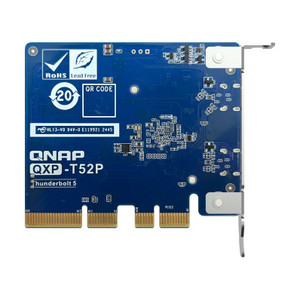
PCIe Gen4 x4 expansion card that adds two Thunderbolt 5 (USB Type-C) ports to a compatible QNAP NAS or workstation
Looking for more StarTech products? Shop the full StarTech catalog →
Support services and planning resources for commercial surveillance, access control, and infrastructure deployments.
Fixed scope • Fixed price