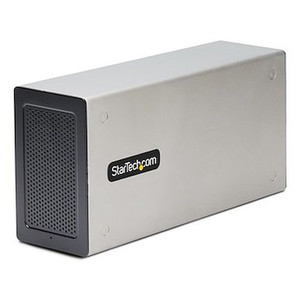
StarTech 4PCIE-PCIE-ENCLOSURE 4-Slot External PCIe 2.0 Expansion Chassis
Overview
The StarTech 4PCIE-PCIE-ENCLOSURE is an external PCIe expansion chassis that gives desktop workstations and servers four additional PCI Express x1 slots without opening the chassis or replacing the motherboard. It connects to a host system through a single USB Type-C cable — a 5.9 ft run that covers the gap between a tower workstation and an adjacent shelf — and delivers PCIe 2.0 bandwidth over a 10 Gbps link. If you are running a surveillance workstation, a capture station, or a security-focused server that has run out of internal PCIe capacity, the 4PCIE-PCIE-ENCLOSURE is a practical expansion path that does not require a new host platform.
The unit is built on SECC steel and houses its own power supply rated at 36W (12V DC at 3A) from a 100–240V AC input, so the cards installed in the expansion chassis draw from a dedicated power rail rather than stressing the host system's PSU. Dimensions come in at 16.2 in wide, 5.6 in tall, and 5.4 in deep, with a shipping weight of 5.1 lb — manageable on a desktop shelf or light-duty rack surface.
Key Features
- 4 x PCIe x1 Expansion Slots: Four independent x1 slots mean you can install up to four add-in cards simultaneously — relevant when deploying multi-port capture cards, hardware accelerators, or security-specific NICs that each occupy a single slot. No slot-sharing, no IRQ arbitration on a single physical connector.
- PCIe 2.0 x2 Host Interface at 10 Gbps: The host card connects over PCIe 2.0 and tunnels traffic through the USB Type-C cable at 10 Gbps aggregate. That bandwidth is shared across all four slots, so plan card selection accordingly — low-bandwidth cards like serial adapters or GPIO interfaces are the best fit. High-throughput cards (10GbE NICs, NVMe adapters) will saturate the shared pipe quickly.
- USB Type-C Host Connection: The USB Type-C interface on the host card means you do not need a proprietary PCIe slot on the motherboard for the connection — the host card occupies a standard PCIe slot and the cable routes externally. This also simplifies cable management and lets you position the enclosure off the main chassis.
- 5.9 ft (1.8m) Cable: The included cable is long enough to place the enclosure on a separate shelf from the host tower, which helps with airflow separation and physical security in a workstation rack environment.
- Self-Contained 36W Power Supply: The integrated PSU (100–240V AC input, 12V DC / 3A output) means add-in cards in the expansion chassis get dedicated power. You are not adding 36W of draw to the host system's power rail, which matters when that host is already near its PSU ceiling.
- SECC Steel Construction: The cold-rolled steel enclosure provides EMI shielding for the PCIe slots and the cards inside, which is relevant when this chassis sits near RF-sensitive equipment in a control room or server closet.
- OS Compatibility — Windows, macOS, Linux: Driver support across all three major operating systems means the chassis integrates into heterogeneous environments without sourcing specialty drivers. Linux compatibility in particular is useful in security workstations and NVR platforms running Ubuntu or CentOS-based stacks.
- 0 to 60°C Operating Temperature: The rated operating range covers typical indoor environments including unconditioned equipment rooms, though it is not rated for outdoor or industrial extremes — deploy indoors in a controlled environment.
- 2-Year Manufacturer Warranty: StarTech backs the 4PCIE-PCIE-ENCLOSURE with a 2-year warranty, which aligns with the expected service cycle for infrastructure expansion hardware in commercial deployments.
Integration and Compatibility
The 4PCIE-PCIE-ENCLOSURE installs via a host card that seats in a standard PCIe slot on the host motherboard. The USB Type-C cable routes from the host card to the enclosure — no PCIe riser or proprietary backplane required on the host side. Compatibility spans Windows, macOS, and Linux, making it viable alongside network video recorders and workstation-class servers running Linux-based VMS platforms. The PCIe 2.0 standard used here is backward-compatible with PCIe 1.x cards, so legacy add-in cards will seat and operate at their native speed.
For security integrators adding capture cards or hardware decode accelerators to an existing surveillance server, this chassis provides a non-invasive expansion path. Reference the PCIe expansion planning guide to evaluate bandwidth requirements before selecting cards for the four slots. If you are also evaluating StarTech networking and infrastructure products, the 4PCIE-PCIE-ENCLOSURE fits the same commercial workstation infrastructure focus. For installations requiring additional PoE switches or network expansion alongside PCIe card upgrades, plan both expansions together to avoid a second cable run to the same workstation.
Frequently Asked Questions
Q: What type of PCIe cards can I install in the 4PCIE-PCIE-ENCLOSURE?
A: The enclosure provides four PCIe x1 slots, so any standard half-height or full-height x1 card is physically compatible. Cards that use x4, x8, or x16 connectors will not fit. Aggregate bandwidth across all four slots is shared at 10 Gbps (PCIe 2.0 x2 via USB-C), so low-to-medium bandwidth cards — serial adapters, GPIO controllers, single-port NICs, or security capture cards — are the best candidates.
Q: Does the 4PCIE-PCIE-ENCLOSURE require an external power source?
A: Yes. The chassis includes an integrated power supply that accepts 100–240V AC input and outputs 12V DC at 3A (36W total). You will need to connect it to a standard AC outlet. The host system's PSU is not involved in powering the expansion cards.
Q: What operating systems are supported?
A: The 4PCIE-PCIE-ENCLOSURE is compatible with Windows, macOS, and Linux. This covers the majority of commercial surveillance workstation and server operating environments, including Linux-based VMS deployments.
Q: How long is the cable between the host card and the enclosure?
A: The included USB Type-C cable is 5.9 ft (approximately 1.8m). This is sufficient to place the enclosure on an adjacent shelf or directly beside a tower workstation. Longer cable runs are not tested or specified by StarTech for this product.
Q: What is the warranty on the 4PCIE-PCIE-ENCLOSURE?
A: StarTech provides a 2-year manufacturer warranty on the 4PCIE-PCIE-ENCLOSURE.
Q: Can the 4PCIE-PCIE-ENCLOSURE be used with a server in a rack environment?
A: The enclosure is rated for 0 to 60°C operating temperature and is built for indoor, controlled environments. It is not rack-mountable in a standard 19-inch rack by default, but its compact footprint (16.2 x 5.6 x 5.4 in, 5.1 lb) allows placement on a rack shelf alongside a tower or 1U server. Confirm your rack has a shelf and adequate airflow before deploying.
The 4PCIE-PCIE-ENCLOSURE solves a specific problem I run into regularly on workstation-based surveillance builds: the host motherboard has one or two PCIe slots remaining, and you need three or four more for capture cards or hardware accelerators without migrating to a new server platform. The 10 Gbps USB-C tunnel is the key constraint to understand before you start populating slots — that is shared bandwidth across all four x1 positions, not dedicated per slot.
Technical Highlights:
- 10 Gbps Shared Bandwidth: PCIe 2.0 x2 tunneled over USB Type-C gives you roughly 1 GB/s aggregate across all four slots — more than adequate for four low-bandwidth cards running concurrently, but a hard ceiling if you mix in anything that generates sustained throughput.
- 36W Dedicated PSU: The integrated 12V DC / 3A supply means add-in cards are not competing with the host system's power rail. In a workstation running near its PSU limit, this separation prevents instability when cards under the expansion chassis load up.
- SECC Steel Enclosure: Cold-rolled steel provides meaningful EMI containment for a chassis sitting in a control room next to RF-sensitive receivers or radio equipment — an underappreciated spec in security operations center buildouts.
Deployment Considerations:
- The 5.9 ft cable is the maximum tested run — do not attempt to extend it with a USB-C extension. Place the enclosure within that physical distance of the host card during rack shelf planning.
- All four slots are x1 physical connectors. If your selected add-in cards use x4 or larger edge connectors, they will not seat regardless of electrical speed — verify card form factor before ordering.
The 4PCIE-PCIE-ENCLOSURE is the right call for a surveillance operations center workstation that has exhausted internal slots and needs to add serial I/O cards, hardware codec accelerators, or additional capture interfaces without a platform replacement — particularly where the host is running a Linux-based VMS stack and needs OS-agnostic driver support.