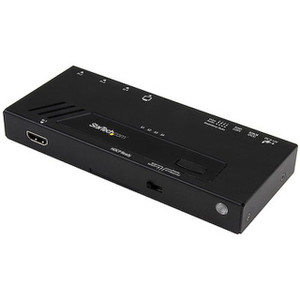
StarTech HDVGADP2HD 3-Input Video Switch to HDMI
The StarTech HDVGADP2HD is a 3-port video switch that consolidates two HDMI sources, one VGA source, and one DisplayPort source down to a single HDMI output — the practical fix for conference rooms, control room workstations, and NOC video walls where a display only has one input but multiple systems need to share it. Instead of physically swapping cables between a laptop, a desktop, and a legacy VGA-only appliance, HDVGADP2HD puts source selection on a front-panel button with LED status indicators, so operators pick the active feed without touching a cable.
Overview
This is a signal-routing box, not a display or recorder — it sits between your source devices and your monitor or video wall processor. With support for 4K digital resolutions up to 3840x2160 at 30Hz and analog VGA up to 1920x1200 at 60Hz, it covers the realistic mix of hardware you'll find in a monitoring or command-center environment: a modern 4K workstation, an older VGA-output KVM extender, and a DisplayPort-equipped server, all landing on one shared monitor.
Key Features
- 2x HDMI + 1x VGA + 1x DisplayPort inputs: covers the three video standards still in active commercial use, so you're not stuck buying separate adapters for legacy VGA gear sitting next to newer DisplayPort workstations.
- 4K digital output at 3840x2160 30Hz: passes through full 4K from HDMI or DisplayPort sources without downscaling, useful when the shared display is a 4K monitor or video wall tile.
- VGA input up to 1920x1200 60Hz: keeps older analog equipment usable on the same switch instead of forcing an early retirement of working VGA hardware.
- Push-button source selection with 4x port LEDs + 1x status LED: operators see at a glance which of the four inputs is live — no digging through an on-screen menu.
- Audio pass-through per input type: 2-channel 3.5mm stereo on VGA, 2-channel stereo over DisplayPort, and 7.1 surround over HDMI, so audio switches along with video instead of needing a separate audio path.
- External power adapter, 100-240V AC input: runs on any standard commercial AC circuit worldwide at 18W draw, drawing 12V DC / 1.5A from the included adapter — no PoE or in-line power dependency to plan around.
- Operating range 0C to 40C: rated for standard equipment-room and office environments; this is not an outdoor or unconditioned-space unit.
- Compact footprint, 1.4 lb: at 6.3 x 4.1 x 1.6 in, it mounts under a desk, behind a monitor, or inside an equipment rack shelf without eating meaningful space.
Integration & Compatibility
HDVGADP2HD works as a source-side companion to any HDMI-input display, projector, or video wall controller — pair it with the monitors already in a control room rather than replacing them. In multi-camera monitoring environments where an operator station needs to reference a live production feed alongside a separate diagnostics laptop, this switch removes the need to physically unplug and replug cables mid-shift. It's a natural fit alongside network video recorders and monitor walls built from IP cameras, letting one display cover both the live NVR feed and a secondary admin PC. For teams planning a broader control-room buildout, the VMS architecture guide covers how monitor and workstation layouts typically get planned around switches like this one. If the room also needs network drops for cameras or workstations, review PoE switches and the PoE planning guide for the surrounding infrastructure, and browse the full StarTech catalog for matching extenders and adapters.
What's in the Box
Evidence does not specify individual package contents beyond the unit and its power adapter, so exact accessory counts are not listed here.
Frequently Asked Questions
Q: What's the maximum resolution the HDVGADP2HD supports?
A: Up to 3840x2160 at 30Hz on digital HDMI/DisplayPort inputs, and 1920x1200 at 60Hz on the analog VGA input.
Q: How many sources can I connect at once?
A: Four total inputs — two HDMI, one VGA, and one DisplayPort — switching to a single HDMI output.
Q: Does the HDVGADP2HD pass audio along with video?
A: Yes. It carries 2-channel 3.5mm stereo audio from VGA sources, 2-channel stereo from DisplayPort, and 7.1 surround sound from HDMI sources.
Q: What's the warranty on the HDVGADP2HD?
A: It carries a 2-year manufacturer warranty.
Q: What power does the HDVGADP2HD require?
A: An external adapter accepting 100-240V AC input and outputting 12V DC at 1.5A, drawing 18 watts.
Q: Can I tell which input is active without an on-screen display?
A: Yes — four port LEDs plus one status LED show the selected source at the front panel.
I get asked a lot about mixed-input monitor walls, and the HDVGADP2HD is the switch I point people to when a room has both legacy VGA gear and current HDMI/DisplayPort sources feeding one display. Four inputs down to one HDMI output, with 4K passthrough at 3840x2160 30Hz, covers the realistic hardware mix in most control rooms I've wired.
Technical Highlights:
- 3840x2160 at 30Hz digital output: full 4K passthrough from HDMI or DisplayPort sources, so a 4K monitor tile isn't bottlenecked by the switch itself.
- 1920x1200 60Hz VGA input: keeps analog legacy equipment on the same shared display instead of forcing a separate monitor just for one old box.
- 18W draw on 100-240V AC: low enough load that it's a non-factor on any standard circuit, and the universal AC input means it travels internationally without a different adapter.
Deployment Considerations:
- Front-panel LED source indicators mean operators don't need to hunt through an OSD menu mid-shift — useful in a NOC where seconds matter during a source swap.
- Watch the resolution ceiling: 30Hz at 4K on the digital inputs is fine for static monitoring dashboards and RDP sessions, but motion-heavy 4K video may look better dropped to 1080p if the source supports 60Hz there instead.
This is the right call for a shared operator workstation in a security control room where a 4K NVR feed, an admin laptop over HDMI, and an older VGA diagnostics terminal all need to land on the same monitor without a cable swap every shift change.