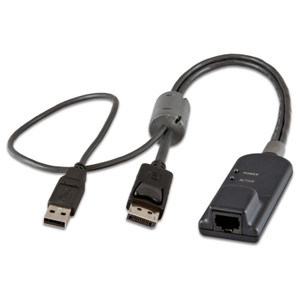
Vertiv MPUIQ-VMCDV DVI USB Virtual Media CAC Server Interface Module
Overview
The Vertiv MPUIQ-VMCDV is a Server Interface Module (SIM) designed to connect DVI-equipped servers to compatible Vertiv Avocent KVM-over-IP switches, delivering USB keyboard and mouse control, virtual media access, Common Access Card (CAC) authentication, and USB 2.0 pass-through — all over a single CAT cable back to the KVM appliance. If you're managing DVI-output servers in a data center or secure facility and need more than basic KVM — specifically smart-card login and remote media mounting — MPUIQ-VMCDV is the SIM that covers that requirement without additional hardware.
The MPUIQ-VMCDV (often searched as MPUIQ VMCDV) fits into the broader Vertiv MPUIQ adapter family, which spans serial, VGA, DisplayPort, HDMI, and smaller form-factor variants — giving you a consistent management architecture regardless of the server video interface mix in your rack.
Key Features
- DVI Video Interface: Connects directly to the DVI output port on the target server — no display adapter or dongle needed. Keeps your signal path clean and eliminates a potential failure point at the server end.
- USB Keyboard and Mouse Emulation: Handles USB HID control at the SIM level, so the target server sees a locally attached keyboard and mouse regardless of KVM switch session state. This matters during BIOS-level access and OS boot sequences where USB timing can drop connections on inferior adapters.
- Virtual Media Support: Mounts remote ISO images, USB drives, or CD/DVD sources as local devices on the target server. Useful for OS deployments, firmware updates, and disaster recovery scenarios where physical media access to the rack isn't practical — or where your policy prohibits it.
- Common Access Card (CAC) Authentication: Passes smart-card reader signals through to the target server, supporting CAC-based login required in DoD, federal agency, and high-security commercial environments. This is a hardware-level pass-through — the server handles the credential validation, not the KVM.
- USB 2.0 Pass-Through: Beyond CAC, the USB 2.0 channel supports other USB peripherals that need direct server-side connectivity, expanding flexibility for specialty devices in managed environments.
- Part of a Consistent MPUIQ Ecosystem: The MPUIQ-VMCDV shares its management architecture with sibling modules covering serial (MPUIQ-SRL), PS/2+VGA (DSAVIQ-PS2M), DisplayPort (MPUIQ-VMCDP), HDMI (MPUIQ-VMCHD), VGA+CAC (MPUIQ-VMCHS-G01), and small form-factor VGA (SFIQ-VGA). A mixed rack with DVI, HDMI, and DisplayPort servers can use matched SIMs throughout — consistent firmware, consistent behavior, single management pane on the KVM appliance.
Integration and Compatibility
The MPUIQ-VMCDV is designed for use with Vertiv Avocent KVM-over-IP appliances that support the MPUIQ adapter family. Within the same product line, you can mix and match SIM types per server: deploy MPUIQ-VMCDV on DVI servers alongside MPUIQ-VMCDP on DisplayPort workstations and MPUIQ-VMCHD on HDMI-only nodes — the KVM switch manages them uniformly. For serial-attached devices (console servers, PDUs, network switches with serial management ports), the MPUIQ-SRL handles extended-distance serial access and requires a separate upgrade module (UPD-AM). For environments with legacy PS/2 servers, the DSAVIQ-PS2M covers VGA video with PS/2 keyboard and mouse plus USB virtual media — useful when you can't retrofit USB HID on older hardware.
If your environment requires KVM switch consolidation across a mixed-interface server fleet, verify that your target Avocent appliance model explicitly lists MPUIQ-VMCDV in its compatible SIM list before ordering — not all appliance generations support every SIM variant. Consult the Vertiv product catalog or your Vertiv appliance's compatibility matrix for confirmation.
For environments with a high density of VGA servers or space-constrained blade chassis, the SFIQ-VGA or SFIQ-VGA08 (8-pack) small form-factor variant may be a better fit — the reduced physical footprint matters in tight 0U or side-mount configurations.
Frequently Asked Questions
Q: What video interface does the MPUIQ-VMCDV support?
A: The MPUIQ-VMCDV supports DVI video output from the target server. It is not compatible with VGA, HDMI, or DisplayPort server outputs — use MPUIQ-VMCHS-G01 for VGA, MPUIQ-VMCHD for HDMI, or MPUIQ-VMCDP for DisplayPort.
Q: Does the MPUIQ-VMCDV support CAC smart-card authentication?
A: Yes. The MPUIQ-VMCDV includes CAC (Common Access Card) pass-through, supporting smart-card-based login required in federal, DoD, and high-security commercial deployments. The authentication is handled server-side — the SIM passes the CAC reader signal through to the target server.
Q: What is virtual media and how does the MPUIQ-VMCDV use it?
A: Virtual media allows a remote ISO image, USB drive, or optical source to be mounted as a local device on the target server through the KVM session. The MPUIQ-VMCDV supports this capability, enabling remote OS installation, firmware updates, and recovery operations without physical access to the server or rack.
Q: Can I mix the MPUIQ-VMCDV with other MPUIQ SIM types on the same KVM appliance?
A: Yes. The MPUIQ adapter family is designed for mixed deployments — you can run MPUIQ-VMCDV (DVI), MPUIQ-VMCDP (DisplayPort), MPUIQ-VMCHD (HDMI), and MPUIQ-VMCHS-G01 (VGA) simultaneously on the same Vertiv Avocent KVM appliance, each connected to the appropriate server.
Q: Is the MPUIQ-VMCDV compatible with all Vertiv Avocent KVM switches?
A: Compatibility depends on the specific Avocent appliance model and firmware revision. Not all appliance generations support every SIM variant. Always verify MPUIQ-VMCDV against your appliance's compatible SIM list before deploying at scale.
Q: What is the difference between the MPUIQ-VMCDV and the SFIQ-VGA?
A: The MPUIQ-VMCDV targets DVI-output servers and uses the standard MPUIQ form factor. The SFIQ-VGA uses a smaller physical footprint and targets VGA-output servers — it also supports virtual media, CAC, and USB 2.0, but is designed for space-constrained installations or blade environments where the larger MPUIQ body won't fit.
The MPUIQ-VMCDV is the SIM I reach for when a DVI-output server needs to be folded into a Vertiv Avocent KVM-over-IP fabric and the environment mandates CAC authentication — federal data centers, cleared facilities, and any site running a smart-card login policy. The key differentiator here is the combination of virtual media plus CAC plus USB 2.0 in a single module, which eliminates the need for a separate CAC reader at the rack.
Technical Highlights:
- DVI Video Path: Native DVI connection to the server — no adapter chain, no signal conversion. Keeps video quality clean and removes a mechanical failure point at the server port.
- CAC Pass-Through: Hardware-level smart-card signal routing to the target server. The server's own OS and credential stack handle authentication — no KVM appliance firmware dependency on the CAC protocol itself, which means it stays compatible as CAC standards evolve.
- Virtual Media + USB 2.0: Both run over the same SIM connection. You can mount a remote ISO for an OS rebuild and simultaneously pass a USB dongle or hardware token through to the server without a second cable or port.
Deployment Considerations:
- Verify appliance compatibility before ordering at scale — not every Avocent KVM generation lists MPUIQ-VMCDV as a supported SIM. Pull the compatibility matrix for your specific appliance model and firmware version.
- For racks with mixed DVI and HDMI server outputs, pair MPUIQ-VMCDV with MPUIQ-VMCHD on the HDMI nodes — both support virtual media and CAC, so your management capabilities stay uniform across the fleet even with mismatched server video interfaces.
Best fit: government and defense data centers, financial sector server rooms, and any managed facility where smart-card login is a compliance requirement and DVI remains the dominant server video interface on the installed base.