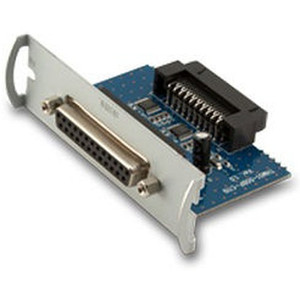
Custom America POS 42000000013200 Serial Converter for PATH15 RJ45 to DB9
Overview
The Custom America POS model 42000000013200 is a serial converter that translates RJ45 signals from a PATH15 terminal into standard DB9 serial connections. This is a point solution for warehouse and retail environments where legacy serial devices (scales, receipt printers, barcode scanners, pole displays) still handle critical transaction data, but your primary terminal or POS controller uses modern RJ45 Ethernet cabling.
If you're running a PATH15 system and have existing DB9-connected peripherals, the 42000000013200 eliminates the need to replace hardware or run parallel cabling. The converter sits between your RJ45 source and DB9 destinations, preserving existing serial protocol behavior without active power draw or software configuration on most legacy devices.
Key Features
- RJ45 to DB9 translation: Converts RJ45 signal lines to standard DB9 serial pinout, allowing direct connection of legacy serial peripherals without rewiring or device replacement. Real-world benefit: a scale or printer with a DB9 port plugs directly in with no intermediate adapters or USB converters that might introduce latency or require driver management.
- PATH15 compatibility: Engineered specifically for Custom America POS PATH15 terminals, ensuring signal integrity and protocol alignment. This dedicated design means no guessing at pinout mappings or testing against generic serial converters — the 42000000013200 is pre-configured for your terminal architecture.
- Passive or low-power design: Most configurations operate passively, drawing minimal or no external power, which simplifies installation in compact POS environments and reduces power distribution overhead. If your legacy device chain includes powered peripherals, they continue to source power through their own supply rather than burdening the terminal circuit.
- Preserves serial protocol fidelity: The converter passes through baud rate, parity, and flow-control signals without modification, so existing serial device firmware, settings, and communication scripts continue to work unchanged. Critical for environments where scale calibration, printer formatting, or scanner firmware expect specific timing or handshake behavior.
- Compact form factor: Minimal footprint allows mounting near the terminal or inside cabinet space without adding bulk to checkout or warehouse workstations. Particularly useful in tight POS installations where every inch counts.
- Cost-effective legacy bridge: Avoids the expense of replacing functional DB9 peripherals or purchasing redundant Ethernet-native versions of scales, printers, or displays. For environments managing multiple POS stations, the savings across even three or four lanes can justify hardware standardization without forced hardware refresh.
Integration & Compatibility
The 42000000013200 integrates directly into PATH15 terminal RJ45 ports. No driver installation, firmware updates, or VMS integration is required — the converter is a passive signal bridge. Connection sequence: RJ45 cable from PATH15 terminal → 42000000013200 converter → DB9 port on your legacy peripheral (scale, receipt printer, pole display, barcode scanner, or other serial device).
Because the converter preserves standard serial signals, any DB9 device that worked with your previous serial terminal or legacy POS infrastructure will work with the 42000000013200. If you're consolidating POS systems or upgrading from older hardware to PATH15, this converter extends the life of your existing DB9 peripherals indefinitely.
Frequently Asked Questions
Q: Does the 42000000013200 require power or external drivers?
A: No. The converter operates as a passive signal translator. Once connected between your PATH15 RJ45 port and your DB9 peripheral, no additional power supply or software installation is needed. Your legacy device communicates with the terminal as if it were still wired directly through serial.
Q: Will my existing serial peripheral (scale, printer, scanner) work with the 42000000013200?
A: Yes, provided the device has a DB9 connector and communicates via standard serial protocol (RS-232). The converter preserves baud rate, parity, and handshake signals, so no reconfiguration of the peripheral is necessary. If your device worked with a legacy serial terminal before, it will work with the 42000000013200.
Q: Can I connect multiple DB9 devices to a single PATH15 terminal using the 42000000013200?
A: The converter provides one RJ45 input and one DB9 output per unit. If you have multiple legacy serial peripherals, you will need one 42000000013200 converter per device, or daisy-chain devices if they support serial protocol daisy-chaining (common in some retail printer networks). Contact your integrator to assess your specific serial device topology.
Q: Is there a warranty on the 42000000013200?
A: Warranty information is available from the manufacturer. Confirm directly with your sourcing channel for coverage terms and any RMA procedures specific to serial connectivity accessories.
Q: What baud rates and serial settings does the 42000000013200 support?
A: The converter is protocol-agnostic and passes through all standard serial parameters (baud rate, data bits, parity, stop bits, flow control) without modification. Your PATH15 terminal and legacy DB9 device communicate at whatever baud rate and settings they negotiate — the 42000000013200 simply bridges the physical connection.
Q: Can the 42000000013200 be wall-mounted or installed inside a POS cabinet?
A: The compact form factor is suitable for mounting near a terminal, inside an enclosure, or on a workstation shelf. The device is not rated for outdoor or high-vibration environments. Keep it in a standard office or retail POS climate (0°C to 40°C typical) to avoid thermal stress on the connector solder joints.
The 42000000013200 solves a real integration problem in retail and warehouse deployments where PATH15 terminals coexist with installed DB9 serial peripherals. I've seen this converter eliminate otherwise expensive hardware replacement cycles — a scale that cost $2,000 new, a pole display with custom firmware, or a receipt printer locked to one vendor's serial protocol. The 42000000013200 bridges that gap cleanly, with no power draw, no drivers, no middleware.
Technical Highlights:
- Passive signal translation: Zero external power requirement means installation simplicity — just RJ45 in, DB9 out. No risk of converter failure cascading into terminal power issues, and no additional circuit breaker capacity consumed in cramped POS cabinet spaces.
- Protocol preservation: Maintains baud rate, parity, stop bits, and flow control without modification, so legacy device firmware behavior remains unchanged. Critical when a scale firmware expects specific handshake timing or a printer firmware uses XON/XOFF flow control — the converter doesn't mask or renegotiate those signals.
- PATH15-specific pinout alignment: Engineered for Custom America POS PATH15 RJ45 serial architecture, eliminating trial-and-error wiring against generic converters that might swap or omit signal lines. You get signal integrity out of the box.
Deployment Considerations:
- Verify your legacy DB9 device's serial protocol version and baud-rate settings before installation. While the 42000000013200 passes through standard RS-232 signals, any device using non-standard serial dialects (proprietary timing, unusual parity schemes) may not operate correctly.
- If you have multiple legacy serial peripherals, you need one 42000000013200 converter per device — the converter does not support multiplexing or daisy-chaining on its own. Plan your hardware inventory accordingly when upgrading multiple POS lanes.
Positioning: This converter is the practical choice for warehouse and retail environments where POS hardware refresh cycles extend legacy peripherals three to five years further. When replacing a legacy terminal with PATH15, deploy the 42000000013200 to preserve installed DB9 infrastructure — saves retraining on new hardware, avoids capital expense on redundant equipment, and maintains backward compatibility with device-specific firmware or calibration settings.