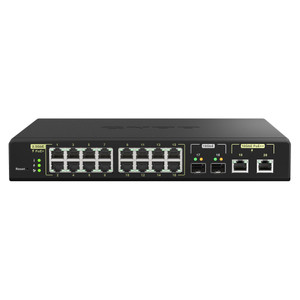
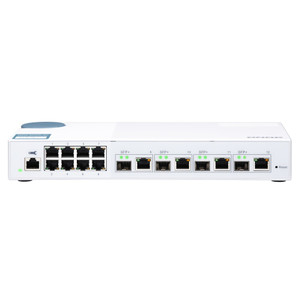
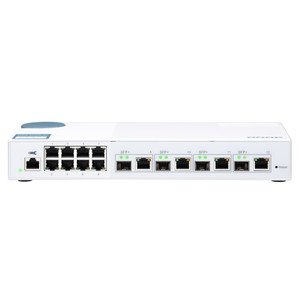
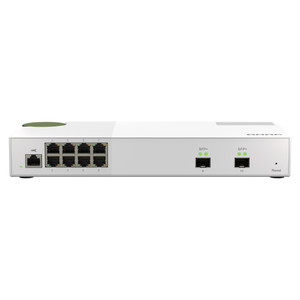
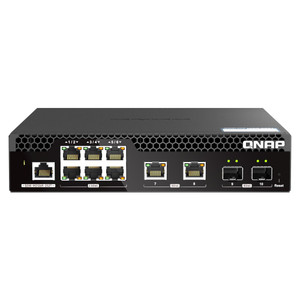
QNAP QSW-M2106-4S-US 10-Port Layer 2 Web Managed Switch
Overview
The QSW-M2106-4S-US is a 10-port Layer 2 Web Managed Switch that pairs six 2.5 Gigabit RJ45 access ports with four 10GbE SFP+ uplinks — a configuration purpose-built for NAS-centric deployments, multi-gigabit workgroup aggregation, and small-to-midsize surveillance networks that have outgrown standard gigabit infrastructure. If your storage, camera, or edge-compute environment is hitting the ceiling of 1GbE but can't yet justify a full 10GbE-to-the-desktop build-out, this switch sits at exactly the right inflection point in the QNAP networking lineup.
The four SFP+ ports are backward compatible with 1G SFP modules, so existing fiber runs to legacy infrastructure don't require rip-and-replace — you can bring 10G uplinks to your core while keeping 1G tails active during the transition. The six 2.5GbE RJ45 ports run over standard Cat5e/Cat6 cabling, which means upgrading workstations, NAS units, or PoE injectors to 2.5G doesn't require new structured cabling. That combination — copper multi-gig access with fiber 10G uplinks — is a practical, cost-contained path to network modernization for integrators working within existing cable plants.
Key Features
- Six 2.5GbE RJ45 Access Ports: 2.5x the throughput of standard Gigabit over existing Cat5e/Cat6 runs — meaningful when connecting QNAP NAS units, high-resolution IP cameras, or workstations that already have 2.5G NICs, without pulling new cable.
- Four 10GbE SFP+ Fiber Ports: Dedicated 10G uplinks handle aggregated traffic from all six 2.5G ports simultaneously without saturation. At 6 × 2.5Gbps = 15Gbps aggregate access-side load, two bonded 10G uplinks keep the backbone clean under real-world burst conditions.
- SFP+ Backward Compatibility with 1G SFP: The same four SFP+ ports accept standard 1G SFP optics, protecting investments in existing fiber infrastructure. Deploy 10G where it matters, 1G where it's sufficient — same port, different module.
- Layer 2 Web Managed: Browser-based management means no CLI expertise required for VLAN segmentation, port mirroring, or traffic prioritization. For a security integrator commissioning a site, that translates to faster provisioning without a network admin on-site.
- 10-Port Total Density: Ten ports in a compact managed form factor is the right count for a dedicated NAS cluster switch, a surveillance-segment aggregator, or a multi-workstation editing bay — enough ports to handle the segment without oversizing the hardware.
- Layer 2 Switching Architecture: MAC-table-based forwarding keeps broadcast domains manageable and gives you the VLAN, STP, and port-isolation primitives that enterprise buyers expect — without the licensing overhead of Layer 3 managed platforms where routing isn't needed.
Integration and Compatibility
The QSW-M2106-4S-US integrates naturally into managed network switch deployments anchored around QNAP NAS arrays. The 2.5GbE RJ45 ports align directly with multi-gig NIC configurations on QNAP TS- and TVS-series NAS units, enabling full-speed simultaneous multi-client access to shared storage without a bandwidth bottleneck at the switch. For surveillance applications, connecting a high-channel NVR or a QNAP QVR-series recorder to a 10GbE SFP+ uplink while the camera segment feeds through the 2.5GbE access ports gives you a clean, low-latency path from camera to storage.
The SFP+ ports support both direct-attach copper (DAC) cables for short rack-to-rack connections and standard LC-duplex fiber modules for longer runs — useful when the switch needs to reach a core distribution layer across a server room or IDF. For deployments planning a PoE switching layer beneath this unit, the 2.5GbE uplinks from PoE access switches land cleanly on the RJ45 ports here, giving camera and access-control endpoints a dedicated uplink path to the NAS or recorder backbone without competing with workstation traffic.
Web management access supports standard browser-based configuration without proprietary client software, making this a straightforward fit for IT teams managing mixed-vendor environments. Consult a network switch selection guide if you're evaluating whether Layer 2 web-managed fits your VLAN and QoS requirements versus a full Layer 3 managed deployment.
Frequently Asked Questions
Q: Can the QSW-M2106-4S-US SFP+ ports use standard 1G SFP modules instead of 10G SFP+?
A: Yes. The four SFP+ ports are backward compatible with 1G SFP modules. You can mix 10GbE SFP+ and 1G SFP optics across those four ports depending on uplink speed requirements at each connection point.
Q: Do the 2.5GbE RJ45 ports require Cat6A cabling, or will existing Cat5e/Cat6 runs work?
A: 2.5GbE (2.5GBASE-T) operates over Cat5e and Cat6 cabling within standard distance limits (up to 100m), so most existing structured cabling plants will support these ports without rewiring.
Q: Is the QSW-M2106-4S-US a PoE switch?
A: No. The QSW-M2106-4S-US does not provide PoE power delivery on any port. If you need to power IP cameras or access control readers directly from the switch, a PoE-capable model is required. This switch is designed as a non-PoE aggregation or backbone layer device.
Q: How is the switch managed — does it require QNAP NAS hardware to configure?
A: Management is browser-based via a web interface; no QNAP NAS is required for configuration. The switch operates as a standalone managed device accessible from any browser on the local network.
Q: What is the total switching capacity of the QSW-M2106-4S-US?
A: With six 2.5GbE ports (6 × 5Gbps full-duplex = 30Gbps) and four 10GbE SFP+ ports (4 × 20Gbps full-duplex = 80Gbps), the non-blocking switching fabric handles up to 110Gbps aggregate — sufficient to sustain simultaneous full-rate traffic on all ports without internal congestion.
Q: Is the QSW-M2106-4S-US rack-mountable?
A: Rack-mount compatibility details are not confirmed in the available evidence. Verify physical mounting options against the manufacturer's hardware specifications before specifying for a rack installation.
The QSW-M2106-4S-US hits a specific gap in multi-gig network design that a lot of integrators have been navigating: you need more than 1G to the NAS or recorder, but you're not ready to repull cable or buy into a full 10GBASE-T copper infrastructure. The six 2.5GbE RJ45 ports solve that over existing Cat5e — no rewire, just new NICs at the endpoints — while the four 10GbE SFP+ ports give you a clean, uncongested path to a core switch or directly into your NAS's 10G uplink.
Technical Highlights:
- 2.5GbE RJ45 × 6: 2.5x the throughput of standard Gigabit over the same Cat5e/Cat6 runs already in the wall — the access-layer upgrade that doesn't require a cabling crew.
- 10GbE SFP+ × 4 (1G backward compatible): Four uplink ports that accept either 10G SFP+ or legacy 1G SFP modules, letting you stage the fiber upgrade across budget cycles without stranding existing optics.
- Layer 2 Web Managed: Browser-based management handles the VLAN and port-isolation work most surveillance and NAS deployments actually need, without the complexity or licensing cost of a full Layer 3 platform.
Deployment Considerations:
- Size the uplink capacity before committing: six 2.5GbE access ports at full load push 15Gbps aggregate — two bonded 10G uplinks handle that cleanly, but if you're planning a single 10G fiber uplink to a core switch, understand that's a 10Gbps ceiling on burst traffic leaving the segment.
- This is a non-PoE switch. If you're deploying it as the access layer for IP cameras or access control readers, you'll need a separate PoE injector or a PoE switch upstream — don't specify this as the camera-facing edge device unless powered endpoints are handled elsewhere.
The QSW-M2106-4S-US (often searched as QSW M2106 4S US) fits best as the dedicated NAS-cluster aggregation switch in a multi-workstation creative or surveillance storage environment — specifically where the workstations or NAS units already carry 2.5G NICs and the fiber backbone runs 10G to a distribution layer. That's the scenario where its port mix pays off cleanly.